# Logic Scripts
> Symcon documentation · English · generated on 2026-11-09
> Index: https://www.symcon.de/en/llms.txt
## Contents
Subpages in separate files:
- [Menu](logic-scripts/menu.md) – The following functions are available:
- [Property Editor](logic-scripts/property-editor.md) – The Property Editor panel displays all available properties of a control element.
- [Repository](logic-scripts/repository.md) – The panel repository offers all available logic script modules, which can be placed on the drawing area simply by "drag and drop".
- [Drawing Area](logic-scripts/drawing-area.md) – The drawing area is located in the middle of the Logic Script Editor.
Source: https://www.symcon.de/en/service/documentation/basics/automations/logic-scripts/
_Requires Symcon >= 7.0_
Logic Scripts is a tool that can be used to create individual logic scripts and automations in IP-Symcon. Typical use cases are
- Group switches for light
- Staircase automation
- Sensor evaluation
#### add logic script
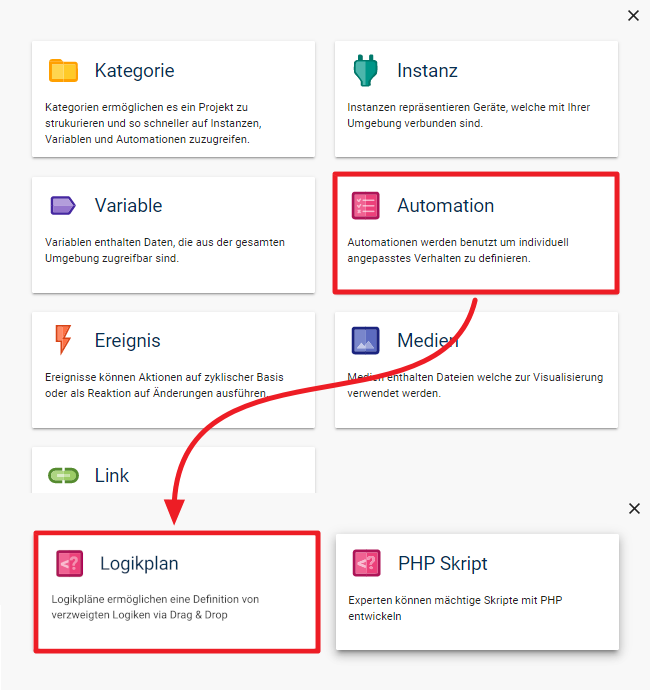
A new logic script can be added via "+" -> "Automation" -> "Logic Script". It is recommended to give the logic scipt a meaningful name.
The name can be changed at any time and the logic script can be moved to a different position in the object tree using drag & drop.
Alternatively, the creation can be done directly at the desired position via "right click" -> "Add object" -> "Automation" -> "Logic Script".
### Components of the editor
The logic script editor is divided into the following areas:
| Name | Description |
| ------------ | ----------------------------------------------------------------------------------------------------------------------------------------------------------------------------------------------------------------------------------------------------------------------------------------------------------------------------------------------- |
| Menu | The menu provides central functions such as saving, zooming or executing a logic script. |
| Panels | The Logic Script Editor provides 2 panels:
- The repository with the list of all available modules
- The PropertyEditor for displaying and editing properties
Use drag & drop to change the position of the panels; 4 predefined positions are available. If you place several panels in one position, tabs are automatically created. |
| Drawing area | The drawing area is the central component of the editor and allows you to place and edit the individual modules. |