# Archive Control
> Symcon documentation · English · generated on 2026-09-26
> Index: https://www.symcon.de/en/llms.txt
Source: https://www.symcon.de/en/service/documentation/module-reference/core-instances/archive-control/
The Archive Control module takes care of storing the variable values in a database.
### Storagetype
With version 4.0 was the SQLite database deleted for an easier usability, using CSV files.
| IPS Version | Storagetype |
| ---------------- | --------------- |
| to Version 3.4 | SQLite database |
| from Version 4.0 | CSV files |
### Activate logging
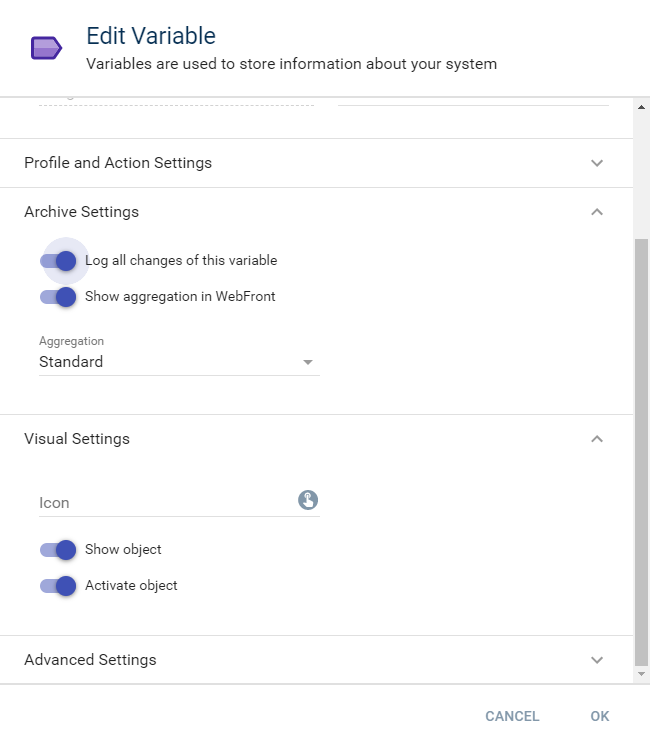
To log a variable in the database, it must be selected for it. You will need to edit the variable and select the checkbox "Log all changes of this variable". If no button for showing the graph is wanted, deactivate the option "Show aggregation in Visualization".
| Aggregation Type | Description |
| ---------------- | -------------------------------------------------------------------------------------------------------------------------------- |
| Standard | For all aggregationlevels (hour, day, week, month, year) will min / max / average calculated. |
| Counter | For all aggregationlevels (hour, day, week, month, yea) will the delta (difference) of the values as min / max / sum calculated. |
> **Note:** If the Counter aggregation is used, the first value logged in the archive is used as reference value and the sum of positive delta starts with the following value. That means a variable with the logged values 500, 505, 520, and 521 is displayed with the values 0, 5, 15, 1.
| Archive settings | Description |
| --------------------------------- | ---------------------------------------------------------------------------------------------------------------------------------------------------------------------------------------------- |
| Log all changes of this varaible | Activates the logging of the variable. |
| Show aggregation in Visualization | Deactivate/Hide the button for showing the visualization of the logged variable. The logging ist still active for the varabelDas Aufzeichnen der Datenpunkte der Variable ist immernoch aktiv. |
> **Note:** If the aggregationtype is changed, the aggregation of this variable starts automatically. This could take some time.
As soon as logging is selected, all data is saved in the database. The data is saved two times. All raw data is logged in the database and these datasets are summarized as individual intervals (days, weeks, months, years) for faster generation of graphs. The graphs can, if activated for the variable, be accessed via Visualization.
### Archive Handler
The Archive Handler is a function to manage all logged variables. All values can be viewed and edited.

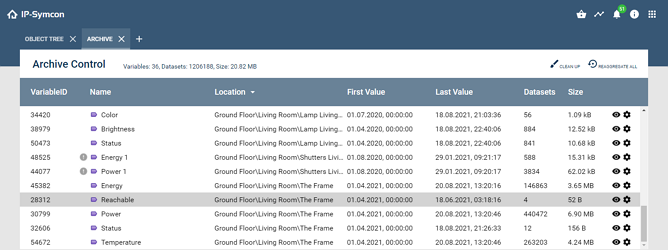
The header provide following functions:
| Function | Description |
| --------------- | ---------------------------------------------------------------------------------------------------------------------------------------------------------------------------- |
| Clean up | Removes all archivedata from nonexistent variables. Data of deactivated variables won't get deleted. |
| Reaggregate all | Aggregates all logged variables again. Depending on the scope, this may take a very long time. Regular status and finishing messages are available in the tab "Message Log". |
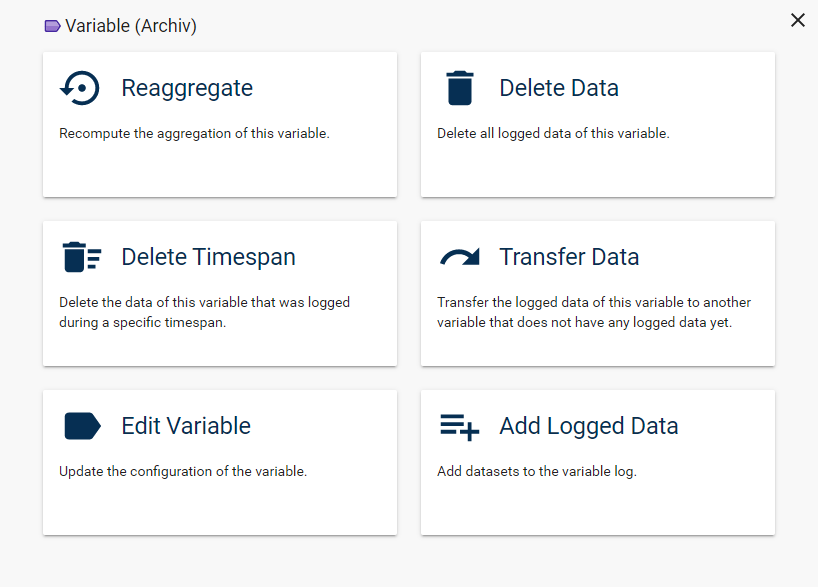
Clicking the eye icon opens the view with saved raw data of the selected variable and allows the deletion of individual datasets. __After deletion, it is required to reaggregate the variable data.__ This function is not available for variables that do not exist any more. A click on the cog wheel opens a dialog with extended functions for the selected variable
| Function | Description |
| --------------- | ------------------------------------------------------------------------------------------------------------------------------------------------------------------------------------------------------------------------------------------------------------------------------------------------------------------------------------------------------------------------------------------------------------------------------------------- |
| Reaggregate | Aggregates the selected variable again. Depending on the scope, this could take very long. Regular status and finishing messages are available in the tab "Message Log". |
| Delete | Deletes all the raw data from the archive. |
| Delete timespan | A time interval can be selected here. All datasets within that interval are deleted. |
| Transfer data | The raw data of a variable is transferred to another variable. This can be useful if a VariableID does not exist any more or a sensor is replaced. A variable must be selected which is not logged yet and whose variable type fits the data. The data of the old variable will be automatically deleted in this process. |
| Edit variable | Opens the dialog to edit the Variable |
| Add logged data | Additional datasets can be added here. Datasets can either be entered manually or from files. For manual adding, another dialog opens, in which a list of times and values can be entered, that are added to the variable with a click on "Add Values". If datasets from files should be added, accordingly prepared csv files are required. In an additional step the values can be checked manually and finally be added to the variable. |
#### Possible datastructures for "Add logged data"
In .csv files for adding logged data, every row must note a point in time and a data value. Two basic notations are possible:
1. Comma as seperator and dot as decimal seperator (Date, 1.5)
2. Semicolon as seperator and comma as decimal seperator (Date; 1,5)
Several formats for the date are supported:
1. Unix Timestamp, e.g., 1522527010
2. German format, e.g., 31.03.2018 22:10:10
3. American format, e.g., 03/31/2018 10:10:10 PM
4. RFC2822, e.g., Sat, 31 Mar 2018 22:10:10 +0000
5. ISO8601, e.g., 2018-03-31 22:10:10
#### Add files from Excel file
It is possible to prepare the .csv files for adding with Microsoft Excel. Here, the points in time are entered into the first column and the values into the second. Verify that the point of time is formatted in one of the supported formats. For example, the German format can be used with the user defined number format DD.MM.YYYY hh:mm:ss.
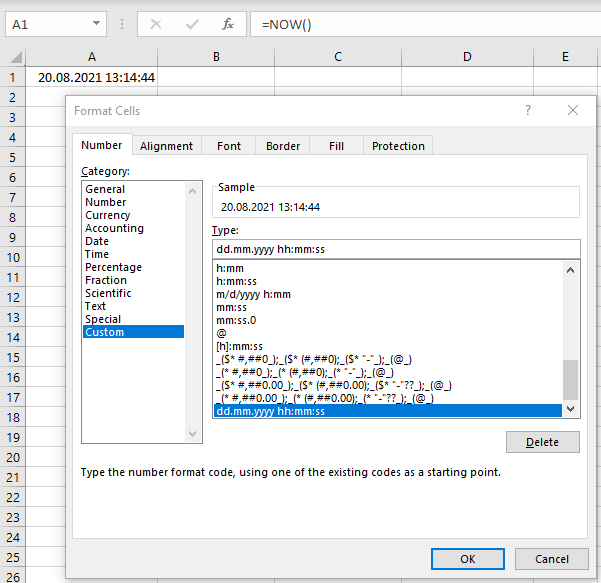
Finally, the list can be saved as .csv file via "Save as" and the type "CSV (Seperator delimited)" and finally confirming with "Save". The generated .csv file kann be added in IP-Symcon via "Add Data" of a [Variable](../concepts.md).
## AC_AddLoggedValues
Source: https://www.symcon.de/en/service/documentation/module-reference/core-instances/archive-control/ac-addloggedvalues/
`bool AC_AddLoggedValues(int $InstanceID, int $VariableID, array $Datasets)`
_Requires Symcon >= 5.1_
adds further data records to a logged variable
**Parameters**
- `$InstanceID` (int): ID for the archive
- `$VariableID` (int): ID of the variable to which the datasets are to be added
- `$Datasets` (array)
An array with datasets, where each set is an array with the following __key => value__ pairs:
| Parameters | Type | Description |
| ---------- | ----------- | -------------------------------------------------------------------------------------------- |
| TimeStamp | Integer | Time of the new data record as a Unix Timestamp |
| Value | by variable | The value of the new data record - the type of the value must match the type of the variable |
**Returns** (bool): If the command succeeds, it returns __TRUE__, otherwise __FALSE__.
An array with datasets, where each set is an array with the following __key => value__ pairs:
| Parameters | Type | Description |
| ---------- | ----------- | -------------------------------------------------------------------------------------------- |
| TimeStamp | Integer | Time of the new data record as a Unix Timestamp |
| Value | by variable | The value of the new data record - the type of the value must match the type of the variable |
**Example**
```php
// Add three additional data records to an Integer variable
AC_AddLoggedValues(12345, 34567, [
[
'TimeStamp' => 1128255120,
'Value' => 30
],
[
'TimeStamp' => 1128257851,
'Value' => 50
],
[
'TimeStamp' => 1128278514,
'Value' => 130
]
]);
```
## AC_ChangeVariableID
Source: https://www.symcon.de/en/service/documentation/module-reference/core-instances/archive-control/ac-changevariableid/
`bool AC_ChangeVariableID(int $InstanceID, int $OldVariableID, int $NewVariableID)`
_Requires Symcon >= 3.0_
migrates the data of a variable into a variable that has not yet been logged
**Parameters**
- `$InstanceID` (int): ID for the archive
- `$OldVariableID` (int): ID of the variable to be migrated
- `$NewVariableID` (int): ID of the new variable
**Returns** (bool): __True__ if successful, otherwise __False__
ID of the new variable
**Example**
```php
// The data of the 34567 variable are migrated to the 56789 variable
AC_ChangeVariableID(12345, 34567, 56789);
```
## AC_DeleteVariableData
Source: https://www.symcon.de/en/service/documentation/module-reference/core-instances/archive-control/ac-deletevariabledata/
`int AC_DeleteVariableData(int $InstanceID, int $VariableID, int $StartTime, int $EndTime)`
_Requires Symcon >= 3.0_
deletes all data records of a logged variable in a certain period of time
**Parameters**
- `$InstanceID` (int): ID for the archive
- `$VariableID` (int): ID of the variable in which the data records are to be deleted
- `$StartTime` (int): Date/time as Unix Timestamp (0 = from the beginning)
- `$EndTime` (int): Date/time as Unix Timestamp (0 = until now)
**Returns** (int): Returns the number of deleted records
Date/time as Unix Timestamp (0 = until now)
**Example**
```php
// Deletes all data of the variable "TestVariable" in the period 07.10.2015 16:00 UTC+2(CEST) to 07.10.2015 17:00 UTC+2(CEST)
AC_DeleteVariableData(12345 /*[Archive]*/, 45678 /*[Variable]*/, 1444226400, 1444237200);
// Deletes all data of the variable "TestVariable" in the period 07.10.2015 16:00 UTC+2(CEST) until now
AC_DeleteVariableData(12345 /*[Archive]*/, 45678 /*[Variable]*/, 1444226400, 0);
// Delete completely and remove from the Archive Control
// Deletes all data of the variable and deactivates the variable in the Archive Control
AC_DeleteVariableData(12345 /*[Archive]*/, 45678 /*[TestVariable]*/, 0, 0);
```
## AC_GetAggregatedValues
Source: https://www.symcon.de/en/service/documentation/module-reference/core-instances/archive-control/ac-getaggregatedvalues/
`array AC_GetAggregatedValues(int $InstanceID, int $VariableID, int $AggregationLevel, int $StartTime, int $EndTime, int $Limit)`
_Requires Symcon >= 3.0_
gets aggregated data from the archive
**Parameters**
- `$InstanceID` (int): ID for the archive
- `$VariableID` (int): ID of the variable to be queried
- `$AggregationLevel` (int)
| Aggregation Level | Description |
| ----------------- | ------------------------------------------------------------------------------ |
| 0 | Hourly Aggregation
(00:00 - 59:59) |
| 1 | Daily Aggregation
(00:00:00 - 23:59:59) |
| 2 | Weekly Aggregation
(Monday 00:00:00 - Sunday 23:59:59) |
| 3 | Monthly Aggregation
(First day of month 00:00:00 - Last day of month 23:59:59) |
| 4 | Annual Aggregation
(01.01. 00:00:00 - 31.12. 23:59:59) |
| 5 | 5-Minute Aggregation (Calculated from raw data) |
| 6 | 1-Minute Aggregation (Calculated from raw data) |
| 8 | 15-Minute Aggregation (Calculated from raw data) (from version 8.1) |
- `$StartTime` (int): Date/time as Unix Timestamp (0 = from the beginning)
- `$EndTime` (int): Date/time as Unix Timestamp (0 = until now)
- `$Limit` (int): Maximum number of datasets. (0 = no limit, 10000 is the hard limit, which always applies)
**Returns** (array): An array with the following __key => value__ pairs.
> **Note:** The output starts with the newest dataset and then, in descending order, with the older data sets.
Meaning of the fields for the aggregation type __Standard__
| Index | Type | Description |
| ------------- | ------- | -------------------------------------------------------------------- |
| __Avg__ | variant | Average value within this aggregation period |
| __Duration__ | integer | Duration of the aggregation period in seconds |
| __Max__ | variant | Largest value within this aggregation period |
| __MaxTime__ | variant | Date/time of __Max__ as Unix Timestamp |
| __Min__ | variant | Smallest value within this aggregation period |
| __MinTime__ | variant | Date/time of __min__ as Unix Timestamp |
| __TimeStamp__ | integer | Date/time of the start of the aggregation period as a Unix Timestamp |
Meaning of the fields for the aggregation type __Counter__
| Index | Type | Description |
| ------------- | ------- | -------------------------------------------------------------------- |
| __Avg__ | variant | Sum of the positive delta within this aggregation period |
| __Duration__ | integer | Duration of the aggregation period in seconds |
| __Max__ | variant | Largest positive delta within this aggregation period |
| __MaxTime__ | variant | Date/time of __Max__ as Unix Timestamp |
| __Min__ | variant | Smallest positive delta within this aggregation period |
| __MinTime__ | variant | Date/time of __min__ as Unix Timestamp |
| __TimeStamp__ | integer | Date/time of the start of the aggregation period as a Unix Timestamp |
Maximum number of datasets. (0 = no limit, 10000 is the hard limit, which always applies)
**Example**
```php
// Query all data records from 01/01/2013 to 12/31/2013 (daily aggregation level)
// e.g. to determine the consumption on the respective day or the average temperature on the respective day
$values = AC_GetAggregatedValues(12345, 55554, 1 /* daily */, mktime(0, 0, 0, 1, 1, 2013), mktime(23, 59, 59, 12, 31, 2013), 0); //55554 is the variable ID, 12345 from the archive
// Query all current data records (daily aggregation level)
// e.g. to determine today's consumption or today's average temperature
$values = AC_GetAggregatedValues(12345, 55554, 1 /* daily */, strtotime("today 00:00"), time(), 0); //55554 is the ID of the variable, 12345 from the archive
// Query all yesterday's records (hourly aggregation level)
// For example, to check yesterday's consumption or the average wind speed every hour
$values = AC_GetAggregatedValues(12345, 55554, 0 /* hourly */, strtotime("yesterday 00:00"), strtotime("today 00:00")-1, 0); //55554 is the ID of the variable, 12345 from the archive
// This part creates an output in the script window with the queried values
foreach($values as $value) {
echo date("d.m.Y H:i:s", $value['TimeStamp']) . " -> " . $value['Avg'] . PHP_EOL;
}
```
## AC_GetAggregationType
Source: https://www.symcon.de/en/service/documentation/module-reference/core-instances/archive-control/ac-getaggregationtype/
`int AC_GetAggregationType(int $InstanceID, int $VariableID)`
_Requires Symcon >= 3.0_
indicates the aggregation type of a variable
**Parameters**
- `$InstanceID` (int): ID for the archive
- `$VariableID` (int): ID of the variable to be queried
**Returns** (int): An integer that represents the type of aggregation.
| Return value | Description |
| ------------ | ----------- |
| 0 | Standard |
| 1 | Counter |
ID of the variable to be queried
**Example**
```php
// The variable is aggregated as a counter
echo AC_GetAggregationType(39147 /*[Archive]*/, 53716 /*[TestVariableCounter]*/);
// Output: 1
```
## AC_GetAggregationVariables
Source: https://www.symcon.de/en/service/documentation/module-reference/core-instances/archive-control/ac-getaggregationvariables/
`array AC_GetAggregationVariables(int $InstanceID, bool $DatabaseQuery)`
_Requires Symcon >= 3.0_
returns an array of all logged variables
**Parameters**
- `$InstanceID` (int): ID for the archive
- `$DatabaseQuery` (bool): True, if additional information is to be displayed, otherwise False (with version 4.0 and above unimportant, but required)
**Returns** (array): An array with the following __key => value__ pairs.
| Index | Type | Description |
| ------------------ | ------- | ---------------------------------------------------------------------------------------------------------------------------------- |
| FirstTime | integer | Date/time from the beginning of the aggregation period as a Unix Timestamp |
| LastTime | integer | Date/time of the last entry of the aggregation period as a Unix Timestamp |
| RecordCount | integer | Number of records |
| RecordSize | integer | Size of all data records in bytes |
| VariableID | integer | ID of the variable |
| AggregationType | integer | Aggregation type as an Integer. See also [AC_GetAggregationType](archive-control.md) |
| AggregationVisible | boolean | Indicates whether the variable is displayed in the visualization. See also [AC_GetGraphStatus](archive-control.md) |
| AggregationActive | boolean | Indicates whether logging is active for this variable. See also [AC_GetLoggingStatus](archive-control.md) |
| Compaction | array | Array of compaction entries. Each entry contains MonthOffset and CompactionType. See also [AC_SetCompaction](archive-control.md) |
True, if additional information is to be displayed, otherwise False (with version 4.0 and above unimportant, but required)
**Example**
```php
// Output with additional information
var_dump(AC_GetAggregationVariables(39147 /*[Archive]*/, true));
// Sample output:
array(1) {
[0]=>
array(9) {
["FirstTime"]=>
int(1444221643)
["LastTime"]=>
int(1444221705)
["RecordCount"]=>
int(6)
["RecordSize"]=>
int(78)
["VariableID"]=>
int(53716)
["AggregationType"]=>
int(0)
["AggregationVisible"]=>
bool(true)
["AggregationActive"]=>
bool(true)
["Compaction"]=>
array(1) {
[0]=>
array(2) {
["MonthOffset"]=>
int(-1)
["CompactionType"]=>
int(1)
}
}
}
}
*/
```
## AC_GetCompaction
Source: https://www.symcon.de/en/service/documentation/module-reference/core-instances/archive-control/ac-getcompaction/
`array AC_GetCompaction(int $InstanceID, int $VariableID)`
_Requires Symcon >= 6.3_
returns the compaction entries of a variable
**Parameters**
- `$InstanceID` (int): ID for the archive
- `$VariableID` (int): ID of the variable to be queried
**Returns** (array): An array containing the compaction entries of the variable.
Each entry contains the following fields:
| Field | Type | Description |
| -------------- | ---- | ---------------------------------- |
| MonthOffset | int | Month offset for the compaction |
| CompactionType | int | Type of compaction (see below) |
**Compaction Types**
| CompactionType | Description |
| -------------- | ---------------------------------- |
| 0 | Compact to one value per minute |
| 1 | Compact to one value per 5 minutes |
| 2 | Compact to one value per hour |
| 3 | Compact to one value per day |
| 4 | Compact to one value per week |
| 5 | Compact to one value per month |
| 6 | Compact to one value per year |
| 7 | Delete values |
ID of the variable to be queried
**Example**
```php
// Query the compaction entries for "TestVariable"
$compaction = AC_GetCompaction(39147 /*[Archive]*/, 53716 /*[TestVariable]*/);
print_r($compaction);
/* Sample output:
Array
(
[0] => Array
(
[MonthOffset] => -1
[CompactionType] => 1
)
[1] => Array
(
[MonthOffset] => 3
[CompactionType] => 2
)
)
*/
```
## AC_GetCounterIgnoreZeros
Source: https://www.symcon.de/en/service/documentation/module-reference/core-instances/archive-control/ac-getcounterignorezeros/
`bool AC_GetCounterIgnoreZeros(int $InstanceID, int $VariableID)`
_Requires Symcon >= 5.5_
gets the status whether zeros and negative values are ignored
**Parameters**
- `$InstanceID` (int): ID for the archive
- `$VariableID` (int): ID of the variable to be queried
**Returns** (bool): True if ignoring zeros and negative values is active for the variable, otherwise False
ID of the variable to be queried
**Example**
```php
// Query the variable "54321" from the ArchivControl "12345"
AC_GetCounterIgnoreZeros(12345, 54321);
```
## AC_GetGraphStatus
Source: https://www.symcon.de/en/service/documentation/module-reference/core-instances/archive-control/ac-getgraphstatus/
`bool AC_GetGraphStatus(int $InstanceID, int $VariableID)`
_Requires Symcon >= 3.0_
asks whether a variable is being visualized
**Parameters**
- `$InstanceID` (int): ID for the archive
- `$VariableID` (int): ID of the variable to be queried
**Returns** (bool): __True__ if the visualization of the variable is active, otherwise __False__
ID of the variable to be queried
**Example**
```php
// Query the variable "TestVariable"
var_dump(AC_GetGraphStatus(39147 /*[Archive]*/, 53716 /*[TestVariable]*/));
echo AC_GetGraphStatus(39147 /*[Archive]*/, 53716 /*[TestVariable]*/);
/* Sample output
var_dump:
bool(true)
echo:
1
*/
```
## AC_GetLoggedValues
Source: https://www.symcon.de/en/service/documentation/module-reference/core-instances/archive-control/ac-getloggedvalues/
`array AC_GetLoggedValues(int $InstanceID, int $VariableID, int $StartTime, int $End time, int $Limit)`
_Requires Symcon >= 3.0_
gets raw data from the Archive Control
**Parameters**
- `$InstanceID` (int): ID for the archive
- `$VariableID` (int): ID of the variable to be queried
- `$StartTime` (int): Date/time as Unix Timestamp. (0 = from the beginning)
- `$End time` (int): Date/time as Unix Timestamp. (0 = until now)
- `$Limit` (int): Maximum number of records. (0 = no limit, 10000 is the hard limit, which always applies)
**Returns** (array): An array with the following __key => value__ pairs.
> **Note:** The output starts with the newest data set and then, in descending order, with the older dataset / datasets.
| Index | Type | Description |
| ------------- | ------- | --------------------------------------------------------------------- |
| __Duration__ | integer | Duration in seconds that the data record was set |
| __TimeStamp__ | integer | Date/time when the dataset / datasets was created as a Unix Timestamp |
| __Value__ | variant | Value |
Maximum number of records. (0 = no limit, 10000 is the hard limit, which always applies)
**Example**
```php
//Get the last value that was saved in the database
$last_value = AC_GetLoggedValues(12345, 55554, 0, 0, 1)[0]['Value'];
// Query all data records from 01/01/2013 to 01/07/2013
$values = AC_GetLoggedValues(12345, 55554, mktime(0, 0, 0, 1, 1, 2013), mktime(23, 59, 59, 1, 7, 2013), 0); //55554 is the ID of the variable, 12345 from the Archive Control
//Query all of today's records
$values = AC_GetLoggedValues(12345, 55554, strtotime("today 00:00"), time(), 0); //55554 is the ID of the variable, 12345 from the Archive Control
//Query all of yesterday's records
$values = AC_GetLoggedValues(12345, 55554, strtotime("yesterday 00:00"), strtotime("today 00:00")- 1, 0); //55554 is the ID of the variable, 12345 from the Archive Control
//This part creates an output in the script window with the queried values
foreach($values as $value) {
echo date("d.m.Y H:i:s", $value['TimeStamp']) . " -> " . $value['Value'] . PHP_EOL;
}
//Auxiliary function that simulates the functionality of IP-Symcon 2.x.
function AC_GetLoggedValuesCompatibility($instanceID, $variableID, $startTime, $endTime, $limit) {
$values = AC_GetLoggedValues($instanceID, $variableID, $startTime, $endTime, $limit );
if((sizeof($values) == 0) || (end($values)['TimeStamp'] > $startTime)) {
$previousRow = AC_GetLoggedValues($instanceID, $variableID, 0, $startTime - 1, 1 );
$values = array_merge($values, $previousRow);
}
return $values;
}
```
## AC_GetLoggingStatus
Source: https://www.symcon.de/en/service/documentation/module-reference/core-instances/archive-control/ac-getloggingstatus/
`bool AC_GetLoggingStatus(int $InstanceID, int $VariableID)`
_Requires Symcon >= 3.0_
asks whether a variable is logged
**Parameters**
- `$InstanceID` (int): ID for the archive
- `$VariableID` (int): ID of the variable to be queried
**Returns** (bool): __True__ if logging is active for the variable, otherwise __False__
ID of the variable to be queried
**Example**
```php
// Query the variable "TestVariable"
var_dump(AC_GetLoggingStatus(39147 /*[Archive]*/, 53716 /*[TestVariable]*/));
echo AC_GetLoggingStatus(39147 /*[Archive]*/, 53716 /*[TestVariable]*/);
/* Sample output
var_dump:
bool(true)
echo:
1
*/
```
## AC_ReAggregateVariable
Source: https://www.symcon.de/en/service/documentation/module-reference/core-instances/archive-control/ac-reaggregatevariable/
`bool AC_ReAggregateVariable(int $InstanceID, int $VariableID)`
_Requires Symcon >= 3.0_
starts the re-aggregation of a variable
**Parameters**
- `$InstanceID` (int): ID for the archive
- `$VariableID` (int): ID of the variable to be re-aggregated
**Returns** (bool): __True__ if successful, otherwise __False__
ID of the variable to be re-aggregated
**Example**
```php
// This starts the re-aggregation of the variable "test variable"
AC_ReAggregateVariable(39147 /*[Archive]*/, 53716 /*[TestVariable]*/);
/* Sample output in the message window
07.10.2015 15:50:05 | Archive Control | Reaggregation for VariableID #53716 is in progress... 10/2015! (6 rows)
07.10.2015 15:50:05 | Archive Control | Reaggregation for VariableID #53716 is complete! (6 rows)
*/
```
## AC_SetAggregationType
Source: https://www.symcon.de/en/service/documentation/module-reference/core-instances/archive-control/ac-setaggregationtype/
`bool AC_SetAggregationType(int $InstanceID, int $VariableID, int $Aggregation_Type)`
_Requires Symcon >= 3.0_
sets the aggregation type of a variable
**Parameters**
- `$InstanceID` (int): ID for the archive
- `$VariableID` (int): ID of the variable for which the aggregation type is to be set
- `$Aggregation_Type` (int)
| Aggregationstyp | Description |
| --------------- | ----------- |
| 0 | Standard |
| 1 | Counter |
**Returns** (bool): __True__ if successful, otherwise __False__
| Aggregationstyp | Description |
| --------------- | ----------- |
| 0 | Standard |
| 1 | Counter |
**Example**
```php
// Sets the aggregation type of the "TestVariable" variable to 1 (counter)
AC_SetAggregationType(39147 /*[Archive]*/, 53716 /*[TestVariable]*/, 1);
```
## AC_SetCompaction
Source: https://www.symcon.de/en/service/documentation/module-reference/core-instances/archive-control/ac-setcompaction/
`bool AC_SetCompaction(int $InstanceID, int $VariableID, int $MonthOffset, int $CompactionType)`
_Requires Symcon >= 6.3_
Configures the compression of the variable
**Parameters**
- `$InstanceID` (int): ID for the archive
- `$VariableID` (int): ID of the variable for which the compaction is to be set
- `$MonthOffset` (int): The number of months after which the compaction is applied; 0 = After the current month is ended, -1 = Compact values directly
- `$CompactionType` (int)
| CompactionType | Description |
| -------------- | ---------------------------------- |
| -1 | Deactivate compaction |
| 0 | Compact to one value per minute |
| 1 | Compact to one value per 5 minutes |
| 2 | Compact to one value per hour |
| 3 | Compact to one value per day |
| 4 | Compact to one value per week |
| 5 | Compact to one value per month |
| 6 | Compact to one value per year |
| 7 | Delete values |
**Returns** (bool): **True** if successful, otherwise **False**
| CompactionType | Description |
| -------------- | ---------------------------------- |
| -1 | Deactivate compaction |
| 0 | Compact to one value per minute |
| 1 | Compact to one value per 5 minutes |
| 2 | Compact to one value per hour |
| 3 | Compact to one value per day |
| 4 | Compact to one value per week |
| 5 | Compact to one value per month |
| 6 | Compact to one value per year |
| 7 | Delete values |
**Example**
```text
// Set the direct compaction of the variable "TestVariable" to 1 (One value per 5 minutes)
AC_SetCompaction(39147 /*[Archive]*/, 53716 /*[TestVariable]*/, -1, 1);
```
## AC_SetCounterIgnoreZeros
Source: https://www.symcon.de/en/service/documentation/module-reference/core-instances/archive-control/ac-setcounterignorezeros/
`bool AC_SetCounterIgnoreZeros(int $InstanceID, int $VariableID, bool $IgnoreZeros)`
_Requires Symcon >= 5.5_
sets the status whether zeros and negative values are ignored
**Parameters**
- `$InstanceID` (int): ID for the archive
- `$VariableID` (int): ID of the variable to be queried
- `$IgnoreZeros` (bool): True if zeros and negative values are to be ignored, otherwise False.
**Returns** (bool)
True if zeros and negative values are to be ignored, otherwise False.
**Example**
```php
```
## AC_SetGraphStatus
Source: https://www.symcon.de/en/service/documentation/module-reference/core-instances/archive-control/ac-setgraphstatus/
`bool AC_SetGraphStatus(int $InstanceID, int $VariableID, bool $Active)`
_Requires Symcon >= 3.0_
sets the property for the visualization of a variable
**Parameters**
- `$InstanceID` (int): ID for the archive
- `$VariableID` (int): ID of the variable to be queried
- `$Active` (bool): True if the display of the variable is to be activated in the visualization, otherwise False.
**Returns** (bool): __True__ if successful, otherwise __False__
True if the display of the variable is to be activated in the visualization, otherwise False.
**Example**
```php
// Sets the property of the "test variable" for visualization to true
AC_SetGraphStatus(39147 /*[Archive]*/, 53716 /*[TestVariable]*/, true);
```
## AC_SetLoggingStatus
Source: https://www.symcon.de/en/service/documentation/module-reference/core-instances/archive-control/ac-setloggingstatus/
`bool AC_SetLoggingStatus(int $InstanceID, int $VariableID, bool $Active)`
_Requires Symcon >= 3.0_
sets the property for logging a variable
**Parameters**
- `$InstanceID` (int): ID for the archive
- `$VariableID` (int): ID of the variable to be queried
- `$Active` (bool): True if the logging of the variable is to be activated, otherwise False.
**Returns** (bool): __True__ if successful, otherwise __False__
True if the logging of the variable is to be activated, otherwise False.
**Example**
```php
// Sets the property of the "test variable" for logging to true
AC_SetLoggingStatus(39147 /*[Archive]*/, 53716 /*[TestVariable]*/, true);
```
## Data Format
Source: https://www.symcon.de/en/service/documentation/module-reference/core-instances/archive-control/data-format/
> **Note:** Since version 4.0 of IP-Symcon CSV files are used for logging. Before, an SQL database was used.
The archive saves two different types of values.
* Primaryly, all raw data is stored.
* Secondaryly, the aggregated data is calculated and stored for different timespans (year, month, week, day, hour)
### CSV Structure
* all files include the VariableID in their name and end with .csv
* Raw data is written into individual folders per year and month
* Aggregation data is stored in the db mainfolder
* Files are only created when data is available
* The decimal seperator is always a dot (.)
#### Content of Raw Data
One set of data per row.
Values are seperated by comma (,).
* Unix Timestamp
* Raw Data
> **Note:** The logged values are always stored in UTC, independent of the configured server time.
> **Note:** String values are stored Base64 encoded.
#### Folder Structure of Raw Data
* db\2010\01\12345.csv
* db\2010\01\23456.csv
* db\2010\02\12345.csv
* db\2010\02\23456.csv
#### Content of Aggregation Data
One set of data per row.
Values are seperated by comma (,).
* Unix Timestamp for Avg value
* Avg value
* Delta to the Unix Timestamp for Min value
* Min value
* Delta to the Unix Timestamp for Max value
* Max value
#### Folder Structure of Aggregation Data
* db\12345.year.csv
* db\12345.month.csv
* db\12345.week.csv
* db\12345.day.csv
* db\12345.hour.csv