# Catan
> Symcon documentation · English · generated on 2026-09-26
> Index: https://www.symcon.de/en/llms.txt
Source: https://www.symcon.de/en/service/documentation/module-reference/devices/catan/
_Requires Symcon >= 9.0_
### Integration in Symcon
The Catan interfaces can be integrated via the [Device search](../components/management-console.md). To do this, "Catan Discovery" must be selected as the system. The Discovery instance then offers the creation of a Catan Configurator [Configurator](../concepts.md) for each interface.
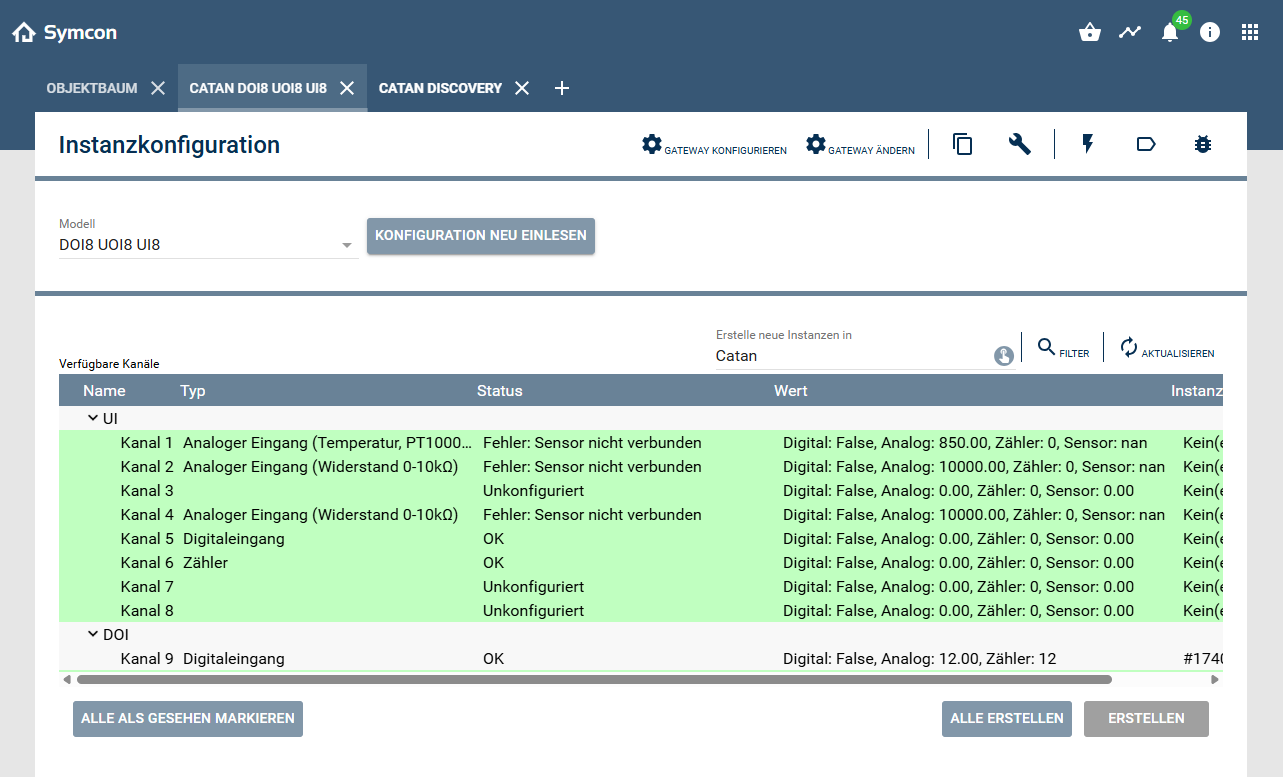
All channels of a device are displayed in the configurator and can be created and configured. Different channel types are available depending on the device: DOI UOI UI and DOR. A type can be assigned to each of these channels in the instance configuration. A variable is created below each channel instance that corresponds to the value of the channel. The name as well as the display and action are specified by the channel type.
**UI**
- Unconfigured
- Digital output
- Counter
- Analog input (voltage 0-10V)
- Analog input (current 0-20mA)
- Analog input (current 4-20mA)
- Analog input (resistance 0-10kΩ)
- Analog input (temperature, PT1000, DIN)
- Analog input (temperature, NI1000, DIN)
- Analog input (temperature, NI1000, LG)
- Analog input (temperature, NTC 10k)
- Analog input (temperature, NTC 10k, PRE)
- Analog input (temperature, NTC 20k)
**UOI**
- Unconfigured
- Digital output
- Digital input
- Counter
- Analog output (voltage 0-10V)
**DOI**
- Unconfigured
- Digital output
- Digital input
### configuration
Which of the following setting options are available depends on the channel type.
#### Configuration of the display
| Name | Description |
| ----------------------------------- | ----------------------------------------------------------------------------------------------------------------------------------------------------------------------------------------------------------------------------------------------------- |
| Allow override on display | If active, the value can be changed via the control panel |
| Override on display can be canceled | If active, the override can be canceled via the "Cancel override" button in the instance configuration. Alternatively, the PHP function CATAN_CancelOverride can also be used. If the override is canceled, the value is reset to the previous value. |
| Name source | The name of the channel that is displayed in the Control Panel.
From instance name: Name of the instance.
From text field: Freely selectable. |
| Unit | The text that is displayed after the value on the control panel. |
#### Configuration of the value change
| Name | Description |
| ---------------------- | ------------------------------------------------------------ |
| Minimum send interval | The interval in milliseconds at which value changes are sent |
| Value change increment | The threshold value at which the change to a value is sent |
#### configuration of the default value
| Name | Description |
| ---------------------------- | -------------------------------------------------------------------------------------------- |
| Default value | The default value |
| Use default value at start | If active, the default value is set when Catan is started. |
| Use default value on failure | If active, the default value is set in the event of an error or if the supply voltage fails. |
#### configuration of the counter
| Name | Description |
| ------------------------- | ------------------------------------------------------------------------------------------------ |
| Scaling factor | The factor by which the counter value is multiplied before it is written to the counter variable |
| Show raw value of counter | If active, an additional variable is created with the raw value of the counter. |
#### Additional configuration
| Name | Description |
| ---------------------- | ---------------------------------------------------------------------------------------------------------------- |
| Display channel status | If active, a variable is created that displays the channel status. (States: OK, Error, Overwritten, Deactivated) |
| Display error status | If active, a variable is created that displays the current error code. |
##### Error codes
| Value | Description |
| ----- | ---------------------------------------------- |
| 0 | No error |
| 5 | Peripheral error |
| 10 | Resistance too high |
| 11 | Temperature too high |
| 12 | Input voltage too high |
| 13 | Input current or shunt resistance too high |
| 14 | Output voltage too high |
| 15 | Upper warning limit exceeded |
| 20 | Temperature too low |
| 21 | Negative input voltage |
| 22 | Input current too low |
| 23 | Negative input current |
| 24 | Negative input current or sensor not connected |
| 25 | Output voltage too low |
| 26 | Lower warning limit not reached |
| 30 | Sensor not connected |
| 31 | Load resistance too high for valid voltage |
| 40 | Output overload |
| 50 | Virtual zero |
| 51 | Virtual alarm |
| 52 | Virtual obsolete |
| 53 | Virtual crash |
| 54 | Virtual error |
| 55 | Virtual Disabled |
Catan also supports other systems
- [KNX](knx.md)
- [ModBus](modbus-rtu-tcp.md)
- [DMX](dmx-artnet.md)
## CATAN_CancelOverride
Source: https://www.symcon.de/en/service/documentation/module-reference/devices/catan/catan-canceloverride/
`bool CATAN_CancelOverride(int $InstanzID)`
_Requires Symcon >= 9.0_
**Parameters**
- `$InstanzID` (int): The ID of the Catan channel instance whose overwriting is to be canceled.
**Returns** (bool): If the command could be executed successfully, it returns **TRUE**, otherwise **FALSE**.
The ID of the Catan channel instance whose overwriting is to be canceled.
**Example**
```text
CATAN_CancelOverride(12345); // Bricht die Überschreibung des Kanals ab
```
## CATAN_ResetCounter
Source: https://www.symcon.de/en/service/documentation/module-reference/devices/catan/catan-resetcounter/
`bool CATAN_ResetCounter(int $InstanzID)`
_Requires Symcon >= 9.0_
Resets the counter reading
**Parameters**
- `$InstanzID` (int): The ID of the Catan channel instance whose counter is to be reset.
**Returns** (bool): If the command could be executed successfully, it returns **TRUE** as the result, otherwise **FALSE**.
The ID of the Catan channel instance whose counter is to be reset.
**Example**
```text
CATAN_ResetCounter(12345); // Setzt den Zähler des Kanals ab
```
## Device List
Source: https://www.symcon.de/en/service/documentation/module-reference/devices/catan/device-list/
### Supported devices
| Device | Description |
| ------------------- | ------------------- |
| Catan C1 | Control |
| Catan DOR6 UI8 | Relay module |
| Catan DOI8 UOI8 UI8 | input/output module |