# KNX
> Symcon documentation · English · generated on 2026-09-26
> Index: https://www.symcon.de/en/llms.txt
Source: https://www.symcon.de/en/service/documentation/module-reference/devices/knx/
KNX is a wired as well as radio based system. A connection with IP-Symcon is possible via a serial or KNX IP interface. For the configuration of the system an engineering tool software (short "ETS") is needed.
> **Note:** The following devices are supported by IP-Symcon:
>
> [Supported components (excerpt)](knx.md)
>
> KNX Data Secure and KNX IP Secure are supported!
### Summary
- Introduction
- Installation
- XML Export in ETS
- Integration IP-Symcon
- Integration without KNX Data Secure
- Integration with KNX Data Secure
- Set up single actuators
- Automatic detection of feedback address
- Examples
- Example: Send temperature values to the bus
- Better roller shutter control with KNX Shutter
- Tips and Tricks
- Conversion of group addresses
- KNX with QNAP, Synology or Docker
- Read out states
- Output of group addresses
- Legacy
- OPC Export in ETS
- Assignment EIS type / DPT
### Introduction
KNX is a network of home and building control systems according to EN 50090 and ISO/IEC 14543. It controls, for example, heating, lighting, blinds, ventilation and security systems across different trades. The system usually uses cables (designation e.g. J-Y (St) Y 2x2x0.8 EIB or YCYM 2x2x0.8) with two wire pairs (red-black and white-yellow). The KNX system is supplied by a power supply with 30 V nominal voltage [DC voltage]. This voltage supplies the bus couplers via which each KNX device communicates with the other networked KNX devices. The data exchange between the KNX devices takes place via telegrams.
The programming of the participants and the assignment of the group addresses is done with the Engineering Tool Software (ETS). The ETS is provided by the umbrella organization Konnex and ensures the trouble-free cooperation of components from different manufacturers.
The connection to IP-Symcon is done via a serial or IP gateway.
As a rule, all serial gateways "PEI type 10″ with FT1.2 protocol (interfaces of type PEI 16 do not work) are supported and all KNX/IP gateways that offer the tunneling protocol. If a KNX gateway meets these requirements and does not work, Symcon support should be contacted. The problem will be solved as soon as possible.
Since IP-Symcon 6.4, KNX Data Secure and KNX IP Secure are also fully supported. In addition, all KNX IP Secure Interfaces also support the new KNX/IP over TCP, which is much more robust than the older KNX/IP over UDP.
### Installation
When all KNX devices are correctly set up and connected, they must be configured with the ETS. The three-stage address assignment is used for this purpose.
> **Warning:** Currently only three-level addresses (e.g. 10/2/5) are supported. Two-level or free addresses are not supported by IP-Symcon at the moment. About the Conversion any two-level address can be controlled via the translated three-level address
If the installation was done by an electrician, he should include the OPC/XML export explained below and the associated file of type XML.
To use KNX in IP-Symcon, either a serial FT1.2 gateway or a compatible KNX/IP gateway is required. The setup of the different gateways differs slightly. A KNX instance can be created directly in IP-Symcon and the gateway can be configured from there. Alternatively, the XML export from the ETS can be used.
Using the XML export with the IP-Symcon configurator allows a fast integration of all KNX components.
> **Note:** From IP-Symcon 5.3 the export as XML is recommended, because it supports the new KNX DPT instances
#### XML Export to ETS
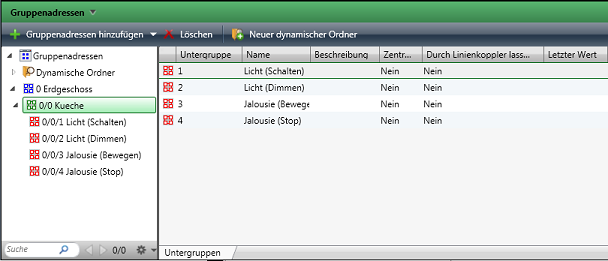
An XML export can be saved within the ETS in the opened project via right click on the group addresses.
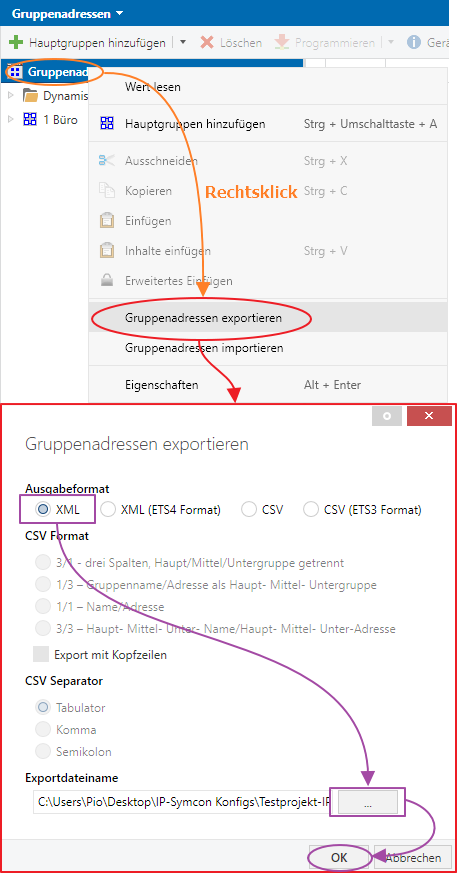
Video tutorial for export:
From version 6.0.0
[Video](https://www.youtube.com/embed/-hdo5nrTr3Y?rel=0&cc_load_policy=1)
From version 5.6.5
[Video](https://www.youtube.com/embed/DeGCLestF_I?rel=0&cc_load_policy=1)
#### Integration in IP-Symcon
The KNX interface can be integrated via the [device-search](../components/management-console.md). For this, "KNX Discovery" must be selected as the system. The Discovery instance then offers the creation of a KNX [Configurator](../concepts.md). After the configurator has been created, the individual devices can be added via this as described below.
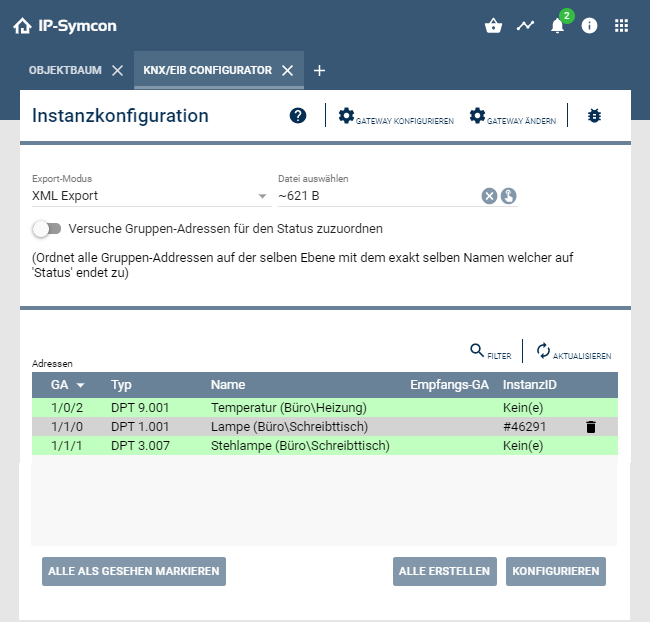
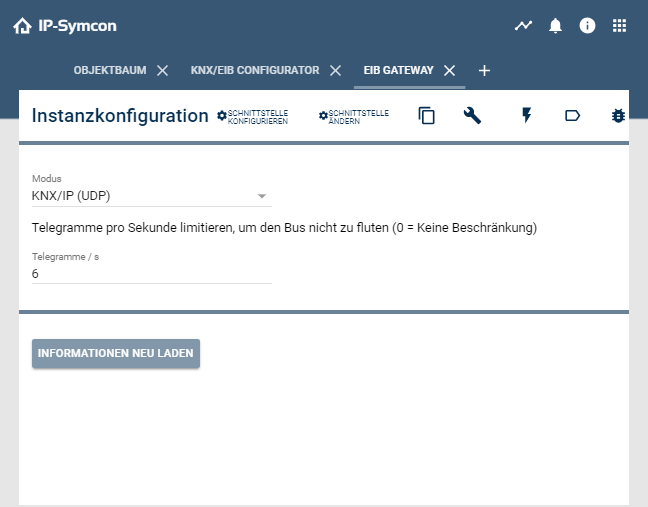
Before the import of the group addresses can be started, the interface must be correctly selected and configured. To do this, click on the "cogwheel" in the upper part of the configuration. The following dialog should open.
> **Note:** If KNX Data Secure should be used, you can read more in the chapter KNX Data Secure
#### Integration without KNX Data Secure
Under Mode the type of gateway has to be selected. For all common IP gateways the mode "KNX/IP (UDP)" may be selected. For the KNX IP interfaces with secure support, you can also choose the more reliable mode “KNX/IP (TCP)” or the appropriate secure equivalent. Changes are saved with the "Apply" button. To be able to enter the address for the interface, the "Gearwheel" in the upper area must be clicked again. Depending on the mode, either the IP address or the serial port belonging to the interface must be entered. In case of doubt, the IP address can also be found out with the help of the ETS. Further settings are not necessary. The changes are confirmed with "Apply". In the configuration of the gateway, the parameters of the gateway can now be read out via "Reload information". If these have been read out correctly, the configuration is complete.
Video tutorial:
[Video](https://www.youtube.com/embed/hgz7nv0SC-Q?rel=0&cc_load_policy=1)
#### Integration in IP-Symcon with KNX IP Secure / KNX Data Secure
To use KNX Data Secure and/or KNX IP Secure in IP-Symcon, a backup of a keychain is needed in addition to the XML file.
Video tutorial to export the keychain:
[Video](https://www.youtube.com/embed/R8BTUxpIDUc?rel=0&cc_load_policy=1)
In the KNX Gateway the mode "KNX/IP Secure (TCP)" must be selected. In the field "Select keychain" the keychain file is imported and the password is entered in the field "Keychain password". Changes will be saved with the button "Apply". Now the field "Secure tunnel" appears over which the configured tunnel of the interface can be selected. To be able to enter the address for the interface, the "Gearwheel" in the upper area must be clicked again. Here the IP address must be entered belongs. In case of doubt, the IP address can also be found out with the help of the ETS. Further settings are not necessary. The changes are confirmed with "Apply". In the configuration of the gateway, the gateway parameters can now be read out via "Reload information". If these have been read out correctly, the configuration is complete.
Video tutorial for KNX Data Secure with KNX IP Secure Interface:
[Video](https://www.youtube.com/embed/AZo_TwAyn-U?rel=0&cc_load_policy=1)
Video tutorial for KNX Data Secure with SymBox with KNX extension:
[Video](https://www.youtube.com/embed/aA8mcKEyHOY?rel=0&cc_load_policy=1)
##### find IP address
[Video](https://www.youtube.com/embed/0nEpt1Y_2nc?rel=0&cc_load_policy=1)
#### Single Actuators Setup
In the KNX Configurator after uploading the XML file all previously configured KNX actuators can be integrated and visualized in IP-Symcon.
For this purpose devices have to be created by pressing "Create". The devices are now operable.
The ID that appears on the right side is the instance ID assigned by IP-Symcon. This is unique and unchangeable.
After clicking on a selected KNX device and then clicking on "Configure", the functionality of each individual device can be tested.
The devices can be found again in the object tree.
The created devices can now be switched via the "Visualization".
#### Automatic detection of feedback addresses
If a device has a feedback address set up, this can be automatically detected and set as a feedback address. To do this, click on the button "Detect feedback GA automatically" in the KNX Configurator and activate this via the item "Activate detection".
Then you must select the levels via which the group addresses are to be linked. If the feedback address and the device are in the same middle group, the item "Link on the same level (1/1/x)" is selected. If the feedback address and the device are in different middle groups, the item "Link over two levels (1/x/x)" is selected. If the addresses are in different main groups, the item "Link on all levels (x/x/x)" is selected.
The linking of the group addresses is done by the specified keywords. If the name of a feedback address is identical with the name of a group address after removing the keyword, they will be linked. The upper/lower case is ignored. The feedback address is then set as the feedback address of the group address.
Video about the setup with automatic feedback addresses:
[Video](https://www.youtube.com/embed/hDwXGSwMjvc?rel=0&cc_load_policy=1)
### Examples
### Sending temperature values to the KNX bus
In order to be able to send values such as the temperature to the KNX bus, an action script is required. This forms the link between the visualization and the actuators. A script with the following content must be created:
```php
EIB_Value(IPS_GetParent($_IPS['VARIABLE']), $_IPS['VALUE']);
```
For each desired device that should be changeable, the corresponding variable must be linked to this action script. This must be done in the configuration of the respective variable. To do this, the variable must be double-clicked. The selection of the action script is located in the "Profile settings" area. Here, the script just created must be selected. In addition, a suitable profile (e.g. ~temperature) should be selected via "Own profile".
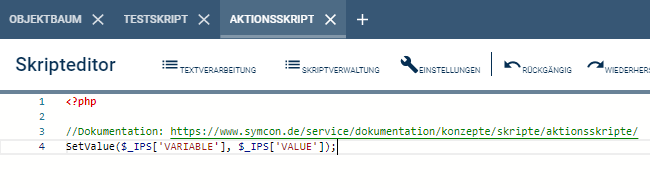
> **Note:** The last step can be repeated as often as needed. It is only necessary to create the script once with the above mentioned content
### Better Shutter Control with KNX Shutter
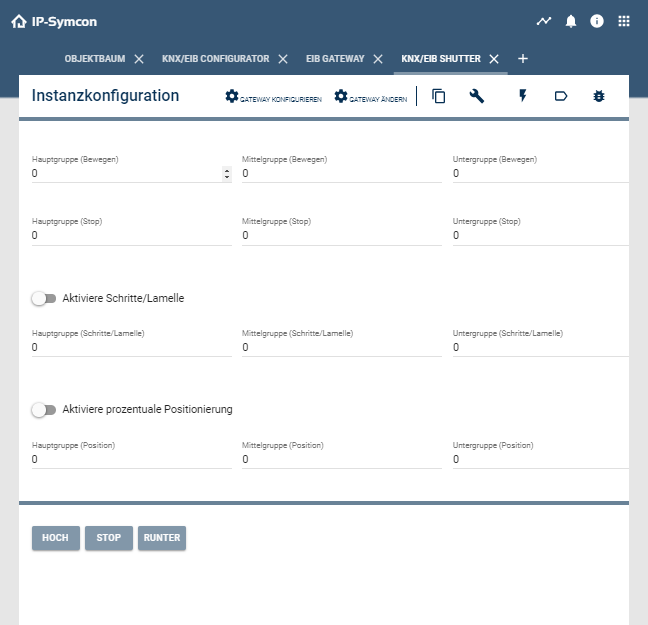
Due to the many setting options and linked addresses, shutters cannot be added via the configurator.
#### Move
Here the address for the up and down movement of the shutter must be entered. In the area "More?" further addresses can be entered on which the instance for moving up/down should listen.
#### Stop
Here the address for stopping the shutter must be entered. In the "More?" area, further addresses can be entered to which the instance is to listen for stopping.
#### Activate_steps/Slat
This address can be enabled and controls the stepwise movement of the shutter. This is used to adjust the slats of the shutter. In the "More?" area, further addresses can be entered to which the instance for step control should listen.
#### Activate percentage positioning
These two addresses can be enabled and control either the percentage positioning of the shutter or the slats.
#### Test Center
In the Test Center basic functions can be tested adhoc.
### Tips and Tricks
* [Is the ETS mandatory?](/forum/f18/ets-mandatory-7102/)
* [Synchronize time with KNX](/forum/f53/date-time-knx-synchronize-send-12064/)
#### Conversion of group addresses
##### Convert from two-level group addresses to three-level group addresses
If a two-level representation of the group addresses has been selected in the ETS, the addresses can be converted with the help of this tool. If the OPC export is used, the ETS takes over this process automatically.
##### Convert free group addresses to three level group addresses
If you have selected the free representation of the group addresses in the ETS, unfortunately an OPC export is not possible. With the help of this tool the addresses can be converted.
#### KNX with QNAP, Synology or Docker
If KNX is to be used with QNAP, Synology or Docker, NATSupport must be set up to receive responses from the system. This process is explained [here](../getting-started.md).
#### Script to read states from the bus
Since only variable changes are perceived by IP-Symcon, it is necessary to query IP-Symcon when restarting to see if there have been any status changes in order to ensure a consistent display.
For this a start script can be added in the [Event-Control](event-control.md) .
```php
$gatewayIDs = IPS_GetInstanceListByModuleID("{1C902193-B044-43B8-9433-419F09C641B8}");
$instanceIDs = IPS_GetInstanceList();
foreach($gatewayIDs as $gatewayID) {
foreach($instanceIDs as $instanceID) {
$i = IPS_GetInstance($instanceID);
if($i['ConnectionID'] == $gatewayID) {
switch($i['ModuleInfo']['ModuleID']) {
case "{24A9D68D-7B98-4D74-9BAE-3645D435A9EF}": //Shutter
case "81F54858-72B1-4C2C-8CE3-7E00A3168378": //RGB (Legacy until IP-Symcon 5.0)
case "{81F54858-72B1-4C2C-8CE3-7E00A3168378}": //RGB (IP-Symcon 5.1+)
case "4D7F7548-0979-4ABD-9BB3-81F9477C0903": //RGBW (Legacy until IP-Symcon 5.0)
case "{4D7F7548-0979-4ABD-9BB3-81F9477C0903}": //RGBW (IP-Symcon 5.1+)
EIB_RequestStatus($instanceID);
break;
case "{D62B95D3-0C5E-406E-B1D9-8D102E50F64B}": //Group
if(IPS_GetProperty($instanceID, "GroupCapabilityRead")) {
EIB_RequestStatus($instanceID);
}
break;
case "{FB223058-3084-C5D0-C7A2-3B8D2E73FE8A}": //Device
KNX_RequestStatus($instanceID);
break;
default:
//DPTs
if(strpos($i['ModuleInfo']['ModuleName'], "DPT") !== false) {
if(IPS_GetProperty($instanceID, "CapabilityRead")) {
KNX_RequestStatus($instanceID);
}
}
break;
}
}
}
}
```
#### Script to output the group addresses
The following script can be used to output the group addresses including id, name and location.
```php
echo "ID,Name,Location,GA,MoreGA" . PHP_EOL;
$gatewayIDs = IPS_GetInstanceListByModuleID("{1C902193-B044-43B8-9433-419F09C641B8}");
$instanceIDs = IPS_GetInstanceList();
foreach($gatewayIDs as $gatewayID) {
foreach($instanceIDs as $instanceID) {
$i = IPS_GetInstance($instanceID);
if($i['ConnectionID'] == $gatewayID) {
switch($i['ModuleInfo']['ModuleID']) {
case "{24A9D68D-7B98-4D74-9BAE-3645D435A9EF}": //Shutter
printGA($instanceID, "GroupMove");
if (IPS_GetProperty($instanceID, "EnableStep")) {
printGA($instanceID, "GroupStep");
}
printGA($instanceID, "GroupStop");
if (IPS_GetProperty($instanceID, "EnablePosition")) {
printGA($instanceID, "GroupPosition");
}
if (IPS_GetProperty($instanceID, "EnableBladePosition")) {
printGA($instanceID, "GroupBladePosition");
}
break;
case "81F54858-72B1-4C2C-8CE3-7E00A3168378": //RGB (Legacy until IP-Symcon 5.0)
case "{81F54858-72B1-4C2C-8CE3-7E00A3168378}": //RGB (IP-Symcon 5.1+)
case "4D7F7548-0979-4ABD-9BB3-81F9477C0903": //RGBW (Legacy until IP-Symcon 5.0)
case "{4D7F7548-0979-4ABD-9BB3-81F9477C0903}": //RGBW (IP-Symcon 5.1+)
case "{D62B95D3-0C5E-406E-B1D9-8D102E50F64B}": //Group
printGA($instanceID, "Group");
break;
case "{FB223058-3084-C5D0-C7A2-3B8D2E73FE8A}": //Device
printGAs($instanceID);
break;
default:
//DPTs
if(strpos($i['ModuleInfo']['ModuleName'], "DPT") !== false) {
printGA($instanceID, "");
}
break;
}
}
}
}
function printGA($id, $prefix) {
$c = json_decode(IPS_GetConfiguration($id), true);
echo sprintf("%d,%s,%s,", $id, IPS_GetName($id), IPS_GetLocation($id));
echo sprintf("%d/%d/%d", $c[$prefix . "Address1"], $c[$prefix . "Address2"], $c[$prefix . "Address3"]);
foreach (json_decode($c[$prefix . "Mapping"], true) as $a) {
echo "," . sprintf("%d/%d/%d", $a[$prefix . "Address1"], $a[$prefix . "Address2"], $a[$prefix . "Address3"]);
}
echo PHP_EOL;
}
function printGAs($id) {
$c = json_decode(IPS_GetConfiguration($id), true);
foreach(json_decode($c['GroupAddresses'], true) as $ga) {
echo sprintf("%d,%s,%s,", $id, IPS_GetName($id), IPS_GetLocation($id));
echo sprintf("%d/%d/%d", $ga["Address1"], $ga["Address2"], $ga["Address3"]);
foreach ($ga["Mapping"] as $a) {
echo "," . sprintf("%d/%d/%d", $a["Address1"], $a["Address2"], $a["Address3"]);
}
echo PHP_EOL;
}
}
```
### Legacy
##### OPC Export in ETS
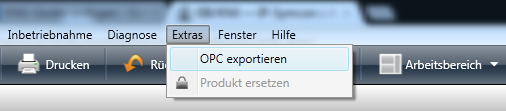
Video tutorial for export:[Video](https://www.youtube.com/embed/WnJ3qRI0qVE?rel=0&cc_load_policy=1)
##### Setup with OPC[Video](https://www.youtube.com/embed/kfv0HSX9PVM?rel=0&cc_load_policy=1)
### Assignment of individual functions to EIS type/DPT
| function | EIS type | DPT |
| ------------------------------------------------------------ | -------- | ------------ |
| [EIB_Char](knx.md) | EIS13 | DPT4 |
| [EIB_Counter8bit](knx.md) | EIS14 | DPT5, DPT6 |
| [EIB_Counter16bit](knx.md) | EIS10 | DPT7, DPT8 |
| [EIB_Counter32bit](knx.md) | EIS11 | DPT12, DPT13 |
| [EIB_Date](knx.md) | EIS4 | DPT11 |
| [EIB_DimControl](knx.md) | EIS2 | DPT3 |
| [EIB_DimValue](knx.md) | EIS6 | DPT5 |
| [EIB_DriveBladeValue](knx.md) | EIS6 | DPT5 |
| [EIB_DriveMove](knx.md) | EIS7 | DPT1 |
| [EIB_DriveShutterValue](knx.md) | EIS6 | DPT5 |
| [EIB_DriveStep](knx.md) | EIS7 | DPT1 |
| [EIB_FloatValue](knx.md) | EIS9 | DPT14 |
| [EIB_Move](knx.md) | EIS7 | DPT1 |
| [EIB_Position](knx.md) | EIS6 | DPT5 |
| [EIB_PriorityControl](knx.md) | EIS8 | DPT2 |
| [EIB_PriorityPosition](knx.md) | EIS1 | DPT1 |
| [EIB_Scale](knx.md) | EIS6 | DPT5 |
| [EIB_Str](knx.md) | EIS15 | DPT16 |
| [EIB_Switch](knx.md) | EIS1 | DPT1 |
| [EIB_Time](knx.md) | EIS3 | DPT10 |
| [EIB_Value](knx.md) | EIS5 | DPT9 |
| N/A | EIS12 | DPT15 |
## EIB_Char
Source: https://www.symcon.de/en/service/documentation/module-reference/devices/knx/eib-char/
`bool EIB_Char(int $InstanceID, string $Letter)`
**Parameters**
- `$InstanceID` (int): ID of the device to be switched
- `$Letter` (string): Single letter
**Returns** (bool): If the command succeeds, it returns __TRUE__, otherwise __FALSE__.
Single letter
**Example**
```php
EIB_Char(12345, "A"); //Sends the letter A onto the bus
```
## EIB_Counter8Bit
Source: https://www.symcon.de/en/service/documentation/module-reference/devices/knx/eib-counter8bit/
`bool EIB_Counter8Bit(int $InstanceID, float $Value)`
sends an 8-bit counter value
**Parameters**
- `$InstanceID` (int): ID of the device to be switched
- `$Value` (float): Default = 0..255; Signed = -127..127
**Returns** (bool): If the command succeeds, it returns __TRUE__, otherwise __FALSE__.
Default = 0..255; Signed = -127..127
**Example**
```php
EIB_Counter8Bit(12345, 10); //Sends the value 10 on the bus
```
## EIB_Counter16Bit
Source: https://www.symcon.de/en/service/documentation/module-reference/devices/knx/eib-counter16bit/
`bool EIB_Counter16Bit(int $InstanceID, float $Value)`
sends a 16bit counter value
**Parameters**
- `$InstanceID` (int): ID of the device to be switched
- `$Value` (float): Standard = 0..65535; Signed = -32768..32767
**Returns** (bool): If the command succeeds, it returns __TRUE__, otherwise __FALSE__.
Standard = 0..65535; Signed = -32768..32767
**Example**
```php
EIB_Counter16Bit(12345, 10); //Sends the value 10 on the bus
```
## EIB_Counter32bit
Source: https://www.symcon.de/en/service/documentation/module-reference/devices/knx/eib-counter32bit/
`bool EIB_Counter32Bit(int $InstanceID, float $Value)`
sends a 32bit counter value
**Parameters**
- `$InstanceID` (int): ID of the device to be switched
- `$Value` (float): Standard = -2147483648..2147483647
**Returns** (bool): If the command succeeds, it returns __TRUE__, otherwise __FALSE__.
Standard = -2147483648..2147483647
**Example**
```php
EIB_Counter32bit (12345, 10);//Sends the value 10 to the bus
```
## EIB_Date
Source: https://www.symcon.de/en/service/documentation/module-reference/devices/knx/eib-date/
`bool EIB_Date(int $InstanceID, string $Date)`
**Parameters**
- `$InstanceID` (int): ID of the device to be switched
- `$Date` (string): Default = yyyymmdd
**Returns** (bool): If the command succeeds, it returns __TRUE__, otherwise __FALSE__.
Default = yyyymmdd
**Example**
```php
EIB_Date(12345, date("Ymd")); //Sends the current date on the bus
```
## EIB_DimControl
Source: https://www.symcon.de/en/service/documentation/module-reference/devices/knx/eib-dimcontrol/
`bool EIB_DimControl(int $InstanceID, int $Value)`
**Parameters**
- `$InstanceID` (int): ID of the device to be switched
- `$Value` (int): Dim value date between 0..15 or -7..7
**Returns** (bool): If the command succeeds, it returns __TRUE__, otherwise __FALSE__.
Dim value date between 0..15 or -7..7
**Example**
```php
EIB_DimControl(12345, 0);
```
## EIB_DimValue
Source: https://www.symcon.de/en/service/documentation/module-reference/devices/knx/eib-dimvalue/
`bool EIB_DimValue(int $InstanceID, int $Value)`
**Parameters**
- `$InstanceID` (int): ID of the device to be switched
- `$Value` (int): Value 0..255, 0..100%
**Returns** (bool): If the command succeeds, it returns __TRUE__, otherwise __FALSE__.
Value 0..255, 0..100%
**Example**
```php
EIB_DimValue(12345, 100); //Dimming to 100%
```
## EIB_DriveBladeValue
Source: https://www.symcon.de/en/service/documentation/module-reference/devices/knx/eib-drivebladevalue/
`bool EIB_DriveBladeValue(int $InstanceID, int $Value)`
**Parameters**
- `$InstanceID` (int): ID of the device to be switched
- `$Value` (int): Value 0..255, 0..100%
**Returns** (bool): If the command succeeds, it returns __TRUE__, otherwise __FALSE__.
Value 0..255, 0..100%
**Example**
```php
EIB_DriveBladeValue(12345, 100); //Go to 100%
```
## EIB_DriveMove
Source: https://www.symcon.de/en/service/documentation/module-reference/devices/knx/eib-drivemove/
`bool EIB_DriveMove(int $InstanceID, bool $Direction)`
Moving the device with ID __InstanceID__ in a particular __Direction__. Depending on configuration the movement direction can be inverted.
-
**Parameters**
- `$InstanceID` (int): ID of the device to be switched
- `$Direction` (bool): Standard
**Returns** (bool): If the command succeeds, it returns __TRUE__, otherwise __FALSE__.
Standard
**Example**
```php
```
## EIB_DriveShutterValue
Source: https://www.symcon.de/en/service/documentation/module-reference/devices/knx/eib-driveshuttervalue/
`bool EIB_DriveShutterValue(int $InstanceID, int $Value)`
**Parameters**
- `$InstanceID` (int): ID of the device to be switched
- `$Value` (int): Value 0..255, 0..100%
**Returns** (bool): If the command succeeds, it returns __TRUE__, otherwise __FALSE__.
Value 0..255, 0..100%
**Example**
```php
EIB_DriveShutterValue(12345, 100); //Go to 100%
```
## EIB_DriveStep
Source: https://www.symcon.de/en/service/documentation/module-reference/devices/knx/eib-drivestep/
`bool EIB_DriveStep(int $InstanceID, bool $StepTowards)`
**Parameters**
- `$InstanceID` (int): ID of the device to be switched
- `$StepTowards` (bool): Standard
**Returns** (bool): If the command succeeds, it returns __TRUE__, otherwise __FALSE__.
Standard
**Example**
```php
EIB_DriveStep(12345, true); //Shutters move stepwise
```
## EIB_FloatValue
Source: https://www.symcon.de/en/service/documentation/module-reference/devices/knx/eib-floatvalue/
`bool EIB_FloatValue(int $InstanceID, float $Value)`
sends a float value
**Parameters**
- `$InstanceID` (int): ID of the device to be switched
- `$Value` (float): Floating point value
**Returns** (bool): If the command succeeds, it returns __TRUE__, otherwise __FALSE__.
Floating point value
**Example**
```php
EIB_FloatValue(12345, 22.1); //Sends 22.1°C to the controller
```
## EIB_Move
Source: https://www.symcon.de/en/service/documentation/module-reference/devices/knx/eib-move/
`bool EIB_Move(int $InstanceID, int $Direction)`
moves a roller shutter
**Parameters**
- `$InstanceID` (int): ID of the KNX shutter instance
- `$Direction` (int): 0 = up, 1 = step (up), 2 = stop, 3 = step (down), 4 = down
**Returns** (bool): If the command succeeds, it returns __TRUE__, otherwise __FALSE__.
0 = up, 1 = step (up), 2 = stop, 3 = step (down), 4 = down
**Example**
```php
EIB_move (12345, 3); //Stop shutters
```
## EIB_Position
Source: https://www.symcon.de/en/service/documentation/module-reference/devices/knx/eib-position/
`bool EIB_Position(int $InstanceID, int $Position)`
moves a roller shutter to a position
**Parameters**
- `$InstanceID` (int): ID of the KNX shutter instance
- `$Position` (int): 0-100%
**Returns** (bool): If the command succeeds, it returns __TRUE__, otherwise __FALSE__.
0-100%
**Example**
```php
EIB_Position(12345, 50); //Move roller shutters to 50%
```
## EIB_PriorityControl
Source: https://www.symcon.de/en/service/documentation/module-reference/devices/knx/eib-prioritycontrol/
`bool EIB_PriorityControl(int $InstanceID, int $State)`
sets a device state
**Parameters**
- `$InstanceID` (int): ID of the device to be switched
- `$State` (int): Default
**Returns** (bool): If the command succeeds, it returns __TRUE__, otherwise __FALSE__.
Default
**Example**
```php
EIB_PriorityControl(12345, 0);
```
## EIB_PriorityPosition
Source: https://www.symcon.de/en/service/documentation/module-reference/devices/knx/eib-priorityposition/
`bool EIB_PriorityPosition(int $InstanceID, bool $Direction)`
**Parameters**
- `$InstanceID` (int): ID of the device to be switched
- `$Direction` (bool): Standard
**Returns** (bool): If the command succeeds, it returns __TRUE__, otherwise __FALSE__.
Standard
**Example**
```php
EIB_PriorityPosition(12345, true); //Move shutters
```
## EIB_RequestStatus
Source: https://www.symcon.de/en/service/documentation/module-reference/devices/knx/eib-requeststatus/
`bool EIB_RequestStatus(int $InstanceID)`
sends a read request for EIB instances to the bus
**Parameters**
- `$InstanceID` (int): Device ID
**Returns** (bool): If the command succeeds, it returns __TRUE__, otherwise __FALSE__.
Device ID
**Example**
```php
EIB_RequestStatus(12345); //Send read request
```
## EIB_Scale
Source: https://www.symcon.de/en/service/documentation/module-reference/devices/knx/eib-scale/
`bool EIB_Scale(int $InstanceID, int $Value)`
**Parameters**
- `$InstanceID` (int): ID of the device to be switched
- `$Value` (int): Value 0..255, 0..100, 0..360
**Returns** (bool): If the command succeeds, it returns __TRUE__, otherwise __FALSE__.
Value 0..255, 0..100, 0..360
**Example**
```php
EIB_Scale(12345, 360);
```
## EIB_SetRGB
Source: https://www.symcon.de/en/service/documentation/module-reference/devices/knx/eib-setrgb/
`bool EIB_SetRGB(int $InstanceID, int $Red, int $Green, int $Blue)`
sets an RGB stripe to a specific color
**Parameters**
- `$InstanceID` (int): ID of the device to be switched
- `$Red` (int): 0 .. 255 (0 = off, 255 = bright)
- `$Green` (int): 0 .. 255 (0 = off, 255 = bright)
- `$Blue` (int): 0 .. 255 (0 = off, 255 = bright)
**Returns** (bool): If the command succeeds, it returns __TRUE__, otherwise __FALSE__.
0 .. 255 (0 = off, 255 = bright)
**Example**
```php
EIB_SetRGB(12345, 255, 0, 0); //Sets the RGB stripe to red
```
## EIB_SetRGBW
Source: https://www.symcon.de/en/service/documentation/module-reference/devices/knx/eib-setrgbw/
`bool EIB_SetRGBW(int $InstanceID, int $Red, int $Green, int $Blue, int $White)`
sets an RGBW stripe to a specific color
**Parameters**
- `$InstanceID` (int): ID of the device to be switched
- `$Red` (int): 0 .. 255 (0 = off, 255 = bright)
- `$Green` (int): 0 .. 255 (0 = off, 255 = bright)
- `$Blue` (int): 0 .. 255 (0 = off, 255 = bright)
- `$White` (int): 0 .. 255 (0 = off, 255 = bright)
**Returns** (bool): If the command succeeds, it returns __TRUE__, otherwise __FALSE__.
0 .. 255 (0 = off, 255 = bright)
**Example**
```php
EIB_SetRGBW(12345, 255, 0, 0, 0); //Sets the RGB stripe to red
```
## EIB_Str
Source: https://www.symcon.de/en/service/documentation/module-reference/devices/knx/eib-str/
`bool EIB_Str(int $InstanceID, string $String)`
**Parameters**
- `$InstanceID` (int): ID of the device to be switched
- `$String` (string): Text to send (14 characters maximum)
**Returns** (bool): If the command succeeds, it returns __TRUE__, otherwise __FALSE__.
Text to send (14 characters maximum)
**Example**
```php
EIB_Str(12345, “It rings! “); //Send the string to the bus
```
## EIB_Switch
Source: https://www.symcon.de/en/service/documentation/module-reference/devices/knx/eib-switch/
`bool EIB_Switch(int $InstanceID, bool $Status)`
**Parameters**
- `$InstanceID` (int): ID of the device to be switched
- `$Status` (bool): __TRUE__ for On, __FALSE__ for Off
**Returns** (bool): If the command succeeds, it returns __TRUE__, otherwise __FALSE__.
__TRUE__ for On, __FALSE__ for Off
**Example**
```php
EIB_Switch(12345, true); //Turns on the device
```
## EIB_Time
Source: https://www.symcon.de/en/service/documentation/module-reference/devices/knx/eib-time/
`bool EIB_Time(int $InstanceID, string $Time)`
sends a time value
**Parameters**
- `$InstanceID` (int): ID of the device to be switched
- `$Time` (string): Standard = dhhmmss; TimeOnly = hhmmss
**Returns** (bool): If the command succeeds, it returns __TRUE__, otherwise __FALSE__.
Standard = dhhmmss; TimeOnly = hhmmss
**Example**
```php
EIB_Time(12345, date("NHis")); //Sends the current time on the bus (Standard)
EIB_Time(12345, date("His")); //Sends the current time on the bus (TimeOnly)
```
## EIB_Value
Source: https://www.symcon.de/en/service/documentation/module-reference/devices/knx/eib-value/
`bool EIB_Value(int $InstanceID, float $Value)`
**Parameters**
- `$InstanceID` (int): ID of the device to be switched
- `$Value` (float): -671088,64 .. 670760,96
**Returns** (bool): If the command succeeds, it returns __TRUE__, otherwise __FALSE__.
-671088,64 .. 670760,96
**Example**
```php
EIB_Value(12345, 22.1); //Sends 22.1 ° C to the controller
```
## Device list
Source: https://www.symcon.de/en/service/documentation/module-reference/devices/knx/device-list/
### Supported Gateways
All serial gateways with FT1.2 protocol (and cEMI messages) and all KNX/IP gateways, that offer the tunneling protocol, are supported. For KNX gateways that meet these requirements but do not work, please contact our support. We will solve the problem as quickly as possible.
Since IP-Symcon 6.4 we also support KNX Data Secure and KNX IP Secure.
| Component | Manufacturer | Connection type | Description |
| ----------------------------- | -------------------------- | --------------- | ------------------------------------------------- |
| SymBox with KNX extension | Symcon GmbH | Serial | Integrated module from Weinzierl Engineering GmbH |
| 1a EIB KNX IP interface PoE | EIBMARKT | IP | EIB KNX IP interface PoE (ArtNr. N000401) |
| i-bus® KNX/IP interface | ABB | IP | REG IPS/S 2.1, 2CDG 110 098 R0011 |
| MDT SCN-IP000.02 | MDT | IP | |
| MDT SCN-IP000.03 | MDT | IP (Secure) | |
| 1168 KNX IP Secure Interface | Enertex | IP (Secure) | |
| KNX BAOS Module 838 kBerry | Weinzierl Engineering GmbH | IP (Secure) | |
| KNX BAOS Module 838 kBerry | Weinzierl Engineering GmbH | Seriell | |
| KNX IP Interface 730 | Weinzierl Engineering GmbH | IP | |
| KNX IP Interface 731 | Weinzierl Engineering GmbH | IP | |
| KNX IP Interface 732 Secure | Weinzierl Engineering GmbH | IP (Secure) | |
| KNX IP Interface 740 wireless | Weinzierl Engineering GmbH | IP | |
| KNX Router Weinzierl 750 | Weinzierl Engineering GmbH | IP | |
| N146 | Siemens | IP | |
| N148 | Siemens | IP | |
### Supported DPT
#### Since Version 5.0
| DPT-Type | Version |
| --------------------------------------------------------- | --------- |
| DPT 001.x | since 5.0 |
| DPT 002.x | since 5.0 |
| DPT 003.x | since 5.0 |
| DPT 004.x | since 5.0 |
| DPT 005.x | since 5.0 |
| DPT 006.x | since 5.0 |
| DPT 007.x | since 5.0 |
| DPT 008.x | since 5.0 |
| DPT 009.x | since 5.0 |
| DPT 010.x | since 5.0 |
| DPT 011.x | since 5.0 |
| DPT 012.x | since 5.0 |
| DPT 013.x | since 5.0 |
| DPT 014.x | since 5.0 |
| DPT 015.x | since 5.0 |
| DPT 016.x | since 5.0 |
| DPT 017.x | since 5.0 |
| DPT 018.x | since 5.0 |
| DPT 019.x | since 5.0 |
| DPT 020.x | since 5.0 |
| DPT 021.x | since 5.0 |
| DPT 022.x | since 5.0 |
| DPT 023.x | since 5.0 |
| DPT 024.x | since 5.0 |
| DPT 025.x | since 5.0 |
| DPT 026.x | since 5.0 |
| DPT 027.x | since 5.0 |
| DPT 028.x | since 5.0 |
| DPT 029.x | since 5.0 |
| DPT 030.x | since 5.0 |
| DPT 031.x | since 5.0 |
| DPT 200.x | since 5.0 |
| DPT 201.x | since 5.0 |
| DPT 202.x | since 5.0 |
| DPT 203.x | since 5.0 |
| DPT 204.x | since 5.0 |
| DPT 205.x | since 5.0 |
| DPT 206.x | since 5.0 |
| DPT 207.x | since 5.0 |
| DPT 209.x | since 5.0 |
| DPT 210.x | since 5.0 |
| DPT 211.x | since 5.0 |
| DPT 212.x | since 5.0 |
| DPT 213.x | since 5.0 |
| DPT 214.x | since 5.0 |
| DPT 215.x | since 5.0 |
| DPT 216.x | since 5.0 |
| DPT 217.x | since 5.0 |
| DPT 218.x | since 5.0 |
| DPT 219.x | since 5.0 |
| DPT 220.x | since 5.0 |
| DPT 221.x | since 5.0 |
| DPT 222.x | since 5.0 |
| DPT 223.x | since 5.0 |
| DPT 224.x | since 5.0 |
| DPT 225.x | since 5.0 |
| DPT 229.x | since 5.0 |
| DPT 230.x | since 5.0 |
| DPT 231.x | since 5.0 |
| DPT 232.x | since 5.0 |
| DPT 234.x | since 5.0 |
| DPT 235.x | since 5.0 |
| DPT 236.x | since 5.0 |
| DPT 237.x | since 5.0 |
| DPT 238.x | since 5.0 |
| DPT 239.x | since 5.0 |
| DPT 240.x | since 5.0 |
| DPT 241.x | since 5.0 |
| DPT 242.x | since 5.0 |
| DPT 249.x | since 5.0 |
| DPT 251.x | since 5.0 |
#### DPT 001.x
| DPT | DPT_Name |
| ----- | ---------------------- |
| 1.001 | DPT_Switch |
| 1.002 | DPT_Bool |
| 1.003 | DPT_Enable |
| 1.004 | DPT_Ramp |
| 1.005 | DPT_Alarm |
| 1.006 | DPT_BinaryValue |
| 1.007 | DPT_Step |
| 1.008 | DPT_UpDown |
| 1.009 | DPT_OpenClose |
| 1.010 | DPT_Start |
| 1.011 | DPT_State |
| 1.012 | DPT_Invert |
| 1.013 | DPT_DimSendStyle |
| 1.014 | DPT_InputSource |
| 1.015 | DPT_Reset |
| 1.016 | DPT_Ack |
| 1.017 | DPT_Trigger |
| 1.018 | DPT_Occupancy |
| 1.019 | DPT_Window_Door |
| 1.021 | DPT_LogicalFunction |
| 1.022 | DPT_Scene_AB |
| 1.023 | DPT_ShutterBlinds_Mode |
| 1.024 | DPT_DayNight |
| 1.100 | DPT_Heat/Cool |
#### DPT 002.x
| DPT | DPT_Name |
| ----- | ----------------------- |
| 2.001 | DPT_Switch_Control |
| 2.002 | DPT_Bool_Control |
| 2.003 | DPT_Enable_Control |
| 2.004 | DPT_Ramp_Control |
| 2.005 | DPT_Alarm_Control |
| 2.006 | DPT_BinaryValue_Control |
| 2.007 | DPT_Step_Control |
| 2.008 | DPT_Direction1_Control |
| 2.009 | DPT_Direction2_Control |
| 2.010 | DPT_Start_Control |
| 2.011 | DPT_State_Control |
| 2.012 | DPT_Invert_Control |
#### DPT 003.x
| DPT | DPT_Name |
| ----- | ------------------- |
| 3.007 | DPT_Control_Dimming |
| 3.008 | DPT_Control_Blinds |
#### DPT 004.x
| DPT | DPT_Name |
| ----- | --------------- |
| 4.001 | DPT_Char_ASCII |
| 4.002 | DPT_Char_8859_1 |
#### DPT 005.x
| DPT | DPT_Name |
| ----- | ------------------ |
| 5.001 | DPT_Scaling |
| 5.003 | DPT_Angle |
| 5.004 | DPT_Percent_U8 |
| 5.005 | DPT_DecimalFactor |
| 5.006 | DPT_Tariff |
| 5.010 | DPT_Value_1_Ucount |
#### DPT 006.x
| DPT | DPT_Name |
| ----- | ----------------- |
| 6.001 | DPT_Percent_V8 |
| 6.010 | DPT_Value_1_Count |
| 6.020 | DPT_Status_Mode3 |
#### DPT 007.x
| DPT | DPT_Name |
| ----- | --------------------- |
| 7.001 | DPT_Value_2_Ucount |
| 7.002 | DPT_TimePeriodMsec |
| 7.003 | DPT_TimePeriod10MSec |
| 7.004 | DPT_TimePeriod100MSec |
| 7.005 | DPT_TimePeriodSec |
| 7.006 | DPT_TimePeriodMin |
| 7.007 | DPT_TimePeriodHrs |
| 7.010 | DPT_PropDataType |
| 7.011 | DPT_Length_mm |
| 7.012 | DPT_UElCurrentmA |
| 7.013 | DPT_Brightness |
#### DPT 008.x
| DPT | DPT_Name |
| ----- | -------------------- |
| 8.001 | DPT_Value_2_Count |
| 8.002 | DPT_DeltaTimeMsec |
| 8.003 | DPT_DeltaTime10MSec |
| 8.004 | DPT_DeltaTime100MSec |
| 8.005 | DPT_DeltaTimeSec |
| 8.006 | DPT_DeltaTimeMin |
| 8.007 | DPT_DeltaTimeHrs |
| 8.010 | DPT_Percent_V16 |
| 8.011 | DPT_Rotation_Angle |
| 8.012 | DPT_Length_m |
#### DPT 009.x
| DPT | DPT_Name |
| ----- | --------------------- |
| 9.001 | DPT_Value_Temp |
| 9.002 | DPT_Value_Tempd |
| 9.003 | DPT_Value_Tempa |
| 9.004 | DPT_Value_Lux |
| 9.005 | DPT_Value_Wsp |
| 9.006 | DPT_Value_Pres |
| 9.007 | DPT_Value_Humidity |
| 9.008 | DPT_Value_AirQuality |
| 9.010 | DPT_Value_Time1 |
| 9.011 | DPT_Value_Time2 |
| 9.020 | DPT_Value_Volt |
| 9.021 | DPT_Value_Curr |
| 9.022 | DPT_PowerDensity |
| 9.023 | DPT_KelvinPerPercent |
| 9.024 | DPT_Power |
| 9.025 | DPT_Value_Volume_Flow |
| 9.026 | DPT_Rain_Amount |
| 9.027 | DPT_Value_Temp_F |
| 9.028 | DPT_Value_Wsp_kmh |
#### DPT 010.x
| DPT | DPT_Name |
| ------ | ------------- |
| 10.001 | DPT_TimeOfDay |
#### DPT 011.x
| DPT | DPT_Name |
| ------ | -------- |
| 11.001 | DPT_Date |
#### DPT 012.x
| DPT | DPT_Name |
| ------- | ---------------------- |
| 12.001 | DPT_Value_4_Ucount |
| 12.1200 | DPT_VolumeLiquid_Litre |
| 12.1201 | DPT_Volume_m3 |
#### DPT 013.x
| DPT | DPT_Name |
| ------- | --------------------------- |
| 13.001 | DPT_Value_4_Count |
| 13.002 | DPT_FlowRate_m3/h |
| 13.010 | DPT_ActiveEnergy |
| 13.011 | DPT_ApparantEnergy |
| 13.012 | DPT_ReactiveEnergy |
| 13.013 | DPT_ActiveEnergy_kWh |
| 13.014 | DPT_ApparantEnergy_kVAh |
| 13.015 | DPT_ReactiveEnergy_kVARh |
| 13.100 | DPT_LongDeltaTimeSec |
| 13.1200 | DPT_DeltaVolumeLiquid_Litre |
| 13.1201 | DPT_DeltaVolume_m3 |
| 13.16 | DPT_ActiveEnergy_MWh |
#### DPT 014.x
| DPT | DPT_Name |
| ------- | -------------------------------------- |
| 14.000 | DPT_Value_Acceleration |
| 14.001 | DPT_Value_Acceleration_Angular |
| 14.002 | DPT_Value_Activation_Energy |
| 14.003 | DPT_Value_Activity |
| 14.004 | DPT_Value_Mol |
| 14.005 | DPT_Value_Amplitude |
| 14.006 | DPT_Value_AngleRad |
| 14.007 | DPT_Value_AngleDeg |
| 14.008 | DPT_Value_Angular_Momentum |
| 14.009 | DPT_Value_Angular_Velocity |
| 14.010 | DPT_Value_Area |
| 14.011 | DPT_Value_Capacitance |
| 14.012 | DPT_Value_Charge_DensitySurface |
| 14.013 | DPT_Value_Charge_DensityVolume |
| 14.014 | DPT_Value_Compressibility |
| 14.015 | DPT_Value_Conductance |
| 14.016 | DPT_Value_Electrical_Conductivity |
| 14.017 | DPT_Value_Density |
| 14.018 | DPT_Value_Electric_Charge |
| 14.019 | DPT_Value_Electric_Current |
| 14.020 | DPT_Value_Electric_CurrentDensity |
| 14.021 | DPT_Value_Electric_DipoleMoment |
| 14.022 | DPT_Value_Electric_Displacement |
| 14.023 | DPT_Value_Electric_FieldStrength |
| 14.024 | DPT_Value_Electric_Flux |
| 14.025 | DPT_Value_Electric_FluxDensity |
| 14.026 | DPT_Value_Electric_Polarization |
| 14.027 | DPT_Value_Electric_Potential |
| 14.028 | DPT_Value_Electric_PotentialDifference |
| 14.029 | DPT_Value_ElectromagneticMoment |
| 14.030 | DPT_Value_Electromotive_Force |
| 14.031 | DPT_Value_Energy |
| 14.032 | DPT_Value_Force |
| 14.033 | DPT_Value_Frequency |
| 14.034 | DPT_Value_Angular_Frequency |
| 14.035 | DPT_Value_Heat_Capacity |
| 14.035 | DPT_Value_Heat_Capacity |
| 14.036 | DPT_Value_Heat_FlowRate |
| 14.037 | DPT_Value_Heat_Quantity |
| 14.038 | DPT_Value_Impedance |
| 14.039 | DPT_Value_Length |
| 14.040 | DPT_Value_Light_Quantity |
| 14.041 | DPT_Value_Luminance |
| 14.042 | DPT_Value_Luminous_Flux |
| 14.043 | DPT_Value_Luminous_Intensity |
| 14.044 | DPT_Value_Magnetic_FieldStrength |
| 14.045 | DPT_Value_Magnetic_Flux |
| 14.046 | DPT_Value_Magnetic_FluxDensity |
| 14.047 | DPT_Value_Magnetic_Moment |
| 14.048 | DPT_Value_Magnetic_Polarization |
| 14.049 | DPT_Value_Magnetization |
| 14.050 | DPT_Value_MagnetomotiveForce |
| 14.051 | DPT_Value_Mass |
| 14.052 | DPT_Value_MassFlux |
| 14.053 | DPT_Value_Momentum |
| 14.054 | DPT_Value_Phase_AngleRad |
| 14.055 | DPT_Value_Phase_AngleDeg |
| 14.056 | DPT_Value_Power |
| 14.057 | DPT_Value_Power_Factor |
| 14.058 | DPT_Value_Pressure |
| 14.059 | DPT_Value_Reactance |
| 14.060 | DPT_Value_Resistance |
| 14.061 | DPT_Value_Resistivity |
| 14.062 | DPT_Value_SelfInductance |
| 14.063 | DPT_Value_SolidAngle |
| 14.064 | DPT_Value_Sound_Intensity |
| 14.065 | DPT_Value_Speed |
| 14.066 | DPT_Value_Stress |
| 14.067 | DPT_Value_Surface_Tension |
| 14.068 | DPT_Value_Common_Temperature |
| 14.069 | DPT_Value_Absolute_Temperature |
| 14.070 | DPT_Value_TemperatureDifference |
| 14.071 | DPT_Value_Thermal_Capacity |
| 14.072 | DPT_Value_Thermal_Conductivity |
| 14.073 | DPT_Value_ThermoelectricPower |
| 14.074 | DPT_Value_Time |
| 14.075 | DPT_Value_Torque |
| 14.076 | DPT_Value_Volume |
| 14.077 | DPT_Value_Volume_Flux |
| 14.078 | DPT_Value_Weight |
| 14.079 | DPT_Value_Work |
| 14.1200 | DPT_Volume_Flux_Meter |
| 14.1201 | DPT_Volume_Flux_ls |
#### DPT 015.x
| DPT | DPT_Name |
| ------ | --------------- |
| 15.000 | DPT_Access_Data |
#### DPT 016.x
| DPT | DPT_Name |
| ------ | ----------------- |
| 16.000 | DPT_String_ASCII |
| 16.001 | DPT_String_8859_1 |
#### DPT 017.x
| DPT | DPT_Name |
| ------ | --------------- |
| 17.001 | DPT_SceneNumber |
#### DPT 018.x
| DPT | DPT_Name |
| ------ | ---------------- |
| 18.001 | DPT_SceneControl |
#### DPT 019.x
| DPT | DPT_Name |
| ------ | ------------ |
| 19.001 | DPT_DateTime |
#### DPT 020.x
| DPT | DPT_Name |
| ------- | ------------------------------- |
| 20.001 | DPT_SCLOMode |
| 20.002 | DPT_BuildingMode |
| 20.003 | DPT_OccMode |
| 20.004 | DPT_Priority |
| 20.005 | DPT_LightApplicationMode |
| 20.006 | DPT_ApplicationArea |
| 20.007 | DPT_AlarmClassType |
| 20.008 | DPT_PSUMode |
| 20.011 | DPT_ErrorClass_System |
| 20.012 | DPT_ErrorClass_HVAC |
| 20.013 | DPT_Time_Delay |
| 20.014 | DPT_Beaufort_Wind_Force_Scale |
| 20.017 | DPT_SensorSelect |
| 20.020 | DPT_ActuatorConnectType |
| 20.100 | DPT_FuelType |
| 20.101 | DPT_BurnerType |
| 20.102 | DPT_HVACMode |
| 20.103 | DPT_DHWMode |
| 20.104 | DPT_LoadPriority |
| 20.105 | DPT_HVACContrMode |
| 20.106 | DPT_HVACEmergMode |
| 20.107 | DPT_ChangeoverMode |
| 20.108 | DPT_ValveMode |
| 20.109 | DPT_DamperMode |
| 20.110 | DPT_HeaterMode |
| 20.111 | DPT_FanMode |
| 20.112 | DPT_MasterSlaveMode |
| 20.113 | DPT_StatusRoomSetp |
| 20.120 | DPT_ADAType |
| 20.121 | DPT_BackupMode |
| 20.122 | DPT_StartSynchronization |
| 20.600 | DPT_Behaviour_Lock_Unlock |
| 20.601 | DPT_Behaviour_Bus_Power_Up_Down |
| 20.602 | DPT_DALI_Fade_Time |
| 20.603 | DPT_BlinkingMode |
| 20.604 | DPT_LightControlMode |
| 20.605 | DPT_SwitchPBModel |
| 20.606 | DPT_PBAction |
| 20.607 | DPT_DimmPBModel |
| 20.608 | DPT_SwitchOnMode |
| 20.609 | DPT_LoadTypeSet |
| 20.610 | DPT_LoadTypeDetected |
| 20.801 | DPT_SABExceptBehaviour |
| 20.802 | DPT_SABBehaviour_Lock_Unlock |
| 20.803 | DPT_SSSBMode |
| 20.804 | DPT_BlindsControlMode |
| 20.1000 | DPT_CommMode |
| 20.1001 | DPT_AddInfoTypes |
| 20.1002 | DPT_RF_ModeSelect |
| 20.1003 | DPT_RF_FilterSelect |
#### DPT 021.x
| DPT | DPT_Name |
| ------- | -------------------------- |
| 21.001 | DPT_StatusGen |
| 21.002 | DPT_Device_Control |
| 21.100 | DPT_ForceSign |
| 21.101 | DPT_ForceSignCool |
| 21.102 | DPT_StatusRHC |
| 21.103 | DPT_StatusSDHWC |
| 21.104 | DPT_FuelTypeSet |
| 21.105 | DPT_StatusRCC |
| 21.106 | DPT_StatusAHU |
| 21.601 | DPT_LightActuatorErrorInfo |
| 21.1000 | DPT_RF_ModeInfo |
| 21.1001 | DPT_RF_FilterInfo |
| 21.1010 | DPT_Channel_Activation_8 |
#### DPT 022.x
| DPT | DPT_Name |
| ------- | ------------------------- |
| 22.100 | DPT_StatusDHWC |
| 22.101 | DPT_StatusRHCC |
| 22.1000 | DPT_Media |
| 22.1010 | DPT_Channel_Activation_16 |
#### DPT 023.x
| DPT | DPT_Name |
| ------ | ------------------ |
| 23.001 | DPT_OnOff_Action |
| 23.002 | DPT_Alarm_Reaction |
| 23.003 | DPT_UpDown_Action |
| 23.102 | DPT_HVAC_PB_Action |
#### DPT 024.x
| DPT | DPT_Name |
| ------ | -------------------- |
| 24.001 | DPT_VarString_8859_1 |
#### DPT 025.x
| DPT | DPT_Name |
| ------- | ---------------- |
| 25.1000 | DPT_DoubleNibble |
#### DPT 026.x
| DPT | DPT_Name |
| ------ | ------------- |
| 26.001 | DPT_SceneInfo |
#### DPT 027.x
| DPT | DPT_Name |
| ------ | --------------------- |
| 27.001 | DPT_CombinedInfoOnOff |
#### DPT 028.x
| DPT | DPT_Name |
| ------ | --------- |
| 28.001 | DPT_UTF-8 |
#### DPT 029.x
| DPT | DPT_Name |
| ------ | ---------------------- |
| 29.010 | DPT_ActiveEnergy_V64 |
| 29.011 | DPT_ApparantEnergy_V64 |
| 29.012 | DPT_ReactiveEnergy_V64 |
#### DPT 030.x
| DPT | DPT_Name |
| ------- | ------------------------- |
| 30.1010 | DPT_Channel_Activation_24 |
#### DPT 031.x
| DPT | DPT_Name |
| ------ | --------------------------- |
| 31.101 | DPT_PB_Action_HVAC_Extended |
#### DPT 200.x
| DPT | DPT_Name |
| ------- | ----------------- |
| 200.100 | DPT_Heat/Cool_Z |
| 200.101 | DPT_BinaryValue_Z |
#### DPT 201.x
| DPT | DPT_Name |
| ------- | ------------------------------------- |
| 201.100 | DPT_HVACMode_Z |
| 201.102 | DPT_DHWMode_Z |
| 201.104 | DPT_HVACContrMode_Z |
| 201.105 | DPT_EnablH/Cstage_Z DPT_EnablH/CStage |
| 201.107 | DPT_BuildingMode_Z |
| 201.108 | DPT_OccMode_Z |
| 201.109 | DPT_HVACEmergMode_Z |
#### DPT 202.x
| DPT | DPT_Name |
| ------- | ------------------ |
| 202.001 | DPT_RelValue_Z |
| 202.002 | DPT_UCountValue8_Z |
#### DPT 203.x
| DPT | DPT_Name |
| ------- | ----------------------------- |
| 203.002 | DPT_TimePeriodMsec_Z |
| 203.003 | DPT_TimePeriod10Msec_Z |
| 203.004 | DPT_TimePeriod100Msec_Z |
| 203.005 | DPT_TimePeriodSec_Z |
| 203.006 | DPT_TimePeriodMin_Z |
| 203.007 | DPT_TimePeriodHrs_Z |
| 203.011 | DPT_UFlowRateLiter/h_Z |
| 203.012 | DPT_UCountValue16_Z |
| 203.013 | DPT_UElCurrentμA_Z |
| 203.014 | DPT_PowerKW_Z |
| 203.015 | DPT_AtmPressureAbs_Z |
| 203.017 | DPT_PercentU16_Z |
| 203.100 | DPT_HVACAirQual_Z |
| 203.101 | DPT_WindSpeed_Z DPT_WindSpeed |
| 203.102 | DPT_SunIntensity_Z |
| 203.104 | DPT_HVACAirFlowAbs_Z |
#### DPT 204.x
| DPT | DPT_Name |
| ------- | -------------------- |
| 204.001 | DPT_RelSignedValue_Z |
#### DPT 205.x
| DPT | DPT_Name |
| ------- | ---------------------- |
| 205.002 | DPT_DeltaTimeMsec_Z |
| 205.003 | DPT_DeltaTime10Msec_Z |
| 205.004 | DPT_DeltaTime100Msec_Z |
| 205.005 | DPT_DeltaTimeSec_Z |
| 205.006 | DPT_DeltaTimeMin_Z |
| 205.007 | DPT_DeltaTimeHrs_Z |
| 205.017 | DPT_Percent_V16_Z |
| 205.100 | DPT_TempHVACAbs_Z |
| 205.101 | DPT_TempHVACRel_Z |
| 205.102 | DPT_HVACAirFlowRel_Z |
#### DPT 206.x
| DPT | DPT_Name |
| ------- | -------------------- |
| 206.100 | DPT_HVACModeNext |
| 206.102 | DPT_DHWModeNext |
| 206.104 | DPT_OccModeNext |
| 206.105 | DPT_BuildingModeNext |
#### DPT 207.x
| DPT | DPT_Name |
| ------- | -------------------------- |
| 207.100 | DPT_StatusBUC |
| 207.101 | DPT_LockSign |
| 207.102 | DPT_ValueDemBOC |
| 207.104 | DPT_ActPosDemAbs |
| 207.105 | DPT_StatusAct |
| 207.600 | DPT_StatusLightingActuator |
#### DPT 209.x
| DPT | DPT_Name |
| ------- | ------------------ |
| 209.100 | DPT_StatusHPM |
| 209.101 | DPT_TempRoomDemAbs |
| 209.102 | DPT_StatusCPM |
| 209.103 | DPT_StatusWTC |
#### DPT 210.x
| DPT | DPT_Name |
| ------- | ----------------------- |
| 210.100 | DPT_TempFlowWaterDemAbs |
#### DPT 211.x
| DPT | DPT_Name |
| ------- | ------------------ |
| 211.100 | DPT_EnergyDemWater |
#### DPT 212.x
| DPT | DPT_Name |
| ------- | --------------------------- |
| 212.100 | DPT_TempRoomSetpSetShift[3] |
| 212.101 | DPT_TempRoomSetpSet[3] |
#### DPT 213.x
| DPT | DPT_Name |
| ------- | --------------------------- |
| 213.100 | DPT_TempRoomSetpSet[4] |
| 213.101 | DPT_TempDHWSetpSet[4] |
| 213.102 | DPT_TempRoomSetpSetShift[4] |
#### DPT 214.x
| DPT | DPT_Name |
| ------- | ------------------------ |
| 214.100 | DPT_PowerFlowWaterDemHPM |
| 214.101 | DPT_PowerFlowWaterDemCPM |
#### DPT 215.x
| DPT | DPT_Name |
| ------- | ------------- |
| 215.100 | DPT_StatusBOC |
| 215.101 | DPT_StatusCC |
#### DPT 216.x
| DPT | DPT_Name |
| ------- | ---------------- |
| 216.100 | DPT_SpecHeatProd |
#### DPT 217.x
| DPT | DPT_Name |
| ------- | ----------- |
| 217.001 | DPT_Version |
#### DPT 218.x
| DPT | DPT_Name |
| ------- | ------------------- |
| 218.001 | DPT_VolumeLiter_Z |
| 218.002 | DPT_FlowRate_m3/h_Z |
#### DPT 219.x
| DPT | DPT_Name |
| ------- | ------------- |
| 219.001 | DPT_AlarmInfo |
#### DPT 220.x
| DPT | DPT_Name |
| ------- | ------------------- |
| 220.100 | DPT_TempHVACAbsNext |
#### DPT 221.x
| DPT | DPT_Name |
| ------- | ---------- |
| 221.001 | DPT_SerNum |
#### DPT 222.x
| DPT | DPT_Name |
| ------- | ------------------------------ |
| 222.100 | DPT_TempRoomSetpSetF16[3] |
| 222.101 | DPT_TempRoomSetpSetShiftF16[3] |
#### DPT 223.x
| DPT | DPT_Name |
| ------- | ---------------- |
| 223.100 | DPT_EnergyDemAir |
#### DPT 224.x
| DPT | DPT_Name |
| ------- | ------------------------- |
| 224.100 | DPT_TempSupply AirSetpSet |
#### DPT 225.x
| DPT | DPT_Name |
| ------- | --------------------- |
| 225.001 | DPT_ScalingSpeed |
| 225.002 | DPT_Scaling_Step_Time |
| 225.003 | DPT_TariffNext |
#### DPT 229.x
| DPT | DPT_Name |
| ------- | ----------------- |
| 229.001 | DPT_MeteringValue |
#### DPT 230.x
| DPT | DPT_Name |
| -------- | ---------------- |
| 230.1000 | DPT_MBus_Address |
#### DPT 231.x
| DPT | DPT_Name |
| ------- | ---------------- |
| 231.001 | DPT_Locale_ASCII |
#### DPT 232.x
| DPT | DPT_Name |
| ------- | -------------- |
| 232.600 | DPT_Colour_RGB |
#### DPT 234.x
| DPT | DPT_Name |
| ------- | ---------------------------- |
| 234.001 | DPT_LanguageCodeAlpha2_ASCII |
| 234.002 | DPT_RegionCodeAlpha2_ASCII |
#### DPT 235.x
| DPT | DPT_Name |
| ------- | ----------------------- |
| 235.001 | DPT_Tariff_ActiveEnergy |
#### DPT 236.x
| DPT | DPT_Name |
| ------- | ---------------------------- |
| 236.001 | DPT_Prioritised_Mode_Control |
#### DPT 237.x
| DPT | DPT_Name |
| ------- | -------------------------------- |
| 237.600 | DPT_DALI_Control_Gear_Diagnostic |
#### DPT 238.x
| DPT | DPT_Name |
| ------- | -------------------- |
| 238.001 | DPT_SceneConfig |
| 238.600 | DPT_DALI_Diagnostics |
#### DPT 239.x
| DPT | DPT_Name |
| ------- | ------------------ |
| 239.001 | DPT_FlaggedScaling |
#### DPT 240.x
| DPT | DPT_Name |
| ------- | -------------------- |
| 240.800 | DPT_CombinedPosition |
#### DPT 241.x
| DPT | DPT_Name |
| ------- | ------------- |
| 241.800 | DPT_StatusSAB |
#### DPT 242.x
| DPT | DPT_Name |
| ------- | -------------- |
| 242.600 | DPT_Colour_xyY |
#### DPT 249.x
| DPT | DPT_Name |
| ------- | -------------------------------------------- |
| 249.600 | DPT_Brightness_Colour_Temperature_Transition |
#### DPT 251.x
| DPT | DPT_Name |
| ------- | --------------- |
| 251.600 | DPT_Colour_RGBW |
### Supported EIS
| EIS-Type | Version | Matching DPT |
| -------- | --------- | --------------------------------------------------------------------------------------------------------------------- |
| EIS1 | since 3.4 | DPT 001.x |
| EIS2 | since 3.4 | DPT 003.x |
| EIS3 | since 3.4 | DPT 010.x |
| EIS4 | since 3.4 | DPT 011.x |
| EIS5 | since 3.4 | DPT 009.x |
| EIS6 | since 3.4 | DPT 005.x |
| EIS7 | since 3.4 | DPT 001.x |
| EIS8 | since 3.4 | DPT 002.x |
| EIS9 | since 3.4 | DPT 014.x |
| EIS10 | since 3.4 | DPT 007.x , DPT 008.x |
| EIS11 | since 3.4 | DPT 012.x , DPT 013.x |
| EIS12 | since 3.4 | DPT 015.x |
| EIS13 | since 3.4 | DPT 004.x |
| EIS14 | since 3.4 | DPT 005.x , DPT 006.x |
| EIS15 | since 3.4 | DPT 016.x |
## KNX_RequestStatus
Source: https://www.symcon.de/en/service/documentation/module-reference/devices/knx/knx-requeststatus/
`bool KNX_RequestStatus(int $InstanceID)`
sends a read request for DPT instances on the bus
**Parameters**
- `$InstanceID` (int): Device ID
**Returns** (bool): If the command succeeds, it returns __TRUE__, otherwise __FALSE__.
Device ID
**Example**
```php
KNX_RequestStatus(12345); //Send read request
```