# SMTP
> Symcon documentation · English · generated on 2026-09-26
> Index: https://www.symcon.de/en/llms.txt
Source: https://www.symcon.de/en/service/documentation/module-reference/notifications/smtp/
_Requires Symcon >= 2.2_
SMTP is a module of IP-Symcon that can send e-mails. The module is set up as an instance in IP-Symcon. It can be found under Manufacturer "None" and "Send Email (SMTP)". The individual properties can be found in the table.
> **Note:** In order to send a message to one or more e-mail addresses, the [SMTP_SendMailEx](smtp.md) function must be used.
> **Note:** The emails cannot be specially formatted. /n /r are functional but any formatting such as bold, italics etc will not work. A PHPMailer, for example, must be used for this instead.
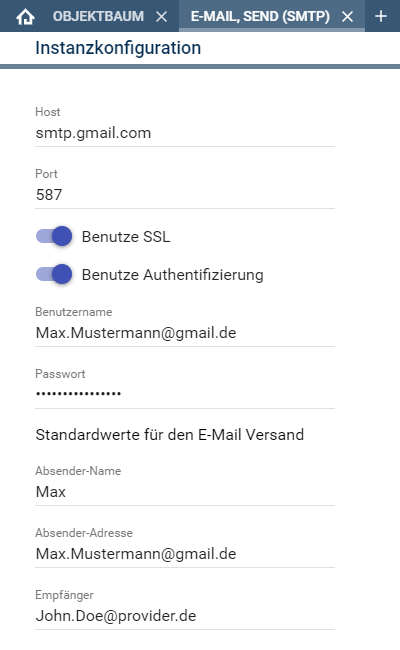
| Property | Meaning |
| -------------- | ---------------------------------------------------------------------------------------------------------------------------------------------- |
| Host | Server name or IP to the mail provider |
| Port | Port on which the server is working |
| SSL | Indicates whether SSL should be used |
| Authentication | Indicates whether a username/password is required |
| Username | Username (details are available from the mail provider) |
| Password | Password |
| Sender-Name | The name visible to the recipient |
| Sender-Address | The address visible to the recipient. Depending on the provider, the sender address must match ones own address. |
| Recipient | Only required for the [SMTP_SendMail](smtp.md) function, which automatically sends to the recipient of this field. |
> **Note:** An overview of host, port and authentication for many providers can be viewed here: [table](https://www.arclab.com/en/kb/email/list-of-smtp-and-imap-servers-mailserver-list.html)
### Example with Gmail
Gmail does not allow direct access with the username and password without further settings. With these settings, it depends on whether two-factor authentication is activated.
#### Without two-factor authentication
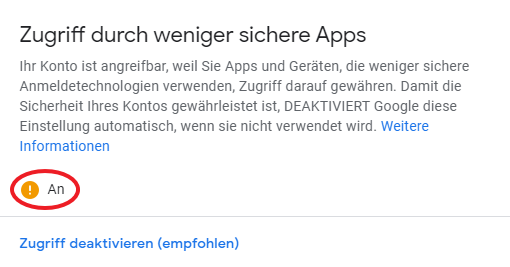
For use without two-factor authentication, "Access through less secure apps" must be activated in the administration of the Google account under "Security". A direct link would be [https://myaccount.google.com/lesssecureapps](https://myaccount.google.com/lesssecureapps) .
When access is enabled, it looks like this. Username and password can now be used to log in.
#### With two-factor authentication
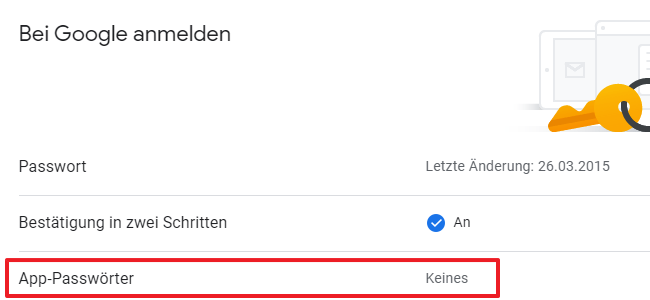
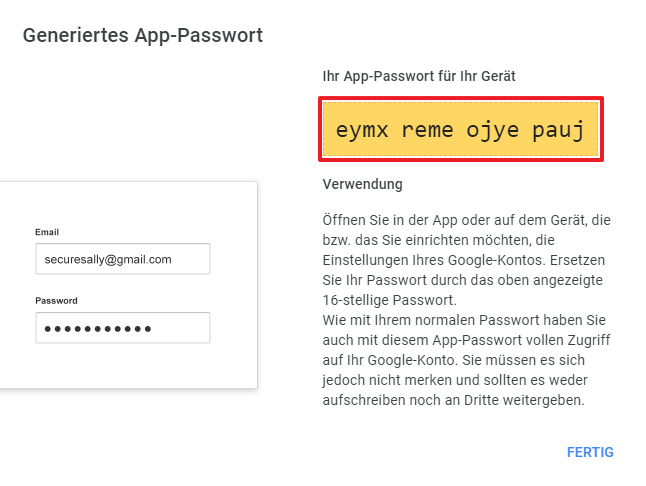
When using two-factor authentication, an app password must be assigned in the administration of the Google account under "Security" in the "Sign in to Google" section.
Click on the line "App passwords".
A new password with an individual name can be generated in the overview.
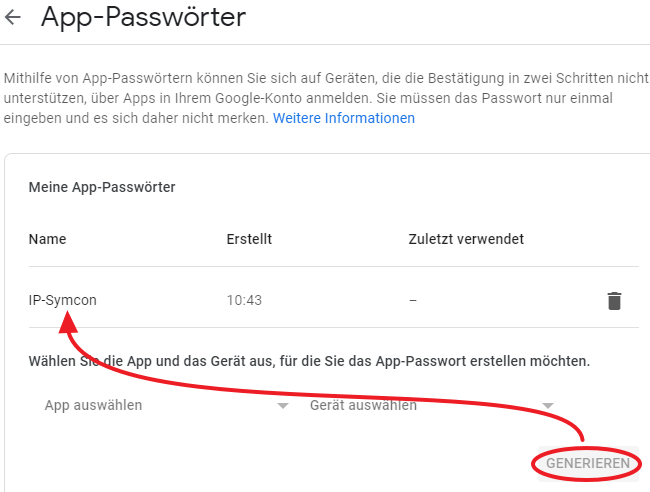
The generated password must then be entered in IP-Symcon.
## SMTP_SendMail
Source: https://www.symcon.de/en/service/documentation/module-reference/notifications/smtp/smtp-sendmail/
`bool SMTP_SendMail(int $InstanceID, string $Subject, string $Body)`
_Requires Symcon >= 2.2_
sends an e-mail to the default address
**Parameters**
- `$InstanceID` (int): ID of the device to be switched
- `$Subject` (string): Subject of mail
- `$Body` (string): Content of the email. Sent as HTML (since 7.0) if and is found, otherwise as text
**Returns** (bool): If the command succeeds, it returns __TRUE__, otherwise __FALSE__.
Content of the email. Sent as HTML (since 7.0) if and is found, otherwise as text
**Example**
```php
SMTP_SendMail(12345, "Alarm!", "The heating system has broken.!");
```
## SMTP_SendMailAttachment
Source: https://www.symcon.de/en/service/documentation/module-reference/notifications/smtp/smtp-sendmailattachment/
`bool SMTP_SendMailAttachment(int $InstanceID, string $Subject, string $Body, string $FilePath)`
_Requires Symcon >= 2.2_
sends an e-mail with attachment to the default address
**Parameters**
- `$InstanceID` (int): ID of the SMTP instance
- `$Subject` (string): Email subject
- `$Body` (string): Content of the email. Sent as HTML (since 7.0) if and is found, otherwise as text
- `$FilePath` (string): Path to the file
**Returns** (bool): If the command succeeds, it returns __TRUE__, otherwise __FALSE__.
Path to the file
**Example**
```php
SMTP_SendMailAttachment(12345, "Alarm!", "The heater is down!", "media/webcam.jpg");
```
## SMTP_SendMailAttachmentEx
Source: https://www.symcon.de/en/service/documentation/module-reference/notifications/smtp/smtp-sendmailattachmentex/
`bool SMTP_SendMailAttachmentEx(int $InstanceID, string $Recipient, string $Subject, string $Body, string $FilePath)`
_Requires Symcon >= 2.2_
sends an email with an attachment to any address
**Parameters**
- `$InstanceID` (int): ID of the SMTP instance
- `$Recipient` (string): Recipient's e-mail address
- `$Subject` (string): Subject of the email
- `$Body` (string): Content of the email. Sent as HTML (since 7.0) if and is found, otherwise as text
- `$FilePath` (string): Path to the file
**Returns** (bool): If the command succeeds, it returns __TRUE__, otherwise __FALSE__.
Path to the file
**Example**
```php
SMTP_SendMailAttachmentEx(12345, "me@example.com", "Alarm!", "The heater is down!", "media/webcam.jpg");
```
## SMTP_SendMailEx
Source: https://www.symcon.de/en/service/documentation/module-reference/notifications/smtp/smtp-sendmailex/
`bool SMTP_SendMailEx(int $InstanceID, string $Receiver, string $Subject, string $Body)`
_Requires Symcon >= 2.2_
sends an e-mail to any address
**Parameters**
- `$InstanceID` (int): ID of the device to be switched
- `$Receiver` (string): E-mail Address of the receiver
- `$Subject` (string): Subject of mail
- `$Body` (string): Content of the email. Sent as HTML (since 7.0) if and is found, otherwise as text
**Returns** (bool): If the command succeeds, it returns __TRUE__, otherwise __FALSE__.
Content of the email. Sent as HTML (since 7.0) if and is found, otherwise as text
**Example**
```php
SMTP_SendMailEx(12345, "me@example.com", "Alarm!", "The heating system has broken.!");
```
## SMTP_SendMailMedia
Source: https://www.symcon.de/en/service/documentation/module-reference/notifications/smtp/smtp-sendmailmedia/
`bool SMTP_SendMailMedia(int $InstanceID, string $Subject, string $Body, int $MediaID)`
_Requires Symcon >= 4.0_
sends an email with an attachment of a media object of type "image/sound" to the default address
**Parameters**
- `$InstanceID` (int): ID of the SMTP instance
- `$Subject` (string): Subject of the email
- `$Body` (string): Content of the email. Sent as HTML (since 7.0) if and is found, otherwise as text
- `$MediaID` (int): Media object ID (image/sound and document only)
**Returns** (bool): If the command succeeds, it returns __TRUE__, otherwise __FALSE__.
Media object ID (image/sound and document only)
**Example**
```php
SMTP_SendMailMedia(12345, "Alarm!", "Someone rang the doorbell, but you're not here!", 23456);
```
## SMTP_SendMailMediaEx
Source: https://www.symcon.de/en/service/documentation/module-reference/notifications/smtp/smtp-sendmailmediaex/
`bool SMTP_SendMailMediaEx(int $InstanceID, string $Recipient, string $Subject, string $Body, int $MediaID)`
_Requires Symcon >= 4.0_
sends an e-mail with an attachment of a media object of the "image/sound" type to any address
**Parameters**
- `$InstanceID` (int): ID of the SMTP instance
- `$Recipient` (string): Recipient's e-mail address
- `$Subject` (string): Subject of the email
- `$Body` (string): Content of the email. Sent as HTML (since 7.0) if and is found, otherwise as text
- `$MediaID` (int): Media object ID (image/sound and document only)
**Returns** (bool): If the command succeeds, it returns __TRUE__, otherwise __FALSE__.
Media object ID (image/sound and document only)
**Example**
```php
SMTP_SendMailMediaEx(12345, "me@example.com", "Alarm!", "Someone rang the doorbell, but you're not here!", 23456);
```