Documentation
Special Switches
Require: Symcon >= 2.6
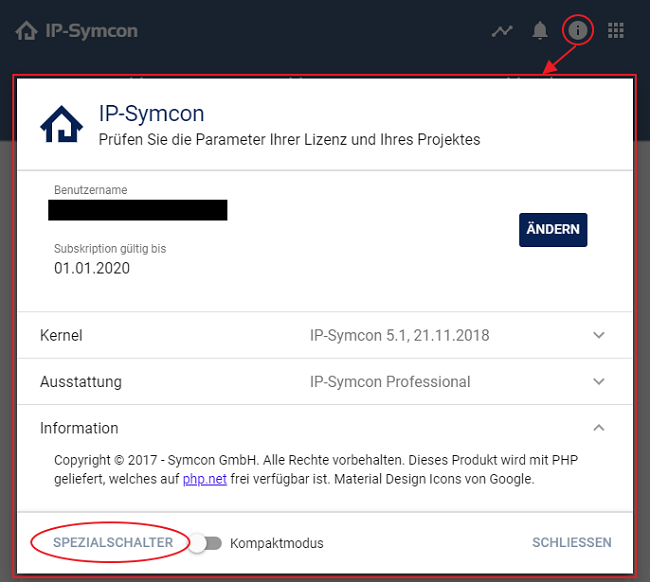
In order to be able to better control some functions of IP-Symcon, it is possible to change some switches within the Management Console.

Please note that changes usually only take effect as soon as IP-Symcon has been restarted. Exceptions are noted in the description of the respective switch.
The following switches are available:
| Option-name | Special switch function | Description |
|---|---|---|
| ArchiveCommitInterval (since 5.0) |
Archive time interval | Default = 60 (in seconds). Interval in seconds after which logged values are written to the hard disk. |
| ArchiveRecordLimit (since 4.3) |
Number of data points used in the archive | Default = 50000 (up to 8.0: 10000). Maximum value for the limit parameters of the archive functions. This correlates directly with the maximum data sets used for rendering and aggregating graphs. Starting with IP-Symcon 8.1, smaller values are automatically raised to 50000. Attention: Higher number slows down graph rendering. Only suitable for high-performance systems. |
| ArchiveRecordLimitBool (since 5.0, up to 7.0) |
Number of raw data points used in the archive | Default = 500. Maximum value for the limit parameters of the archive functions. This correlates directly with the maximum raw data sets used for rendering and aggregating graphs. Attention: Higher number slows down graph rendering. Only suitable for high-performance systems. Starting with IP-Symcon 7.1, ArchiveRecordLimit is used for all limits. |
| ArchiveWatch (since 6.0) |
Enable extended protocol for the archive | Default = Disabled. If activated, extended messages of the archive are written to the logfile. This particularly concerns problematic timestamps (e.g. from the future or not continuous) that are corrected or ignored while writing and aggregating data. |
| BackupCount | Number of backups | Default = 25. Number of Backup Settings that are archived in the 'backup' folder. A Backup Settings is created at every start and shortly after midnight. The number in the file name is a UnixTimeStamp of the creation time. If the value zero (0) is specified, an unlimited number of backups will be created. (Attention, storage consumption!) |
| CompatibilityDeprecations (since 7.0) |
Show deprecations in PHP | Default = Disabled. If activated, PHP deprecation messages are output (error_reporting = E_ALL). If deactivated, they are suppressed. Particularly interesting for developers to adapt deprecations early, so that the planned switch to PHP 9.0 becomes easier. Requires IPSModuleStrict in particular, as e.g. utf8_encode/utf8_decode are affected as well. |
| CompatibilityRequired (since 4.0) |
Compatibility Features | Default = Disabled (Windows: Enabled). If activated, the compatibility functions for deprecated functions since 2.x / 3.x are available under IP-Symcon 4.0. Activating this special switch increases the runtime of every PHP script and should remain deactivated if possible. This feature is enabled by default on Windows due to backwards compatibility. |
| CompatibilitySloppyUTF8 (since 6.3) |
Correct UTF-8 errors automatically | Default = Enabled. If activated, UTF-8 errors are corrected automatically when setting and receiving strings via PHP, so that only single characters may be shown as broken instead of rejecting the whole string with an error message. A change takes effect immediately. |
| ConnectCheck (since 6.4) |
Check interval from the Connect service | Default = 30 (in minutes). Interval in minutes at which the connection is actively checked by the Connect service. |
| ConnectLimit (since 5.4, up to 6.4) |
Connection attempt limit | Default = 25 (maximum 100). Specifies the maximum number of connection attempts within 24 hours of the Connect-Control. All inquiries beyond this are aborted with an error message and written to the logfile. The limit is reset every 24 hours. Starting with IP-Symcon 7.0, the limit is fixed at 100. |
| ConnectWatch (since 4.0) |
Log Connect service | Default = Disabled. If activated, extended outputs from processed "Connect Service" requests are written to the logfile. |
| DataFlowWatch (since 6.1) |
Logs runtimes and statistics of the data flow | Default = Disabled. If activated, the runtimes in the data flow are measured. Packets whose processing takes longer than DataFlowWatchTxLimit or DataFlowWatchRxLimit are written to the logfile and extended statistics of the data flow can be retrieved using the function IPS_GetInstanceDataFlowStatistics. |
| DataFlowWatchRxLimit (since 6.1) |
Delay in milliseconds | Default = 250 (in milliseconds). Delay in milliseconds from which delayed packets in the data flow are logged to the logfile. Blocked function: ReceiveData. Only evaluated if DataFlowWatch is enabled. If the value zero (0) is specified, nothing is logged. |
| DataFlowWatchTxLimit (since 6.1) |
Delay in milliseconds | Default = 250 (in milliseconds). Delay in milliseconds from which delayed packets in the data flow are logged to the logfile. Blocked function: ForwardData. Only evaluated if DataFlowWatch is enabled. If the value zero (0) is specified, nothing is logged. |
| DebugDisableSnapshot (since 6.1) |
Disable snapshots | Default = Disabled. For debugging purposes only. If activated, IPS_GetSnapshot and IPS_GetSnapshotObject abort with an error message. Clients that rely on snapshots will no longer work. |
| DebugDisableSnapshotChanges (since 6.1) |
Disable snapshot changes | Default = Disabled. For debugging purposes only. If activated, messages are no longer stored in the message buffer (see MessageRingBufferSize) and IPS_GetSnapshotChanges aborts with an error message. |
| DebugDisableStreams (since 6.1) |
Disable streams | Default = Disabled. For debugging purposes only. If activated, requests to the stream proxy (e.g. RTSP/MJPEG streams of cameras) are no longer answered by the web server. |
| DebugDisableWebSocket (since 6.1) |
Disable WebSocket return channel | Default = Disabled. For debugging purposes only. If activated, no messages are sent to connected clients via the WebSocket return channel anymore. |
| DebugProtectMemory (since 8.1) |
Enable memory protection for PHP | Default = Disabled. For debugging purposes only. If activated, the number of PHP threads is reduced to 1 and the memory protection of the OPcache (opcache.protect_memory) is enabled to make memory errors easier to track down. Not suitable for productive operation. |
| DefaultVisualization (since 7.0) |
Specify which visualization is on the front page | Default = 1. Specifies which visualization is shown at the base URL of the web server (e.g. http://127.0.0.1:3777/). If 1, the Tile-Visualization is shown, if 0 the WebFront-Visualization is shown. For systems upgrading to 7.0 the default value is 0. |
| DiscoveryWatch (since 4.0) |
Enable extended protocol for SSDP | Default = Disabled. If activated, extended messages related to the SSDP service are written to the log file. The SSDP service is, for example, responsible for the automatic detection of IP-Symcon for the management console and mobile apps. |
| Locale (since 6.4) |
Set language/region | Default = "". Overrides the automatically detected language or region of the system, e.g. "de", "en" or "de_AT". If empty, the setting of the operating system is used. |
| LogfileCount | Number of logfiles | Default = 25. Number of log files that are archived in the 'logs' folder. A log file is created at each start and shortly after midnight. The number in the file name is a UnixTimeStamp of the creation time. If the value zero (0) is specified, an unlimited number of log files is kept. (Attention, storage consumption!) |
| LogfileDisable (since 6.4) |
Disable logfile | Default = Disabled. If activated, no further messages are written to the logfile after the start. The messages are still shown in the message window. |
| LogfileFilter (since 5.4) |
RegEx for logfile messages | Default = "". RegEx to filter certain logfile messages. If not empty and the filter rule applies, the message will not be displayed in the logfile nor in the message window. The text to which the filter is applied can be found in the logfile, excluding the time. |
| LogfileVerbose | Activate extended protocol | Default = Enabled. If activated, all messages are written to the logfile. If deactivated, all messages except KL_DEBUG are written to the logfile. |
| LogMessageCount (since 4.1) |
Number of messages per message type | Default = 25. Number of messages per message type that are saved for the status widget. |
| MatterWatch (since 9.0) |
Enable extended protocol for Matter | Default = Disabled. If activated, the log messages of the Matter stack are written to the logfile as debug messages. |
| MaxLoginAttemptsBeforeLockdown (since 5.1) |
Login attempts until blocked | Default = 15. Number of incorrect logins before the IP address is completely blocked for further logins. |
| MaxLoginAttemptsBeforeSlowdown (since 5.1) |
Login attempts until delay | Default = 5. Number of incorrect logins before further logins from this IP address are slowed down (slowing down is defined by MaxLoginAttemptsSlowdownWaitTime) |
| MaxLoginAttemptsLockdownDuration (since 5.1) |
Duration of the login lock | Default = 900 (in seconds). Delay until the login block for the affected IP address is removed. |
| MaxLoginAttemptsSlowdownDuration (since 5.1) |
Duration of the login delay | Default = 300 (in seconds). Delay until the slowdown is removed for the affected IP address. |
| MaxLoginAttemptsSlowdownWaitTime (since 5.1) |
Time of delay | Default = 5000 (in milliseconds). Delay time in milliseconds for slowed down logins. |
| MessageQueueWatch | Log processing queue | Default = Disabled. If activated, the processing times of the internal processing queue are measured. Messages whose processing takes longer than MessageQueueWatchLimit are recorded in the logfile and statistics can be retrieved using the function IPS_GetInstanceMessageStatistics. If deactivated, these are not logged. |
| MessageQueueWatchLimit (since 6.1) |
Delay in milliseconds | Default = 50 (in milliseconds). Processing time in milliseconds from which a message is recorded in the logfile if MessageQueueWatch is enabled. If the value zero (0) is specified, nothing is logged. |
| MessageRingBufferSize (since 4.1) |
Number of buffer messages | Default = 8192. Indicates the number of messages that are buffered. If the maximum number is reached, the first (oldest) messages are overwritten. The buffer is used for IPS_GetSnapshotChanges. |
| NATPublicIP (since 5.4) |
Set NAT Public IP | Default = "". If NATSupport is active, this public IP is automatically used everywhere. If this setting is empty, the public IP can be set manually in the respective instances. |
| NATSupport (since 5.0) |
Activate NAT extensions | Default = Disabled. If activated, extended functions are activated, e.g. in the KNX gateway and HomeMatic Socket, in order to specify the correct IP address behind the NAT. This is particularly relevant for operation in Docker containers, which are created in bridge mode by default. |
| NotificationLimit (since 5.4) |
Limit of push notifications | Default = 250 (maximum 1000). Specifies the maximum number of push notifications within 24 hours. All inquiries beyond this are aborted with an error message and written to the logfile. The limit is reset every 24 hours, given the limit has not been reached. If the limit has been reached, the cause must be corrected and the service restarted before further push messages can be sent. |
| NotificationWatch (since 5.5) |
Log push notifications | Default = Disabled. If activated, every request to the push notification service is logged in the logfile. |
| OAuthWatch (since 4.3) |
Enable OAuth endpoint protocol | Default = Disabled. If activated, all requests via the OAuth endpoint are logged. |
| ObjectsLimit (since 6.0) |
Maximum number of objects | Default = 50000. Minimum = 10000. Specifies the number of available object IDs. Values above 50000 are only applied if the license allows a correspondingly higher variable limit, otherwise 50000 is used. |
| OPcacheSupport (since 5.0) |
Activate PHP's OPcache | Default = Enabled (up to 5.4 Disabled). If activated, PHP scripts are saved in memory. This avoids loading and parsing the scripts each time it is executed. |
| ProxyConnectLimitFrameRate (since 5.5) |
Number of frames in the stream via Connect service | Default = 2. Specifies whether the number of frames per second via the Connect service should be reduced in order to conserve the data volume. 0 = no limit. |
| ProxyConnectReduceQuality (since 5.5) |
Reduce the quality of the stream | Default = Enabled. If activated, the quality of the stream via the Connect service is reduced in order to conserve the data volume. |
| ProxyConnectReduceResolution (since 5.5) |
Limit the resolution of the stream | Default = Enabled. If activated, the resolution of the stream via the Connect service is reduced to a maximum of 720p. |
| ProxyInterface (since 7.0) |
Setting the IP address for Proxy/VoIP | Default = "". IP address of the network card that is to be used for the Proxy/VoIP connection. Only has to be set if the automatic detection does not work correctly. |
| ProxyLimitFrameRate (since 5.5) |
Number of frames in the local stream | Default = 0. Specifies whether the number of frames per second for local connections should be reduced in order to conserve the data volume. 0 = no limit. |
| ProxyPassthrough (since 7.0) |
Forward streams without transcoding | Default = Enabled. If activated, camera streams for WebRTC are forwarded without re-encoding whenever possible (passthrough), which reduces the CPU load. |
| ProxyPort (since 9.0) |
Port for SIP (VoIP/DoorIP) | Default = 5060. Local port on which SIP connections for VoIP/DoorIP are accepted. |
| ProxyRTSPBuffer (since 5.5) |
Size of the RTSP buffer | Default = 524288 (in bytes). Specifies the size of the buffer for RTSP streams. The larger the buffer, the more latency the stream has, the smaller the jittery the picture can be with bad connections. |
| ProxyRTSPEnforceTCP (since 6.1) |
Enforce RTSP via TCP | Default = Disabled. If activated, RTSP streams are always retrieved via TCP instead of UDP. This can be helpful, e.g. in case of packet loss or firewalls. |
| ProxySTUN (since 8.0) |
Use STUN for WebRTC | Default = Enabled. If activated, the STUN server of Symcon is used for WebRTC connections (e.g. camera streams) to determine the public address. If ProxyTURN is enabled as well, the TURN server is used instead. |
| ProxyThreadCount (since 8.0) |
Number of threads for Proxy/VoIP | Default = 4. Number of threads that are used for processing Proxy/VoIP connections (e.g. WebRTC, SIP). |
| ProxyTURN (since 8.0) |
Use TURN for WebRTC | Default = Enabled. If activated, the TURN server of Symcon is used for WebRTC connections (e.g. camera streams), which can relay the data if no direct connection is possible. |
| ProxyUseHWAccel (since 5.5) |
Hardware acceleration index for RTSP | Default = -1 (automatic). Specifies whether an available hardware acceleration should be used for decoding. 0 = never, 1..x = index of the available acceleration. |
| ProxyWatch (since 5.1) |
Log RTSP/MJPEG streams | Default = Disabled. If activated, further debugging information about called RTSP/MJPEG streams is logged. |
| SaveInterval | StorageInterval | Default = 10 (in minutes). This special switch indicates the cycle in which the settings are automatically saved to the hard disk. When exiting IP-Symcon, the settings are written regardless of this option. If the value zero (0) is specified, the settings are only written on exit (not recommended). |
| ScriptOutputBufferLimit (since 5.2) |
Define script output length | Default = 1048576 (in bytes). Maximum length that a script output can have. If the output is longer, the script is immediately aborted with the error message "Output-Buffer exceeds Limit". |
| ScriptWatch | Log script executions | Default = Disabled (up to 8.1 Enabled). If activated, script executions are logged in the logfile. If deactivated, no script executions are logged. Errors and outputs (e.g. via echo) are always logged. |
| ServerContentTimeout (since 6.2) |
Time limit for transfers | Default = 300 (in seconds). Limit in seconds after which a connection is immediately terminated if transferring a request and its response has not been completed by then. Only applies to unencrypted connections (HTTP), there is no time limit for HTTPS. If the value zero (0) is specified, there is no time limit. |
| ServerHardQueueBytesLimit (since 5.3) |
Byte limit of the queue | Default = 33554432 (in bytes). When the limit of bytes of all messages in the queue is reached, the connection is terminated immediately. |
| ServerHardQueueSizeLimit (since 5.3) |
Message limit of the queue | Default = 65536. When the limit for messages in the queue is reached, the connection is terminated immediately. |
| ServerHardQueueTransferTimeout (since 5.3) |
Queue timeout | Default = 300 (in seconds). Limit in seconds after which an inactive connection is immediately terminated. |
| ServerLogging (since 5.0) |
Activate server logging | Default = Disabled. If activated, logging of accesses to the web server (port = 3777) is activated. This setting only affects the server on port 3777. On own web servers the setting in the respective instance is taken into account. The log file is called “access.log” and is, depending on the operating system, located in the logfiles folder. See Installation |
| ServerLoggingFilter (since 5.0) |
Activate filter for server logging | Default = Enabled. If activated, API calls (IPS_GetSnapshotChanges/WFC_GetSnapshotChanges) are not written to the "access.log" logfile if ServerLogging is active. If deactivated, all entries are written to the logfile. |
| ServerMaxPostSize (since 5.1) |
Maximum bytes for POST | Default = 25165824 (in bytes). Maximum number of bytes that can be sent to the server via POST. |
| ServerSecurity (since 4.1) |
Activate CORS protection | Default = Enabled. If activated, all CORS protection of the web server is activated. |
| ServerSoftQueueBytesLimit (since 5.3) |
Bytes soft limit of the queue | Default = 8388608 (in bytes). When the limit of bytes of all messages in the queue is reached, the connection is disconnected if the ServerSoftQueueTransferTimeout limit is also exceeded. |
| ServerSoftQueueSizeLimit (since 5.3) |
Message soft limit of the queue | Default = 32768. When the limit of messages in the queue is reached, the connection is disconnected if the ServerSoftQueueTransferTimeout limit is also exceeded. |
| ServerSoftQueueTransferTimeout (since 5.3) |
Queue time soft limit | Default = 10 (in seconds). Limit in seconds without successful transmission after which the soft limits apply to the size and number of messages. |
| ServerTokenExpiration (since 8.0) |
Timeout for internal tokens | Default = 3600 (in seconds). When logging in via the RBAC feature, username and password are exchanged for a short-lived token, which expires after the specified number of seconds, so that logging in again is required. |
| ServerUserFolderPassword (since 5.1) |
Basic authentication password | Default = "". Password for the basic authentication of the web server to secure the "user"-folder. |
| ServerUserFolderUsername (since 5.1) |
Basic authentication username | Default = "". Username for the basic authentication of the web server to secure the "user"-folder. |
| SettingsWatch (since 4.0) |
Log saving of settings | Default = Disabled. If activated, a message is written to the logfile as soon as the settings have been saved in the SaveInterval. |
| SOAPEnabled (up to 3.4) |
Activate SOAP | Default = Disabled. If activated, the SOAP interface can be reached via port 3773. |
| StoreDownloadTimeout (since 8.1) |
Timeout for downloads from the Module Store | Default = 60000 (in milliseconds). Time in milliseconds that the download of a module from the Module Store may take before a timeout occurs and the download is aborted with an error message. |
| ThreadCount | Number of threads | Default = 50. Minimum = 25. Indicates the number of PHP threads that are available in IP-Symcon. Each thread consumes a few megabytes of RAM and a small percentage of the CPU load to manage. The maximum value can be determined from the information under Limitations. |
| ThreadHotReserve (since 9.1) |
Number of PHP threads kept ready | Default = 5. Number of PHP threads that permanently keep their PHP state so that scripts can be started without delay. All further threads are only initialized when needed and release their memory again after ThreadIdleTimeout. The value is limited to 0 up to ThreadCount. |
| ThreadIdleTimeout (since 9.1) |
Idle time of PHP threads | Default = 300 (in seconds). Time in seconds after which an unused PHP thread releases its memory if more than ThreadHotReserve threads are initialized. If the value zero (0) is specified, threads never release their memory. |
| ThreadMemoryCleanup (since 6.2) |
Memory cleanup in PHP threads | Default = 10 (in MB). If the memory usage of an execution in a PHP thread exceeds the threshold of X MB, the internally used memory (cache) of the thread is cleaned up afterwards to keep the total consumption of the PHP threads predictable. |
| ThreadQueueLimit (since 4.0) |
Thread queue limit | Default = 50. Specifies the maximum number of PHP requests that are waiting in the internal queue for execution. Any further inquiries will be canceled with an error message. By default, this special switch should not be changed, but instead it should be ensured that scripts have a short runtime. |
| TimerThreadHotReserve (since 9.1) |
Number of timer threads kept ready | Default = 10. Minimum = 1. Number of threads for executing the timers of instances that are permanently kept ready. If needed, further threads are started, which are terminated again after TimerThreadIdleTimeout. |
| TimerThreadIdleTimeout (since 9.1) |
Idle time of timer threads | Default = 300 (in seconds). Time in seconds after which an additionally started, unused timer thread is terminated. If the value zero (0) is specified, additional threads are never terminated. |
| VariableWatch | Activate extended variable log | Default = Disabled (up to 8.1 Enabled). If activated, value changes/updates of all variables are written to the logfile. If deactivated, these are not written to the logfile. |
| VoIPInterface (since 5.2, up to 6.4) |
Setting the IP address for VoIP | Default = "". IP address of the network card that is to be used for the VoIP connection. Only has to be set if the automatic detection does not work correctly. Superseded by the new ProxyInterface special switch that is available since IP-Symcon 7.0. |
| VoIPLogLevel (since 5.2, up to 6.4) |
Set debug output level for VoIP | Default = 0 (disabled). The level can be set between 0 and 3 (Recommended: 2). Where 0 is deactivated and 3 means the highest level of detail. The VoIPLogLevel determines the level of detail of the debug messages in the message log. Superseded by the ProxyWatch special switch that includes this information starting with IP-Symcon 7.0. |
| WebSocketWatch (since 5.1) |
Activate extended WebSocket protocol | Default = Disabled. If activated, further debugging information is output on the WebSocket return channel, such as Open, Close, Error or if timeouts or limits have been exceeded. |