Documentation
Catan
Require: Symcon >= 9.0
Integration in Symcon
The Catan interfaces can be integrated via the Device search. To do this, "Catan Discovery" must be selected as the system. The Discovery instance then offers the creation of a Catan Configurator Configurator for each interface.
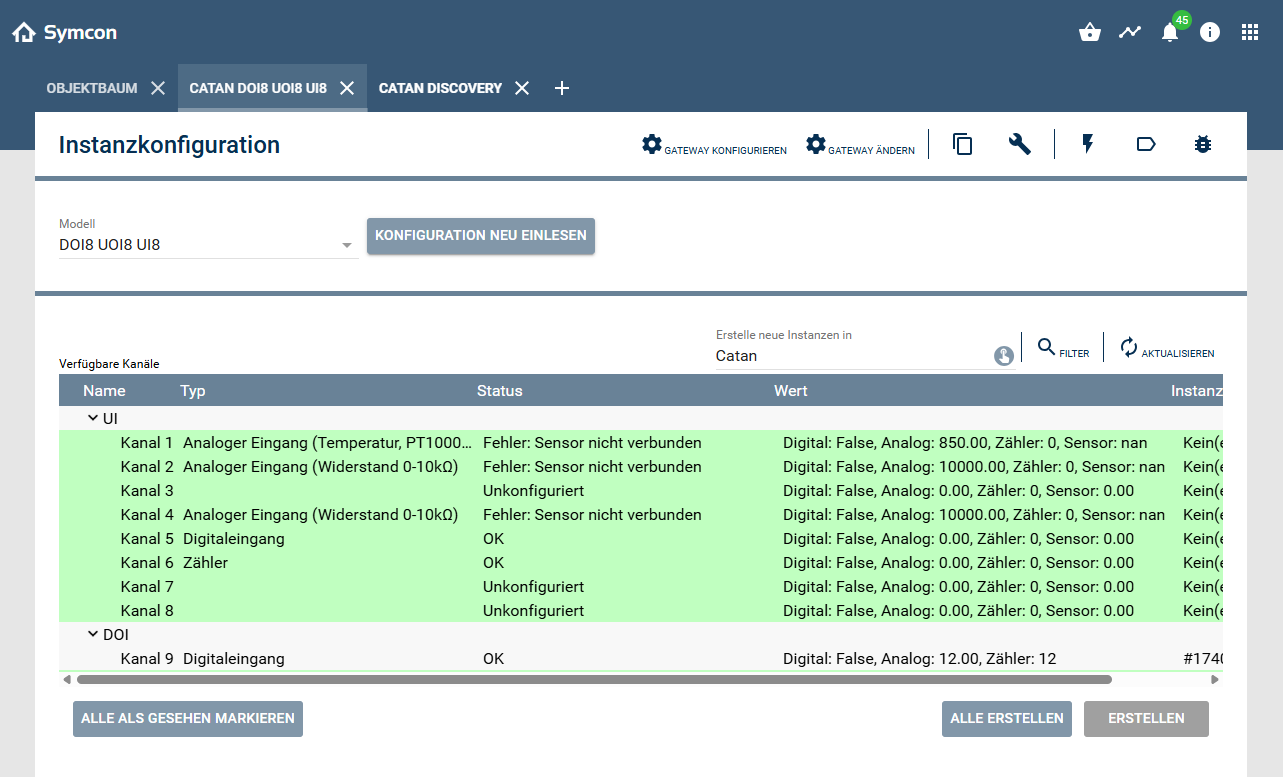
All channels of a device are displayed in the configurator and can be created and configured. Different channel types are available depending on the device: DOI UOI UI and DOR. A type can be assigned to each of these channels in the instance configuration. A variable is created below each channel instance that corresponds to the value of the channel. The name as well as the display and action are specified by the channel type.
UI
- Unconfigured
- Digital output
- Counter
- Analog input (voltage 0-10V)
- Analog input (current 0-20mA)
- Analog input (current 4-20mA)
- Analog input (resistance 0-10kΩ)
- Analog input (temperature, PT1000, DIN)
- Analog input (temperature, NI1000, DIN)
- Analog input (temperature, NI1000, LG)
- Analog input (temperature, NTC 10k)
- Analog input (temperature, NTC 10k, PRE)
- Analog input (temperature, NTC 20k)
UOI
- Unconfigured
- Digital output
- Digital input
- Counter
- Analog output (voltage 0-10V)
DOI
- Unconfigured
- Digital output
- Digital input
configuration
Which of the following setting options are available depends on the channel type.
Configuration of the display
| Name | Description |
|---|---|
| Allow override on display | If active, the value can be changed via the control panel |
| Override on display can be canceled | If active, the override can be canceled via the "Cancel override" button in the instance configuration. Alternatively, the PHP function CATAN_CancelOverride can also be used. If the override is canceled, the value is reset to the previous value. |
| Name source | The name of the channel that is displayed in the Control Panel. From instance name: Name of the instance. From text field: Freely selectable. |
| Unit | The text that is displayed after the value on the control panel. |
Configuration of the value change
| Name | Description |
|---|---|
| Minimum send interval | The interval in milliseconds at which value changes are sent |
| Value change increment | The threshold value at which the change to a value is sent |
configuration of the default value
| Name | Description |
|---|---|
| Default value | The default value |
| Use default value at start | If active, the default value is set when Catan is started. |
| Use default value on failure | If active, the default value is set in the event of an error or if the supply voltage fails. |
configuration of the counter
| Name | Description |
|---|---|
| Scaling factor | The factor by which the counter value is multiplied before it is written to the counter variable |
| Show raw value of counter | If active, an additional variable is created with the raw value of the counter. |
Additional configuration
| Name | Description |
|---|---|
| Display channel status | If active, a variable is created that displays the channel status. (States: OK, Error, Overwritten, Deactivated) |
| Display error status | If active, a variable is created that displays the current error code. |
Error codes
| Value | Description |
|---|---|
| 0 | No error |
| 5 | Peripheral error |
| 10 | Resistance too high |
| 11 | Temperature too high |
| 12 | Input voltage too high |
| 13 | Input current or shunt resistance too high |
| 14 | Output voltage too high |
| 15 | Upper warning limit exceeded |
| 20 | Temperature too low |
| 21 | Negative input voltage |
| 22 | Input current too low |
| 23 | Negative input current |
| 24 | Negative input current or sensor not connected |
| 25 | Output voltage too low |
| 26 | Lower warning limit not reached |
| 30 | Sensor not connected |
| 31 | Load resistance too high for valid voltage |
| 40 | Output overload |
| 50 | Virtual zero |
| 51 | Virtual alarm |
| 52 | Virtual obsolete |
| 53 | Virtual crash |
| 54 | Virtual error |
| 55 | Virtual Disabled |
Catan also supports other systems