Documentation
Heating Control
Description
The heating module is used to control temperatures in living spaces.
Two-point controllers and linear controllers (e.g. P controller) are supported.
The target value is compared with the actual value and the actuator is controlled accordingly.
In contrast to the Heating Control (legacy), variables are switched via their action instead of controlling instances directly. A handler script (expert settings) is only available in the Heating Control (legacy).
Requirement
The actual value is obtained via respective temperature sensors whose value must be known to IP-Symcon as a variable. Furthermore, the heat source must be switchable via an actuator. Examples: Radiator with a thermal actuator or a heater and a radio socket.
Configuration
The "Heating Control" module (manufacturer: None) can be added via the object tree within the Management Console. Optionally, a meaningful name (e.g. "Heating module living room") should be assigned.
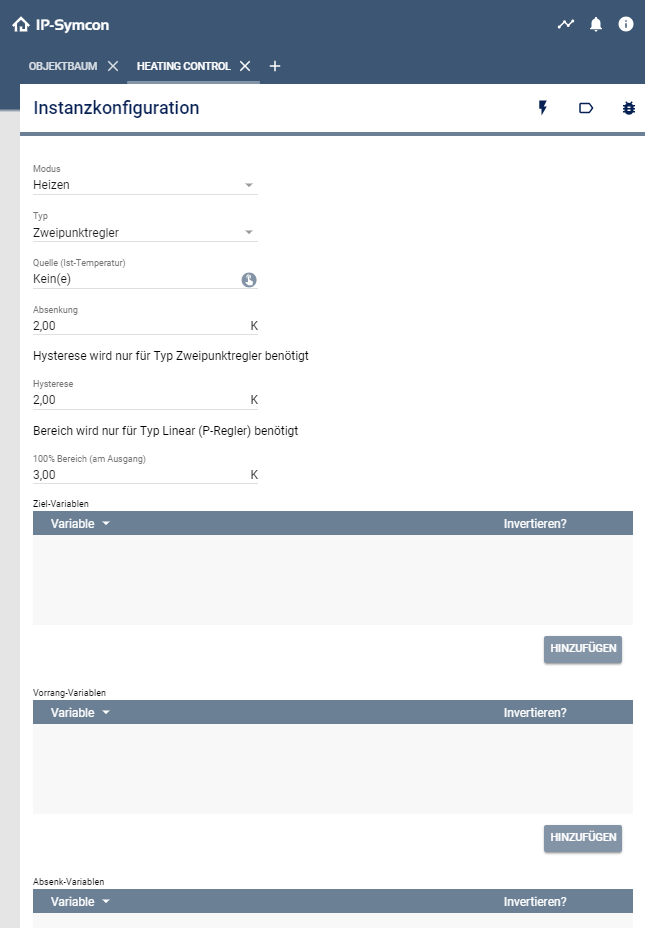
| Variable | Description |
|---|---|
| Mode | Selects whether the Heating Control should heat or cool. |
| Type | Selects which type of controller is used. |
| Source (Actual Temperature) | Variable that contains the actual value. |
| SetBack | Temperature in °C by which the target is lowered if one or more of the "SetBack Variables" are TRUE |
| Hysteresis (Two-Step only) |
Temperature difference between the switch-on and switch-off point; Example: T-Target = 20.0 degrees and hysteresis = 0.4; The actuator is switched on when dropping below 19.8 degrees and switched off when exceeding 20.2 degrees. A hysteresis of 0 causes a "toggling" of the actuator at each update of the actual variable. |
| 100% range (P controller only) |
Describes the size of a range below the target value in which a linear graduated control is calculated; Example heating: T-Target = 20.0 degrees and 100% range = 1; The actuator stays at 100% at 19°C (actual value); at 70% at 19.3°C; at 10% at 19.9°C. Example cooling: T-Target = 10.0 degrees and 100% range = 5; The actuator stays at 100% at 15°C (actual value); at 80% at 14.0°C; at 20% at 11.0°C. |
| Target Variables | The variables to be switched are entered here. They must have an action. Boolean variables are switched on or off. Integer and Float variables require a profile, the output (0 to 100 %) is scaled to the range of the profile. For thermal actuators that are open when de-energized, "Invert" must be activated. |
| Override Variables | Can be e.g. status variables of window contacts. When "True", the output of the controller remains off. |
| SetBack Variables | Can be e.g. presence variables of motion or presence detectors. If no person is in a room, energy can be saved by lowering the temperature. |
| Resend Interval | Interval in minutes in which the current state is sent again, in case a (radio) command was not processed correctly. With 0 nothing is resent. |
| Test Center | To check the function of the controller, a target temperature can be entered here. The actuator must then turn on or off as desired. |
| Status variables | Ident | Description |
|---|---|---|
| Active | Active | Turns the controller on or off. If FALSE, the output is switched off. |
| Target Value | TargetValueVariable | Contains the target temperature. |
| Override | OverrideVariable | If TRUE, at least one override variable is also TRUE (OR operation) and the actuator remains off. |
| SetBack | SetBackVariable | If TRUE, the setback is active. |
| Heating | HeatingVariable | Only in mode Heating. Reflects the output of the controller: Boolean for the two-point controller, 0 to 100 % for the P controller. Inverting the target variables has no effect on this variable. |
| Cooling | CoolingVariable | Only in mode Cooling. Like "Heating". |
Tips & Tricks
Use the lower function in order to save energy in unoccupied rooms.
Practical example:
A motion detector installed in the room provides for a few seconds in IP-Symcon a variable change to TRUE. The following script will be extended to this impulse for example for 15 minutes and writes the status in the variable 'presence' (please create it before!). If within the desired time no movement is detected in the room, the variable is set to FALSE.
It can now be added under the 'lowering variables'. However, also 'Invert' must be activated, because we want to lower the temperature in NOT-Presence. This must now be entered only under 'reduction': for example 2 °C.
An open window with his 'priority variable' also has precedence here and turns the heating off completely.
$id_prae = 12345 /*[Präsenz]*/; // set!

if($_IPS['SENDER'] == "Variable"){
    if($_IPS['VALUE'] == True){  //Start Timer
        IPS_SetScriptTimer($_IPS['SELF'], 15 * 60);
        $prae =  GetValue($id_prae );
        if($prae == False){
            SetValue($id_prae, True);
        }
    }
}

if($_IPS['SENDER'] == "TimerEvent"){
    IPS_SetScriptTimer($_IPS['SELF'], 0);
    SetValue($id_prae , False);
}
Further Links
Two-point controller: de.wikipedia.org/wiki/Zweipunktregler
P controller: de.wikipedia.org/wiki/Regler
Hysteresis: de.wikipedia.org/wiki/Hysterese

Since at any time the PC (control) can fail, in addition a temperature limit/ safety shutdown must be installed to prevent injury or damage.