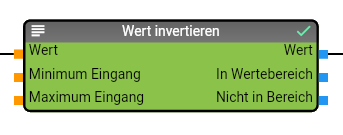
The "Invent value" module offers the option of inverting a value. The respective minimum or maximum can either be configured via the properties of the module or, alternatively, the module also offers inputs for the values.
Properties
Name
Description
Outputs Range
Activates the data points at the "In range" and "Not in range" output. These data points are not activated by default.
Inputs Limit
Activates the data points at the input for the limits ("Minimum input" and "Maximum input"). These data points are not activated by default.
Maximum Input
Specifies the maximum for the inversion of the value, is only used if the data points for the limits are not activated.
Minimum input
Specifies the minimum for the inversion of the value, is only used if the data points for the limits are not activated.
data points input
Name
Description
Value
Value to be inverted
Minimum input
Minimum value for the inversion. This data point is only available if the "Inputs limit" property has been activated.
Maximum input
Maximum value for the inversion. This data point is only available if the "Inputs Limit" property has been activated.
data point output
Name
Description
Value
Converted value
In range
Returns TRUE if the value to be inverted was within the minimum and maximum. This data point is only available if the "Outputs range" property has been activated.
Not in range
Returns TRUE if the value to be inverted was outside the minimum and maximum. This data point is only available if the "Outputs range" property has been activated.