Documentation
One time Timer
The "One-time timer" module enables the time-delayed execution of certain parts of the logic diagram.
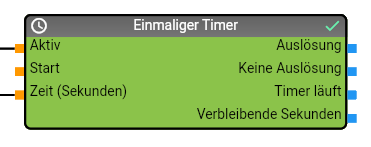
data points input
| Name | Description |
|---|---|
| Restart/Active | Activation of the timer, if TRUE the timer is activated and triggers the logic diagram again after a certain time. If the timer is already running, the remaining time is reset to the original value. |
| Start | Start the timer, if TRUE the timer is activated if it is not yet active and triggers the logic plan again after a certain time. |
| Time (seconds) | Time in seconds after which the timer should be triggered. |
data points output
| Name | Description |
|---|---|
| Triggering | Data point of the module that returns TRUE when the module has triggered. The following branch of the logic script is only executed if the timer has been triggered. |
| No triggering | Data point of the module that returns TRUE if the module has not triggered. The following branch of the logic script is only executed if the timer has not been triggered. |
| Timer running | Data point of the module that returns TRUE if the timer has been started but has not yet been triggered. |
| Remaining seconds | Returns the number of seconds that must elapse before the timer is triggered. |
application example
Given are 1 Homematic push-button and 1 Homematic actuator for switching a light:
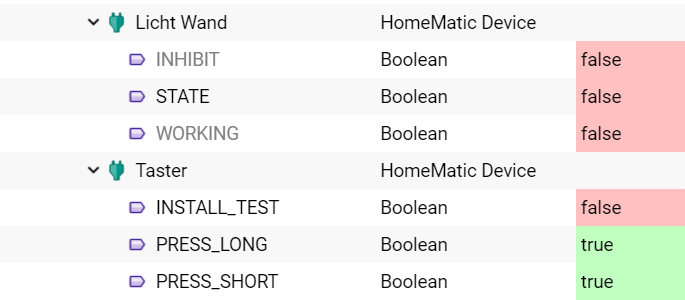
A logic script is now to be created in the logic script that switches on a light when the push-button is triggered and switches it off again after one minute.
You can implement this requirement by using a one-time timer module; predefined instance modules for the push-button or activating the light can be found in the object tree of the logic script designer.
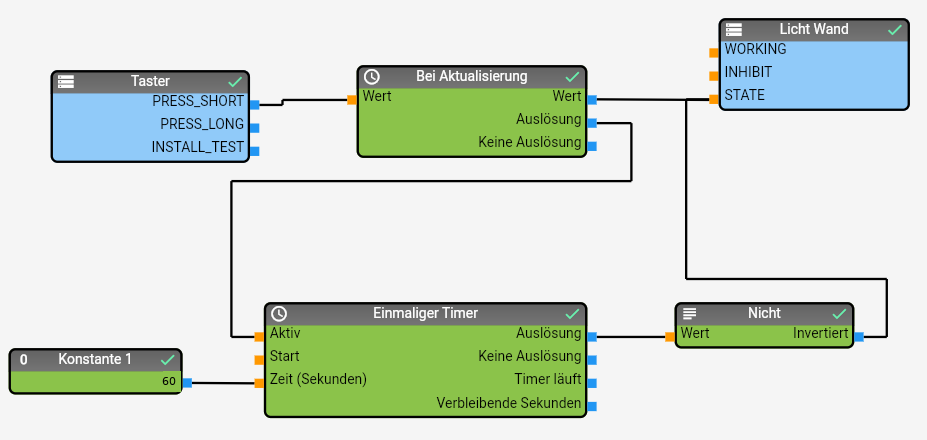
Functionality:
- The PRESS_SHORT variable of a Homematic push-button always has the value TRUE; when the push-button is pressed, the value of the variable is updated and only the date/time of the variable is updated. This update can be evaluated with the On update module and used to control other modules.
- In the current example, the light is switched on when the PRESS_SHORT variable is updated and at the same time a timer with 60 seconds is triggered by setting the "Active" input in the One-time timer module.
- The logic plan script is executed a second time by this timer after 60 seconds and switches the light off again via the Non module.