Documentation
Invert value
The "Invent value" module offers the option of inverting a value. The respective minimum or maximum can either be configured via the properties of the module or, alternatively, the module also offers inputs for the values.
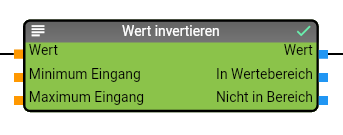
Properties
| Name | Description |
|---|---|
| Outputs Range | Activates the data points at the "In range" and "Not in range" output. These data points are not activated by default. |
| Inputs Limit | Activates the data points at the input for the limits ("Minimum input" and "Maximum input"). These data points are not activated by default. |
| Maximum Input | Specifies the maximum for the inversion of the value, is only used if the data points for the limits are not activated. |
| Minimum input | Specifies the minimum for the inversion of the value, is only used if the data points for the limits are not activated. |
data points input
| Name | Description |
|---|---|
| Value | Value to be inverted |
| Minimum input | Minimum value for the inversion. This data point is only available if the "Inputs limit" property has been activated. |
| Maximum input | Maximum value for the inversion. This data point is only available if the "Inputs Limit" property has been activated. |
data point output
| Name | Description |
|---|---|
| Value | Converted value |
| In range | Returns TRUE if the value to be inverted was within the minimum and maximum. This data point is only available if the "Outputs range" property has been activated. |
| Not in range | Returns TRUE if the value to be inverted was outside the minimum and maximum. This data point is only available if the "Outputs range" property has been activated. |