Documentation
POP3
Require: Symcon >= 2.2
The POP3 module can be configured using the configuration page within the Object Tree of the Management Console. The parameters for host and port can be taken from the manual of the mail provider. The username and password are the login data for the e-mail account.
To display the e-mails in the visualization, the interval must be set. It determines the cyclic request of the inbox. Only the subject line is requested. The complete e-mail will only be loaded when requested by the visualization.
On the variable "Last Message" can be determined if and when new mails arrive. If no e-mails are in the mailbox, the variable has the value 0. Unlike IMAP, the display of the number of unread variables is technically not possible for POP3.
Installation
The module is part of Symcon and does not need to be installed.
Setting up the instances in Symcon
The "POP3" module can be found under "Add instance" using the quick filter. Further information in the documentation of the instances.
Configuration page
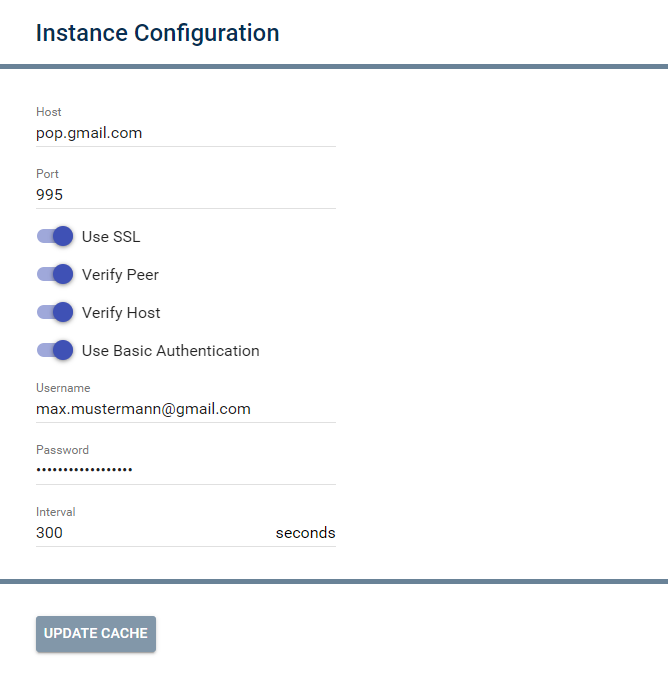
| Name | Description |
|---|---|
| Host | Server name or IP of email provider |
| Port | Port, that is handled by the server |
| Use SSL | Defines if SSL should be used |
| Verify Peer | Verify that hosts SSL certificate is correct (Only visible if Use SSL is active) |
| Verify Host | Verify that host URL from the SSL certificate matches the property Host (Only visible if Use SSL is active) |
| Use Basic Authentication | Defines if a username password is required |
| Username | Username |
| Password | Password |
| Interval | Number of seconds in which the inbox is requested |

An overview for host, port, and authentication for many providers can be found here: Table
Below the configuration, "Update Cache" reads the mailbox immediately.
Status variables
The status variables are created automatically. Deleting individual ones can lead to malfunctions.
| Name | Type | Description |
|---|---|---|
| Last message | Integer | Time of the newest e-mail (UnixTimestamp), 0 if the mailbox is empty |
Functions
| Function | Description |
|---|---|
| POP3_DeleteMail | Deletes a mail with a specific e-mail(UID) |
| POP3_GetCachedMails | The command returns an array containing information about the cached e-mails of a POP3 instance with ID InstanceID |
| POP3_GetMailEx | Returns an array with information for a specific e-mail (UID) |