Documentation
Dynamic Mail
Require: Symcon >= 7.1
Sends an e-mail with a dynamic text.
Range of functions
- Sending an e-mail with a fixed/dynamic text
- Dynamic by replacing placeholders with the variable values
Installation
- Install the 'Dynamic e-mail' module via the Module Store.
Setting up the instances in IP-Symcon
Under 'Add instance', the 'Dynamic E-Mail' module can be found using the quick filter.
- Further information on adding instances can be found in the Instances documentation
Configuration page
| Name | Description |
|---|---|
| SMTP instance | SMTP instance which is fully configured |
| Dynamic subject | Text input which can be set. |
| Dynamic text | Multi-line text input. |
The subject and the text are given a dynamic by inserting variable values. These can be set within the text by the variable ID placed in curly brackets. If the ID is too short or not a variable, the brackets with the number remain.
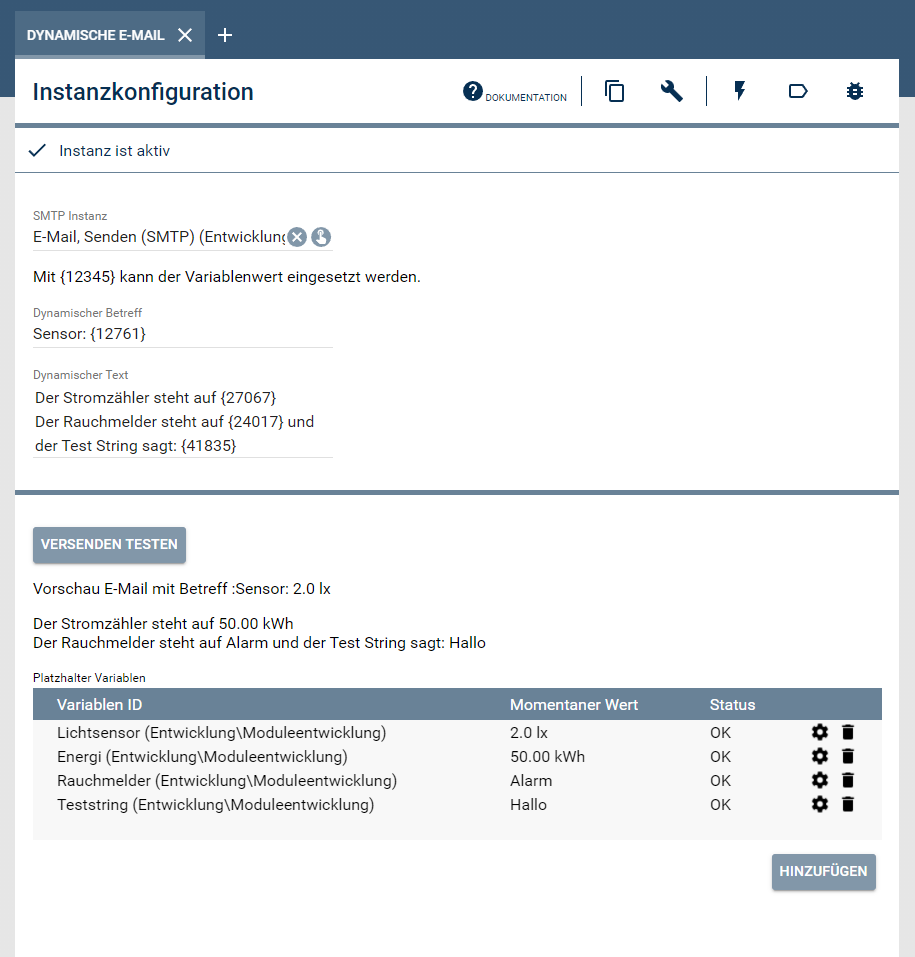
Action area:
| Name | Description |
|---|---|
| Send Test | Sends an e-mail with the set subject and text |
| Preview e-mail with subject | A preview with set variable values |
| Placeholder variables | Table with the given placeholders |
Table:
The placeholders found are listed in the table with their current value and status. If a placeholder is not available, the number entered is not an ID. If a placeholder is invalid, the ID found is not a variable.
Status variables and profiles
No variables or profiles are created.
Visualization
The instance has no functionality in the visualization.