Documentation
PopupButton
Require: Symcon >= 5.0
Creates a button which, when clicked, opens a popup containing additional form fields.
General Parameters
| Parameter | Description |
|---|---|
| caption | Visible caption of the button |
| download (optional) | (default: "") If this parameter is not an empty string and the output of the onClick script is a Data-URL, the output is downloaded as a text file with the name of the download parameter. (since Symcon 7.0) |
| enabled (optional) | (default: true) If true, the button can be used, otherwise it is displayed as deactivated This parameter has no effect on a possibly opened popup (since Symcon 5.2) |
| link (optional) | (default: false) If this parameter is true, the output of the onClick script is opened as a link. If it is false, the output is displayed as a dialog in the configuration form. (since Symcon 6.0) |
| name (optional) | Name of the PopupButton |
| onClick | Script that is executed when the button is clicked. If the script consists of several lines, the individual lines can also be defined as an array (arrays are supported since version 6.0). It has the same properties as onClick of the Button (since Symcon 5.3) |
| popup | Definition of the popup to be opened (parameters can be changed since Symcon 6.1 by linking the parameter names, e.g. popup.closeCaption) |
| type | PopupButton |
| visible (optional) | (default: true) If true, the button is visible, otherwise it is invisible This parameter has no effect on a possibly opened popup (since Symcon 5.2) |
| width (optional) | Fixed width of the button in pixels or % as a string, e.g. "40%" or "250px". If the value is not set or "", the width is automatically selected based on the caption (since Symcon 5.2) |
Parameters for popup
| Parameters | Description |
|---|---|
| buttons (optional) | (default: []) A list of buttons which is shown in the popup at the bottom right. The close button is always displayed first, followed by the buttons described here in sequence (since Symcon 6.1) |
| caption (optional) | (default: "") Visible title of the popup |
| closeCaption (optional) | (default: "Close", "Cancel" if there are several (link: ./#Parameters_for_pages text: pages)) The caption of the close button at the bottom right of the popup (since version 6.1) |
| initialPage (optional) | (default: 0) A reference to the page from pages that is shown when the popup is opened. This can be a number corresponding to the index within the pages list, a string corresponding to the name of the page, or a script returning the page as a number or string. If the script consists of several lines, the individual lines can also be defined as an array. No PHP-tags are required. It has the same properties as onClick of the Button. If the defined page does not exist, the first page is shown. A change to initialPage only takes effect the next time the popup is opened. (since Symcon 9.1) |
| items | List of form fields in the popup (cannot be changed). Alternatively, PHP code can be specified as a string or an array of strings which returns the list of form fields via return (since Symcon 9.1). When using pages, items is the default for pages without their own items and can be omitted |
| pages (optional) | (default: []) A list of pages of the popup that can be linked together to enable the functionality of a wizard. If the list is empty, the regularly defined content is displayed. See Wizard (since Symcon 9.1) |
| width (optional) | (default: "") Initial width of the popup in pixels or % as a string, e.g. "40%" or "250px". Percentages refer to the width of the browser window. If the value is not set or "", the default width is used (since Symcon 9.0) |
Parameters for pages
The pages field contains a list of objects, each describing a page. If the list contains at least two pages, the buttons on the far right additionally show "Previous" and "Next" or "OK", which can be used to switch between pages. The close button is then labeled "Cancel" by default. For the second button, "Next" is displayed if the page determined by nextPage exists, otherwise "OK", which closes the popup. "Previous" is active if the current page was reached via "Next". If a page was left on the way that defines a script for "onConfirm" but none for "onUndo", "Previous" is deactivated and none of the previous pages can be reached again. If the list contains only one page, it is displayed like a regular popup without "Previous" and "Next". Use cases, the exact flow and examples are described in the section Wizard. Each of these objects can use the following parameters:
| Parameter | Description |
|---|---|
| buttons (optional) | (default: buttons of popup) A list of buttons which is shown while this page is active |
| caption (optional) | (default: caption of popup) Visible title of the popup while this page is active |
| items (optional) | (default: items of popup) List of form fields of the page. Alternatively, PHP code can be specified as a string or an array of strings which returns the list of form fields via return. The code is executed when switching to the page and can thus generate content depending on previous inputs. See Values and scripts |
| name (optional) | A unique name for referencing, typically for nextPage or initialPage |
| nextPage (optional) | (default: next page) A reference to the page to be shown when "Next" is clicked. This can be a number corresponding to the index within the pages list, a string corresponding to the name of the page, or a script returning the next page as a number or string. If the script consists of several lines, the individual lines can also be defined as an array. No PHP-tags are required. It has the same properties as onClick of the Button. If the defined page does not exist, e.g. for -1, "OK" is shown and clicking it closes the popup. A string that does not match the name of a page is executed as a script. An index must be returned by the script as a number, a returned string is always interpreted as a name. The script is executed again when the page is shown and after every change of a value, so the caption "Next" or "OK" always fits. If the script is started again before a previous execution has finished, only the result of the most recently started execution is used |
| onConfirm (optional) | (default: "") Script that is executed when "Next" or "OK" is pressed. If the script consists of several lines, the individual lines can also be defined as an array. No PHP-tags are required. It has the same properties as onClick of the Button. If the page change is prevented by validate, onConfirm is not executed. An output of the script is shown as a message, the page change takes place anyway. If onConfirm is defined without onUndo, "Previous" is no longer possible after leaving the page |
| onUndo (optional) | (default: "") Script that is executed when returning to this page via "Previous". If the script consists of several lines, the individual lines can also be defined as an array. No PHP-tags are required. It has the same properties as onClick of the Button. It should revert the changes of the onConfirm of this page. The form fields of the page are available with the values they had when the page was left. Only a non-empty onUndo allows returning to a page with onConfirm. "onUndo": "" behaves like a missing onUndo. If there is nothing to revert but "Previous" should remain possible, a comment is sufficient, e.g. "onUndo": "// Nothing to revert" |
| validate (optional) | (default: "") Script that is executed when "Next" or "OK" is pressed, after the form fields of the page are valid, e.g. according to validate of a ValidationTextBox. If the script consists of several lines, the individual lines can also be defined as an array. No PHP-tags are required. It has the same properties as onClick of the Button. If the script returns a non-empty string via return, it is displayed as an error, no page change takes place and onConfirm is not executed. The string is translated using the translations of the module. The script must not produce any output, e.g. via echo |
The parameters closeCaption and width always apply to the whole popup and cannot be defined per page.
| Parameters | Description |
|---|---|
| caption | Visible caption of the button |
| onClick | Script that is executed when the button is clicked. If the script consists of several lines, the individual lines can also be defined as an array. No PHP-tags are required. It has the same properties as onClick of the Button. If the script does not produce any output, the popup is closed after the script has been processed. Otherwise the output is shown as a red error message at the bottom of the popup. There is an exception here if the return begins with the prefix "MESSAGE:". In this case the popup is closed and the return is displayed after the prefix in a message dialog. |
| enabled (optional) | (default: true) If true, the button can be used, otherwise it is displayed as deactivated |
Wizard
Using the parameter pages, a popup becomes a wizard which guides the user step by step through a process (since Symcon 9.1). Each page only shows the form fields that are relevant for the current step. Inputs can be checked per page, the order of the pages can depend on previous inputs and actions are only executed when the user confirms a step. Pages are available for the PopupButton and the PopupAlert alike.
Use cases
A wizard is useful if
- a module has to be set up after it has been created. A PopupAlert can open the setup wizard automatically as long as the instance is not yet configured, see Setup wizard
- a configuration consists of several steps and later steps depend on previous answers, e.g. address and port for a network connection, but an interface for a serial connection
- inputs should be checked before continuing, e.g. whether a device can be reached at the entered address
- devices are searched or data is imported and the result is shown on a separate page for selection
- a summary of all inputs should be shown before applying them
- options should be requested and a confirmation obtained before an action with serious consequences, e.g. resetting a device. For a plain confirmation, a popup with buttons is sufficient
Individual settings without a fixed order, however, belong in a regular popup or directly in the configuration form.
Flow
| Action | Behavior |
|---|---|
| Open | The page determined by initialPage is shown, by default the first page. For the PopupButton, onClick is executed at the same time. "Previous" is deactivated |
| Next or OK | 1. The form fields of the current page are checked, e.g. validate of a ValidationTextBox. 2. validate of the page is executed. If it returns an error, the page stays. 3. onConfirm of the page is executed. 4. If the page determined by nextPage exists, it is shown, otherwise the popup is closed |
| Previous | The page last left via "Next" is shown again. Its form fields get the values they had when the page was left, and its onUndo is executed. validate and onConfirm of the current page are not executed |
| Cancel | The popup is closed. No script is executed and onConfirm scripts that have already been executed are not reverted |
| Open again | The wizard starts at initialPage again, "Previous" is deactivated. The inputs of the last run are kept until the configuration form is reloaded |
The inputs in the wizard are not saved automatically. The result is typically applied in one of the following ways:
- The onConfirm of the last page sets the properties directly, e.g. via IPS_SetProperty and IPS_ApplyChanges or via a function of the module, see example 1 and 2.
- The onConfirm writes the values into the fields of the configuration form via UpdateFormField. The user sees the values and saves them as usual with "Apply changes", see the example for the PopupAlert.
- Each step directly executes an action, e.g. creating an instance. Then onUndo should revert this action, see example 3.
Values and scripts
The scripts validate, onConfirm, onUndo, nextPage and initialPage as well as PHP code in items are executed like the onClick of a Button as a separate script and not within the module. $this is therefore not available, functions of the module are called via their prefix. The following variables are available:
| Variable | Content |
|---|---|
| $id | ID of the instance |
| $(Name of an element) | The current value of every named form field of all pages of the wizard as well as of the other form fields in the same area (elements or actions). Form fields of statically defined pages are available before their page has been shown and then have their initial value. Form fields that are generated via PHP code in items are only available after their page has been shown |
| Script | Result |
|---|---|
| validate | A non-empty string via return prevents the page change and is displayed as an error |
| nextPage, initialPage | Index as a number or name of the page as a string via return |
| items | Array of form fields via return |
| onConfirm, onUndo | An output, e.g. via echo, is shown as a message. A return value is ignored |
For validate, nextPage, initialPage and items, any output, e.g. via echo or caused by a PHP warning, makes the result invalid and is displayed as an error.
Using UpdateFormField, the module can adjust form fields of any page, even if it is not currently shown. The change becomes visible as soon as the page is shown. This way, e.g. the onChange of a Select on the first page can set the options of a Select on the second page, see example 3.
Controlling page changes
- Without nextPage, the next page of the list follows. On the last page, "OK" is shown.
- With an index or name in nextPage, a fixed page is shown next, e.g. several branches lead back to the same summary via "nextPage": "summary".
- For a branch, a script returns the name of the next page. The easiest way is to use the names of the pages as values of the options of a RadioButtonGroup or Select, e.g. "nextPage": "return $WizardConnection;". As the script is executed after every change of a value, it should be fast and not change anything. Time-consuming checks, e.g. a connection to the device, belong in validate.
- If a page should end the wizard although further pages follow in the list, "nextPage": -1 is set. Instead of "Next", "OK" is then shown, which closes the popup. A script in nextPage can return -1 as well. This is typical for final pages at the end of the list which are reached via their name, e.g. a summary and a note when the setup is skipped.
- The current page of an open wizard cannot be changed directly via UpdateFormField. If the module should decide about the path, nextPage calls a function of the module, e.g. "nextPage": "return WIZ_UIGetNextPage($id, $WizardModel);". Using popup.initialPage, the module can define the start page for the next opening. A PopupAlert can additionally be opened via UpdateFormField using visible. If it is already open, it thereby starts again on the page defined via popup.initialPage, see PopupAlert.
Notes on wizards
- The names of the form fields must be unique across all pages. Form fields with the same name on different pages share one value. The names should also differ from the properties and the other form fields, e.g. by the prefix "Wizard".
- The user can cancel at any time. Permanent changes, e.g. creating an instance or sending to a device, should therefore be made in the onConfirm of the last page if possible. If they are made earlier, onUndo should revert them. However, no onUndo is executed when cancelling.
- An onConfirm without onUndo prevents returning to all previous pages. This is useful if a step cannot be reverted.
- Inputs are kept when the popup is opened again. If the wizard should start empty every time, the values can be reset e.g. in the onClick of the PopupButton via UpdateFormField or the form can be reloaded via ReloadForm.
- The list pages cannot be changed via UpdateFormField. If the number or the content of the pages depends on the configuration, the pages are generated in GetConfigurationForm or their items via PHP code.
- There is no progress indicator. A title like "Step 2 of 3" in the caption of the page shows the user where they are.
Wizard examples
Example 1: Linear wizard with three steps which sets up a limit monitoring. The first page checks via validate whether a variable was selected, the second page uses the validation of the ValidationTextBox. The last page generates a summary from the inputs of the previous pages via PHP code. "OK" sets the properties VariableID, Limit and Message, which the module registers in Create.
// Example 1: Linear wizard, e.g. in actions
{
    "type": "PopupButton",
    "caption": "Set up limit monitoring",
    "popup": {
        "caption": "Set up limit monitoring",
        "width": "600px",
        "pages": [
            {
                "caption": "Step 1 of 3: Variable",
                "items": [
                    { "type": "Label", "caption": "Which variable should be monitored?" },
                    { "type": "SelectVariable", "name": "WizardVariableID", "caption": "Variable", "validVariableTypes": [1, 2] }
                ],
                "validate": "if (!IPS_VariableExists($WizardVariableID)) { return 'Please select a variable'; }"
            },
            {
                "caption": "Step 2 of 3: Limit",
                "items": [
                    { "type": "NumberSpinner", "name": "WizardLimit", "caption": "Limit", "digits": 1 },
                    { "type": "ValidationTextBox", "name": "WizardMessage", "caption": "Message when exceeded", "validate": "^.+$" }
                ]
            },
            {
                "caption": "Step 3 of 3: Summary",
                "items": [
                    "return [",
                    "    ['type' => 'Label', 'caption' => 'Variable: ' . IPS_GetLocation($WizardVariableID)],",
                    "    ['type' => 'Label', 'caption' => 'Limit: ' . $WizardLimit],",
                    "    ['type' => 'Label', 'caption' => 'Message: ' . $WizardMessage],",
                    "    ['type' => 'Label', 'caption' => 'OK activates the monitoring.']",
                    "];"
                ],
                "onConfirm": [
                    "IPS_SetProperty($id, 'VariableID', $WizardVariableID);",
                    "IPS_SetProperty($id, 'Limit', $WizardLimit);",
                    "IPS_SetProperty($id, 'Message', $WizardMessage);",
                    "IPS_ApplyChanges($id);"
                ]
            }
        ]
    }
}
Example 2: Branch depending on a selection. The values of the RadioButtonGroup correspond to the names of the pages, so nextPage can return the selection directly. Both branches lead to the same summary via "nextPage": "summary". The summary only evaluates the fields of the selected branch. "OK" sets the properties Connection, Host, Port and SerialPortID.
// Example 2: Branch, e.g. in actions
{
    "type": "PopupButton",
    "caption": "Set up connection",
    "popup": {
        "caption": "Set up connection",
        "pages": [
            {
                "caption": "Connection type",
                "items": [
                    {
                        "type": "RadioButtonGroup",
                        "name": "WizardConnection",
                        "caption": "How is the device connected?",
                        "value": "network",
                        "options": [
                            { "caption": "Network", "value": "network" },
                            { "caption": "Serial interface", "value": "serial" }
                        ]
                    }
                ],
                "nextPage": "return $WizardConnection;"
            },
            {
                "name": "network",
                "caption": "Network",
                "items": [
                    { "type": "ValidationTextBox", "name": "WizardHost", "caption": "Host", "validate": "^[a-zA-Z0-9.:-]+$" },
                    { "type": "NumberSpinner", "name": "WizardPort", "caption": "Port", "value": 502, "minimum": 1, "maximum": 65535 }
                ],
                "nextPage": "summary"
            },
            {
                "name": "serial",
                "caption": "Serial interface",
                "items": [
                    { "type": "SelectInstance", "name": "WizardSerialPortID", "caption": "Serial Port", "validModules": ["{6DC3D946-0D31-450F-A8C6-C42DB8D7D4F1}"] }
                ],
                "validate": "if (!IPS_InstanceExists($WizardSerialPortID)) { return 'Please select a serial port'; }",
                "nextPage": "summary"
            },
            {
                "name": "summary",
                "caption": "Summary",
                "items": [
                    "if ($WizardConnection == 'network') {",
                    "    $text = 'Network: ' . $WizardHost . ':' . $WizardPort;",
                    "} else {",
                    "    $text = 'Serial: ' . IPS_GetName($WizardSerialPortID);",
                    "}",
                    "return [['type' => 'Label', 'caption' => $text]];"
                ],
                "onConfirm": [
                    "IPS_SetProperty($id, 'Connection', $WizardConnection);",
                    "IPS_SetProperty($id, 'Host', $WizardHost);",
                    "IPS_SetProperty($id, 'Port', $WizardPort);",
                    "IPS_SetProperty($id, 'SerialPortID', $WizardSerialPortID);",
                    "IPS_ApplyChanges($id);"
                ]
            }
        ]
    }
}
Example 3: Adding a device, where the content is determined by the module. The vendors are filled in by GetConfigurationForm. When a vendor is selected, the module sets the models on the second page via UpdateFormField. validate of the second page checks via the module whether the device can be reached. onConfirm creates the instance and onUndo deletes it again if the user returns to this page via "Previous". The third page is generated by the module based on the created instance. Only "OK" completes the setup. If the user cancels on the third page, the created instance remains.
// Example 3: form.json
{
    "actions": [
        {
            "type": "PopupButton",
            "caption": "Add device",
            "popup": {
                "caption": "Add device",
                "pages": [
                    {
                        "caption": "Step 1 of 3: Vendor",
                        "items": [
                            {
                                "type": "Select",
                                "name": "WizardVendor",
                                "caption": "Vendor",
                                "options": [],
                                "onChange": "WIZ_UIUpdateModels($id, $WizardVendor);"
                            }
                        ],
                        "validate": "if ($WizardVendor == '') { return 'Please select a vendor'; }"
                    },
                    {
                        "caption": "Step 2 of 3: Device",
                        "items": [
                            { "type": "Select", "name": "WizardModel", "caption": "Model", "options": [] },
                            { "type": "ValidationTextBox", "name": "WizardHost", "caption": "IP address" }
                        ],
                        "validate": "return WIZ_UIValidateDevice($id, $WizardModel, $WizardHost);",
                        "onConfirm": "WIZ_UICreateDevice($id, $WizardModel, $WizardHost);",
                        "onUndo": "WIZ_UIDeleteDevice($id);"
                    },
                    {
                        "caption": "Step 3 of 3: Finish",
                        "items": "return json_decode(WIZ_UIGetFinishItems($id), true);",
                        "validate": "if (trim($WizardName) == '') { return 'Please enter a name'; }",
                        "onConfirm": "WIZ_UIFinish($id, $WizardName);"
                    }
                ]
            }
        }
    ]
}
// Example 3: module.php
<?php

declare(strict_types=1);

class DeviceWizard extends IPSModule
{
    // GUID of the module whose instances are created
    private const DEVICE_MODULE = '{5A1C8F2E-3B7D-4C9A-9E61-2F4D8B0C7A13}';

    // In a real module, this list comes e.g. from a file with device templates
    private const VENDORS = [
        'vendorA' => ['caption' => 'Vendor A', 'models' => ['A100' => 'Sensor A100', 'A200' => 'Sensor A200']],
        'vendorB' => ['caption' => 'Vendor B', 'models' => ['B10' => 'Meter B10']]
    ];

    public function Create()
    {
        //Never delete this line!
        parent::Create();

        $this->RegisterAttributeInteger('WizardInstanceID', 0);
    }

    public function GetConfigurationForm()
    {
        $form = json_decode(file_get_contents(__DIR__ . '/form.json'), true);
        $options = [['caption' => 'Please select', 'value' => '']];
        foreach (self::VENDORS as $vendor => $data) {
            $options[] = ['caption' => $data['caption'], 'value' => $vendor];
        }
        $form['actions'][0]['popup']['pages'][0]['items'][0]['options'] = $options;
        return json_encode($form);
    }

    // onChange on page 1: Sets the models on page 2, even if it is not shown yet
    public function UIUpdateModels(string $Vendor)
    {
        $options = [];
        foreach (self::VENDORS[$Vendor]['models'] ?? [] as $model => $caption) {
            $options[] = ['caption' => $caption, 'value' => $model];
        }
        $this->UpdateFormField('WizardModel', 'options', json_encode($options));
        $this->UpdateFormField('WizardModel', 'value', $options[0]['value'] ?? '');
    }

    // validate on page 2: An empty string allows the page change
    public function UIValidateDevice(string $Model, string $Host): string
    {
        if ($Model == '') {
            return 'Please select a model';
        }
        if (!filter_var($Host, FILTER_VALIDATE_IP)) {
            return 'Please enter a valid IP address';
        }
        if (!Sys_Ping($Host, 1000)) {
            return 'The device does not respond';
        }
        return '';
    }

    // onConfirm on page 2
    public function UICreateDevice(string $Model, string $Host)
    {
        $instanceID = IPS_CreateInstance(self::DEVICE_MODULE);
        IPS_SetName($instanceID, $Model);
        IPS_SetProperty($instanceID, 'Model', $Model);
        IPS_SetProperty($instanceID, 'Host', $Host);
        IPS_ApplyChanges($instanceID);
        $this->WriteAttributeInteger('WizardInstanceID', $instanceID);
    }

    // onUndo on page 2: Reverts UICreateDevice
    public function UIDeleteDevice()
    {
        $instanceID = $this->ReadAttributeInteger('WizardInstanceID');
        if (IPS_InstanceExists($instanceID)) {
            IPS_DeleteInstance($instanceID);
        }
        $this->WriteAttributeInteger('WizardInstanceID', 0);
    }

    // items on page 3: Executed when switching to the page
    public function UIGetFinishItems(): string
    {
        $instanceID = $this->ReadAttributeInteger('WizardInstanceID');
        return json_encode([
            [
                'type'    => 'Label',
                'caption' => sprintf('The device was created as instance #%d.', $instanceID)
            ],
            [
                'type'    => 'ValidationTextBox',
                'name'    => 'WizardName',
                'caption' => 'Name',
                'value'   => IPS_GetName($instanceID)
            ]
        ]);
    }

    // onConfirm on page 3
    public function UIFinish(string $Name)
    {
        $instanceID = $this->ReadAttributeInteger('WizardInstanceID');
        IPS_SetName($instanceID, $Name);
        $this->WriteAttributeInteger('WizardInstanceID', 0);
    }
}
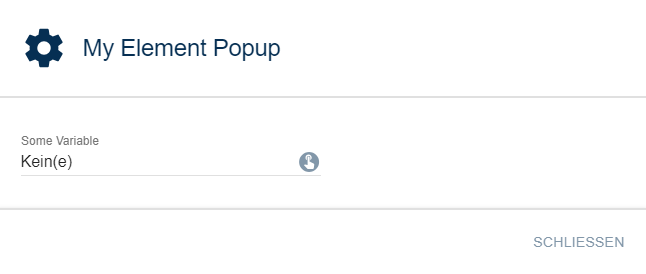
Example
{
    "type": "PopupButton",
    "caption": "Open Popup",
    "popup": {
        "caption": "My Element Popup",
        "items": [
            {
                "type": "SelectVariable",
                "name": "VariableTest",
                "caption": "Some Variable"
            }
        ]
    }
},
{
    "type": "PopupButton",
    "caption": "Start Wizard",
    "popup": {
        "caption": "A title that is never seen since every page overrides it",
        "closeCaption": "Close dialog",
        "items": [
            {
                "type": "Label",
                "caption": "This element is never seen since every page has its own items"
            }
        ],
        "pages": [
            {
                "caption": "Start",
                "items": [
                    {
                        "type": "Label",
                        "caption": "Next page: Selection"
                    }
                ],
                "nextPage": 2
            },
            {
                "caption": "Never visible",
                "items": [
                    {
                        "type": "Label",
                        "caption": "This page is never shown since the start page jumps directly to the page at index 2, the selection"
                    }
                ]
            },
            {
                "caption": "Selection",
                "items": [
                    {
                        "type": "Select",
                        "name": "NextPage",
                        "options": [
                            {"value": "page1", "caption": "Go to page 1"},
                            {"value": "page2", "caption": "Go to page 2"},
                            {"value": "close", "caption": "Done, close"}
                        ],
                        "caption": "Choose next page"
                    }
                ],
                "nextPage": "return $NextPage;"
            },
            {
                "name": "page1",
                "caption": "Page 1",
                "items": [
                    {
                        "type": "Label",
                        "caption": "This is page 1 with 'Undo'"
                    }
                ],
                "onUndo": "echo 'Undo page 1';",
                "onConfirm": "echo 'Confirm page 1';"
            },
            {
                "name": "page2",
                "caption": "Page 2",
                "items": [
                    {
                        "type": "Label",
                        "caption": "This is page 2, there is no 'Undo'. This is also the last page of the wizard."
                    }
                ],
                "onConfirm": "echo 'Confirm page 2';"
            }
        ]
    }
}