Documentation
PopupAlert
Require: Symcon >= 5.0
If the configuration form contains this element, it will be opened when the configuration page is loaded. After the popup has been closed, it is also possible to open it again using dynamics (visible to true).
General Parameters
| Parameters | Description |
|---|---|
| name (optional) | Name of the PopupAlert |
| popup | Definition of the popup to be opened (parameters can be changed since Symcon 6.1 by linking the parameter names, e.g. popup.closeCaption) |
| type | PopupAlert |
| visible (optional) | (default: true) If visible is initially true, the popup is opened when the instance configuration is opened, otherwise nothing happens. By changing to true, the popup can be opened afterwards. A change to false closes a currently open popup. (since Symcon 5.2) |
Parameters for popup
| Parameters | Description |
|---|---|
| buttons (optional) | (default: []) A list of buttons which is shown in the popup at the bottom right. The close button is always displayed first, followed by the buttons described here in sequence (since Symcon 6.1) |
| caption (optional) | (default: "") Visible title of the popup (since Symcon 8.2) |
| closeCaption (optional) | (default: "OK") The caption of the close button in the lower right corner of the popup |
| items | List of form fields in the popup (cannot be changed) |
| pages (optional) | (default: []) A list of pages of the popup that can be linked together to enable the functionality of a wizard. If the list is empty, the regularly defined content is displayed. (since Symcon 9.1) |
Parameters for pages
The pages field contains a list of objects, each describing a page. If a popup has multiple pages, the buttons on the far right show "Back" and "Next" or "OK", which can be used to switch between pages. "Back" is active if a previous page exists and either no script for "onConfirm" has been defined for it, or both "onConfirm" and "onUndo" are defined. If only "onConfirm" is defined, "Back" is deactivated. For the second button, "Next" is displayed if a next page is defined, otherwise "OK". Each of these objects can use the following parameters:
| Parameter | Description |
|---|---|
| name (optional) | A name for referencing, typically for nextPage |
| nextPage (optional) | (default: next page) A reference to the page to be shown when "Next" is clicked. This can be a number corresponding to the index within the pages list, a string corresponding to the name of the page, or a script returning the next page as a number or string. If the script consists of several lines, the individual lines can also be defined as an array. No PHP-tags are required. It has the same properties as onClick of the Button. If the defined page does not exist, clicking "OK" closes the popup. |
| onConfirm (optional) | (default: "") Script that is executed when "Next" or "OK" is pressed. If the script consists of several lines, the individual lines can also be defined as an array. No PHP-tags are required. It has the same properties as onClick of the Button. If the page change is prevented by validate, onConfirm is not executed. |
| onUndo (optional) | (default: "") Script that is executed when returning to this page via "Back". If the script consists of several lines, the individual lines can also be defined as an array. No PHP-tags are required. It has the same properties as onClick of the Button. |
| validate (optional) | (default: "") Script that is executed when "Next" or "OK" is pressed. If the script consists of several lines, the individual lines can also be defined as an array. No PHP-tags are required. It has the same properties as onClick of the Button. If the script returns a non-empty string, it is displayed as an error, no page change takes place and onConfirm is not executed. |
| Further parameters (optional) | All parameters from popup, i.e. buttons, caption, closeCaption and items can also be defined for a page. In that case the parameter defined for the page is used. Only if this is not set, the default from popup is used. |
| Parameters | Description |
|---|---|
| caption | Visible caption of the button |
| onClick | Script that is executed when the button is clicked. If the script consists of several lines, the individual lines can also be defined as an array. No PHP-tags are required. It has the same properties as onClick of the Button. If the script does not produce any output, the popup is closed after the script has been processed. Otherwise the output is shown as a red error message at the bottom of the popup. There is an exception here if the return begins with the prefix "MESSAGE:". In this case the popup is closed and the return is displayed after the prefix in a message dialog. |
| enabled (optional) | (default: true) If true, the button can be used, otherwise it is displayed as deactivated |
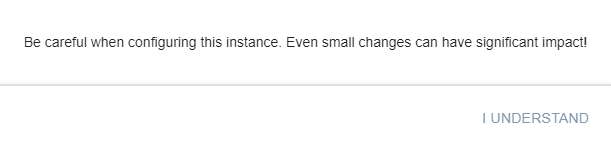
Example
{
    "type": "PopupAlert",
    "popup": {
        "closeCaption": "I understand",
        "items": [
            {
               "type": "Label",
               "caption": "Be careful when configuring this instance. Even small changes can have significant impact!"
            }
        ]
    }
},
{
    "type": "PopupAlert",
    "popup": {
        "items": [
            {
                 "type": "SelectVariable",
                 "name": "VariableActionTest",
                 "caption": "Some Action Variable"
            }
        ]
    }
},
{
    "type": "PopupAlert",
    "popup": {
        "caption": "A title that is never seen since every page overrides it",
        "closeCaption": "Close dialog",
        "items": [
            {
                "type": "Label",
                "caption": "This element is never seen since every page has its own items"
            }
        ],
        "pages": [
            {
                "caption": "Start",
                "items": [
                    {
                        "type": "Label",
                        "caption": "Next page: Selection"
                    }
                ],
                "nextPage": 2
            },
            {
                "caption": "Never visible",
                "items": [
                    {
                        "type": "Label",
                        "caption": "This page is never shown since the start page jumps directly to the page at index 2, the selection"
                    }
                ]
            },
            {
                "caption": "Selection",
                "items": [
                    {
                        "type": "Select",
                        "name": "NextPage",
                        "options": [
                            {"value": "page1", "caption": "Go to page 1"},
                            {"value": "page2", "caption": "Go to page 2"},
                            {"value": "close", "caption": "Done, close"}
                        ],
                        "caption": "Choose next page"
                    }
                ],
                "nextPage": "return $NextPage;"
            },
            {
                "name": "page1",
                "caption": "Page 1",
                "items": [
                    {
                        "type": "Label",
                        "caption": "This is page 1 with 'Undo'"
                    }
                ],
                "onUndo": "echo 'Undo page 1';",
                "onConfirm": "echo 'Confirm page 1';"
            },
            {
                "name": "page2",
                "caption": "Page 2",
                "items": [
                    {
                        "type": "Label",
                        "caption": "This is page 2, there is no 'Undo'. This is also the last page of the wizard."
                    }
                ],
                "onConfirm": "echo 'Confirm page 2';"
            }
        ]
    }
}